Caching and deduplication
Four things Cloud Score calls a cache, what switches each one on, what a hit looks like on the Route board, in Observability and on Optimizations, and the reasons a request was not served from cache.
On this page
What it is
A cache lets Cloud Score answer a request without paying for a fresh model call. Cloud Score has three of its own (an exact response cache, a semantic response cache, and in-flight deduplication) and reports a fourth that belongs to the provider (the provider prompt cache). Only the first three change what a caller receives; the fourth is measured and priced.
Every request records one cache verdict. That one verdict is what the Resolve station on the Route board, the Cache section of a request in Observability, and Response cachein the Playground's Details › Usage each report.
| Cache | What it holds | Who serves it | What a hit saves |
|---|---|---|---|
Exact response cache | Answers keyed by a fingerprint of the request. | Cloud Score, at Resolve. | The cached entry's measured original cost, shown (est.). |
Semantic response cache | The same entries plus an embedding of the prompt. | Cloud Score, at Resolve, when the nearest entry clears the similarity bar. | The entry's measured cost; only output tokens are counted as saved. |
In-flight dedup | Nothing stored: an identical request that is still running. | Cloud Score, at Dedup: the follower gets the leader's answer. | The leader's measured cost, shown (est.). |
Provider prompt cache | Repeated prompt prefixes, on the provider's side. | The provider, during Execute. | Cached input tokens times the provider's published discount, less the cache-write premium, shown (est.). |
Four things called cache
Each mechanism has its own switch and its own hit text. The matrix below lines them up side by side; the callouts after it cover the conditions each one needs.
| Exact response cache | Semantic response cache | In-flight dedup | Provider prompt cache | |
|---|---|---|---|---|
| What turns it on | A policy whose Response caching is exact — serve identical repeats, or the Response cache workspace default set to exact. | A policy set to semantic — also serve close matches, or the workspace default set to semantic. Needs a connected provider that can embed. | The In-flight dedup row on Optimization settings › Settings set to auto. | The provider. The Legacy Anthropic prompt-cache hint (pre-engine baseline) checkbox attaches Anthropic's cache breakpoint; the Context caching row is recorded only. |
| Mechanism mode | Exact response cache: off, observe, auto. | Semantic response cache: off, observe, auto, plus a Min confidence floor. | In-flight dedup: off, observe, auto; Dedup · max wait (ms) under the advanced fields. | Context caching wears the Observe only badge: its mode is stored but nothing acts on it. |
| Route board | Resolve reads hit · gpt-4o-mini · saved $0.000118 · 212 tok. | Resolve reads semantic hit 93% · gpt-4o-mini · saved $0.0042 · 1120 tok. | Dedup reads leader or follower; otherwise skip. | No station of its own; the cached tokens arrive with Execute. |
| Playground | Result header chip From cache; Response cache in Details › Usage reads From cache; the ledger collapses to Served · saved (est.). | Result header chip Semantic match 93.0%. | No chip; read the Dedup station in Details › Routing. | Details › History, Show more on the run: Cached read reads 1,400. |
| Observability | The request's Cache section reads Served from cache (exact match). | Served from cache (semantic match). | The Dedup station reads follower. | Under Cache: provider prompt-cache read 1400 input tokens · ~$0.0009 saved (est.). |
| Aggregates | On Optimizations, the Exact response cache row of By mechanism, the Cache + dedup step of the Savings waterfall and the Cache-served requests tile. | The Semantic response cache row of By mechanism; Diagnostics in the Response cache section of Optimization settings counts entries still pending embedding. | The In-flight dedup row of By mechanism, and Tokens avoided. | The Provider cache (est.) step of the Savings waterfall and the Provider cache-read tokens tile on Optimizations, and Token composition on Usage & cost. Never merged into Cloud Score savings. |
Semantic needs an embedder.
The Response cache row under Workspace defaults shows either Semantic matching available, whose tooltip names the embedder such as openai · text-embedding-3-small, or Semantic matching unavailable. Choosing semantic without one shows Semantic needs an embedder; without one, requests fall back to exact matching (…), and such requests record No connected provider can embed for semantic matching. Semantic hits are served only at or above the similarity bar; the bar is a floor, so a policy can raise it above the workspace Min confidence but never lower it.
Dedup changes what clients receive.
Setting In-flight dedup to auto shows the banner Auto dedup and output budgets change what clients receive. followed by Coalesced followers stream nothing until the leader settles; a capped call that truncates bills one rollback attempt. Followers are identical concurrent requests under the same API key; they bill zero. If the row wears an Observe only badge, the decision is recorded and nothing is coalesced.
Provider cache and affinity.
The provider prompt cache is the provider's own reuse of repeated prompt prefixes. Cloud Score measures the cached token count and estimates the money; the estimate is never added to response-cache savings. The Optimization decision card also shows the affinity line: a conversation can be pinned to the model that answered it before (a +0.05 affinity adjustment), and decisive means the pin changed the winner; no pin means no pin applied. The fallback TTL lives under Legacy · affinity TTL fallback (s).
How a lookup runs
Caches run after Policy and before the model is chosen. Whichever step answers first ends the request: it jumps to Guard out and Record, no attempt is billed, and the request's evidence in Observability records no provider attempt.
Resolve: exact lookup
Fingerprint of the request under the policy's cache scope; a match is served as is.
Resolve: semantic lookup
Semantic mode only. The nearest embedded entry is served when it clears the similarity bar.
Dedup
An identical request already running under the same key makes this one a follower of that leader.
Select and Execute
A fresh model call. The answer is written back unless the verdict says otherwise.
| Rule | Effect |
|---|---|
| Exact always runs first. | A semantic policy still serves a byte-identical repeat as an exact hit; the Exact response cache and Semantic response cache rows of By mechanism count them apart. |
| Semantic is skipped for some shapes. | Requests with a response format, a model override, required capabilities, or a policy-forced model get the exact lookup only. Structured-output entries are badged exact only in the Response cache section. |
| Semantic lookups are timed. | Semantic cache · lookup timeout (ms) bounds the search; the Response cache section's header says whether the index is Vector index valid. |
| Dedup is not a cache verdict. | A follower is never counted as a hit or a miss; its Dedup station reads follower. |
| Write-back happens at Record. | The entry expires after Cache TTL (seconds), default 3600, and is private to the key unless Cache scope is shared across your keys. |
Verdicts and reasons
A verdict is either a hit or a reason. Reasons that start with miss mean the request was eligible and nothing usable existed; every other reason means it could not have been served. Only hits and misses count toward the hit rate. Policy blocks, budget gates, and AI Security all run before the cache, so a blocked request is never served from one.
| Verdict | Meaning | Where the word appears |
|---|---|---|
hit | Served from the response cache, exact or semantic. | The Resolve station; the request's Cache section reads Served from cache (exact match) or (semantic match). |
miss | Eligible, but no usable entry: the tunable population. | Resolve shows the code, for example miss_absent. |
ineligible | Any reason that is not a miss: the request could not use the cache. Caching switched off, a no-retention key, tools, a non-zero temperature, a redaction, and a request stopped before the cache stage all land here. | Only the request's Cache section in Observability; in the Playground, Response cache in Details › Usage shows the reason, for example Caching not enabled by any matching policy when nothing switched the cache on. |
coalesced | A dedup follower. Not a cache verdict. | The Dedup station reads follower. |
| Reason code | Label as shown | Verdict |
|---|---|---|
miss_absent | No cached entry yet | miss |
miss_expired | Entry had expired | miss |
miss_below_similarity | Closest match below similarity bar | miss |
miss_model_disabled | Producing model disabled | miss |
miss_provider_denied | Cached answer's provider or model is not allowed by this request's routing policy | miss |
miss_embed_unavailable | No connected provider can embed for semantic matching | miss |
default_off | Caching off by workspace default (no policy set a cache mode) | ineligible |
policy_off | Caching not enabled by any matching policy | ineligible |
mode_off | Response cache switched off in Optimization settings | ineligible |
mode_observe | Observe mode: a match was measured but not served | ineligible |
store_bodies_off | API key is no-retention | ineligible |
tools | Request uses tools | ineligible |
sampling | Non-zero temperature | ineligible |
security_redacted | Not cached — the request was redacted by AI Security | ineligible |
security_blocked | Not served — the cached response was blocked by AI Security | ineligible |
not_evaluated | Never reached the cache stage | ineligible |
bypass_no_cache | Caller asked for a fresh answer (cache: no-cache); the answer was still stored | ineligible |
bypass_no_store | Caller opted out (cache: no-store); nothing served, nothing stored | ineligible |
ttl_zero | Policy TTL is 0 — never written back | ineligible |
error:<Type> | Cache error (failed open): <Type> | ineligible |
If requests read Caching not enabled by any matching policy or Caching off by workspace default (no policy set a cache mode) in their Cache section, nothing is wrong with the cache; nothing switched it on.
What makes a request eligible
A policy or the workspace default opens the door; the key and the request itself decide whether a request may walk through it. The key and request conditions below hold whatever a policy says.
| Condition | What Cloud Score records | Where you set it |
|---|---|---|
| No policy sets a cache mode and the workspace default is off. | default_off | Optimization settings › Settings › Workspace defaults › Response cache. |
A matching policy is set to off — force-disable. | policy_off | Policies › Response caching. A later policy with off — force-disable carves one scope back out of a broader cache policy. |
The Exact response cache mechanism is off. | mode_off | The mechanism table on Optimization settings › Settings. |
The key was created with Store request/response bodies unchecked. | store_bodies_off | Admin › API keys. Previews on such rows read (body not stored). |
| The request carries tools. | tools | The request body. |
| The request sets a non-zero temperature. | sampling | The request body. |
| AI Security redacted the prompt. | security_redacted | The security profile bound to the key. |
The caller sends constraints.cache = "no-store" or X-Dex-Cache-Control: no-store. | bypass_no_store | The request; no admin needed. |
The caller sends no-cache instead. | bypass_no_cache | The request. The answer is fresh but is still written to the cache. |
The policy's Cache TTL (seconds) is 0. | ttl_zero | Policies; the field appears once Response caching is exact or semantic. Leave it blank for the 3600 second default. |
The policy's Similarity bar (0–1) is above the closest match. | miss_below_similarity | Policies; shown only for semantic. Default 0.90; the effective bar is never below the workspace Min confidence. |
| The request was blocked before Resolve. | not_evaluated | Policy blocks, budget gates, and AI Security all run first. |
Scope decides who can be served.
Cache scope defaults to per API key: an entry written by one key is invisible to every other key. shared across your keys lets any key in the workspace receive the same stored answer. Purging in the Response cache section has scopes of its own, Expired entries, One API key, One model, and Everything, and nothing there is reversible.
What observe means for the two caches.
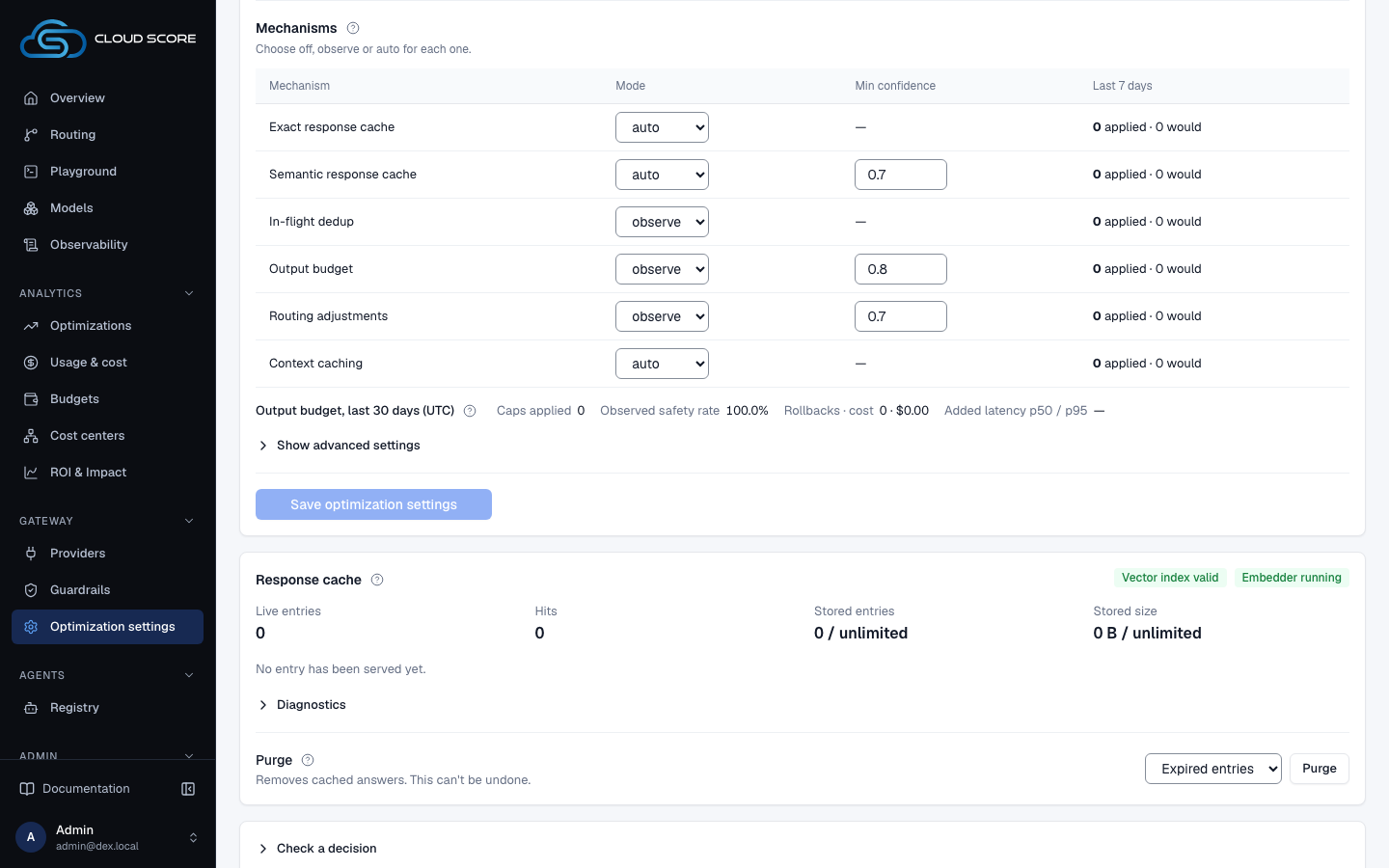
The help beside the Mechanisms heading states it in the product's own words: Cache modes: off applies now; observe for the two caches arrives with the caches sub-project (until then it behaves as auto). Read that help on your deployment before relying on observe for the caches.
In the product
| Term or stage | Where you meet it |
|---|---|
| Cache mode per policy | Policies › New policy › Response caching, with Cache TTL (seconds), Cache scope, and Similarity bar (0–1). The default option is inherit (off unless a broader policy enables it). |
| Workspace default cache mode | Optimization settings › Settings › Workspace defaults › Response cache (off, exact, semantic). Turning it on asks Turn the response cache on for this workspace? before Save and apply. |
| Mechanism modes | The mechanism table on the same tab: Exact response cache, Semantic response cache, In-flight dedup, Context caching, each with off, observe, auto. |
| The store itself | Optimization settings › Settings › Response cache: Live entries, Hits, Stored entries, Stored size, the vector index and embedder badges, Top entries by hits, Diagnostics (with Embeddings), and Purge. |
| The verdict for one request | Playground › Details › Routing (the Resolve and Dedup stations) and Details › Usage (Response cache), plus the From cache chip in the result header. |
| The verdict, after the fact | Observability › Requests: the Cache section of the Request drawer. |
| Savings over a period | Optimizations: the Exact response cache, Semantic response cache and In-flight dedup rows of By mechanism, the Cache + dedup step of the Savings waterfall, the Cache-served requests tile and Savings breakdown. The Cache-eligible traffic rarely hits recommendation flags a low hit rate. |
| Tokens and the provider discount | Tokens avoided on Optimizations; Token composition on Usage & cost, with the Provider cache discount kept apart from Cloud Score savings. |
| The per-request opt-out | constraints.cache = "no-store" in a native request or the X-Dex-Cache-Control header; both are quoted in the help of the Response cache workspace default. |
Every savings figure carries (est.) or ~: a hit is priced at what regenerating the entry once actually cost, not at an invoice. A hit's own cost is a known $0, never —, because no billed call happened. The pipeline these stations belong to is on How Cloud Score routes a request.
Example
The same request twice
- What you do
Create a policy
Cache summarieswithTask typesummarizationandResponse cachingexact — serve identical repeats, then type the prompt "Summarize the attached release notes in three bullets." in the Playground'sMessageand send it twice with the same key.- What Cloud Score does
First run: Resolve finds nothing, the request routes to a model, and the answer is written back with a 3600 second TTL under that key. Second run: Resolve matches the fingerprint and serves the stored answer; no attempt is billed.
- What you see
First run:
ResolveinDetails›Routingreadsmiss_absent,Response cacheinDetails›UsagereadsNo cached entry yet. Second run:Resolvereadshit · gpt-4o-mini · saved $0.000118 · 212 tok, the result header shows theFrom cachechip, and the ledger collapses toServed · saved (est.). In Observability the second request'sCachesection readsServed from cache (exact match), and on Optimizations theExact response cacherow'sAppliedcounts one hit.
Send the second request with a different key and it misses again with No cached entry yet, unless the policy's Cache scope is shared across your keys. Your first hit was described on Your first request.
Related
- Costs, savings, and estimatesWhat AI spend, the estimated invoice, Cloud Score overhead, and the pre-flight estimate each measure, and how one savings ledger reads the same on every page.
- PlaygroundCompare original and optimized prompts, choose which version to route, then inspect the answer and recorded execution evidence.
- PoliciesThe workspace rulebook: when a request matches a policy's conditions, Cloud Score biases scoring, fences providers, forces a model, caps cost, blocks the request, or switches on the response cache.
- API keysIssue the platform keys that authenticate every gateway request, and set what each key carries: a monthly budget, body storage, a security profile, sandbox rights, and cost attribution defaults.
- Response cacheThe Response cache section on the Settings tab of Optimization settings: how many answers the response cache holds, whether semantic lookups can use the vector index and the embedder, which entries are earning hits, and how to purge by scope.
- OptimizationsRead what the optimization engine applied and what it saved against the reference model, on the Optimizations and Prompt Optimization pages in Analytics.