Models
The registry of every model Cloud Score may route to: discover a provider's catalogue, enable the models allowed to compete, and override prices and tiers.
On this page
What you see
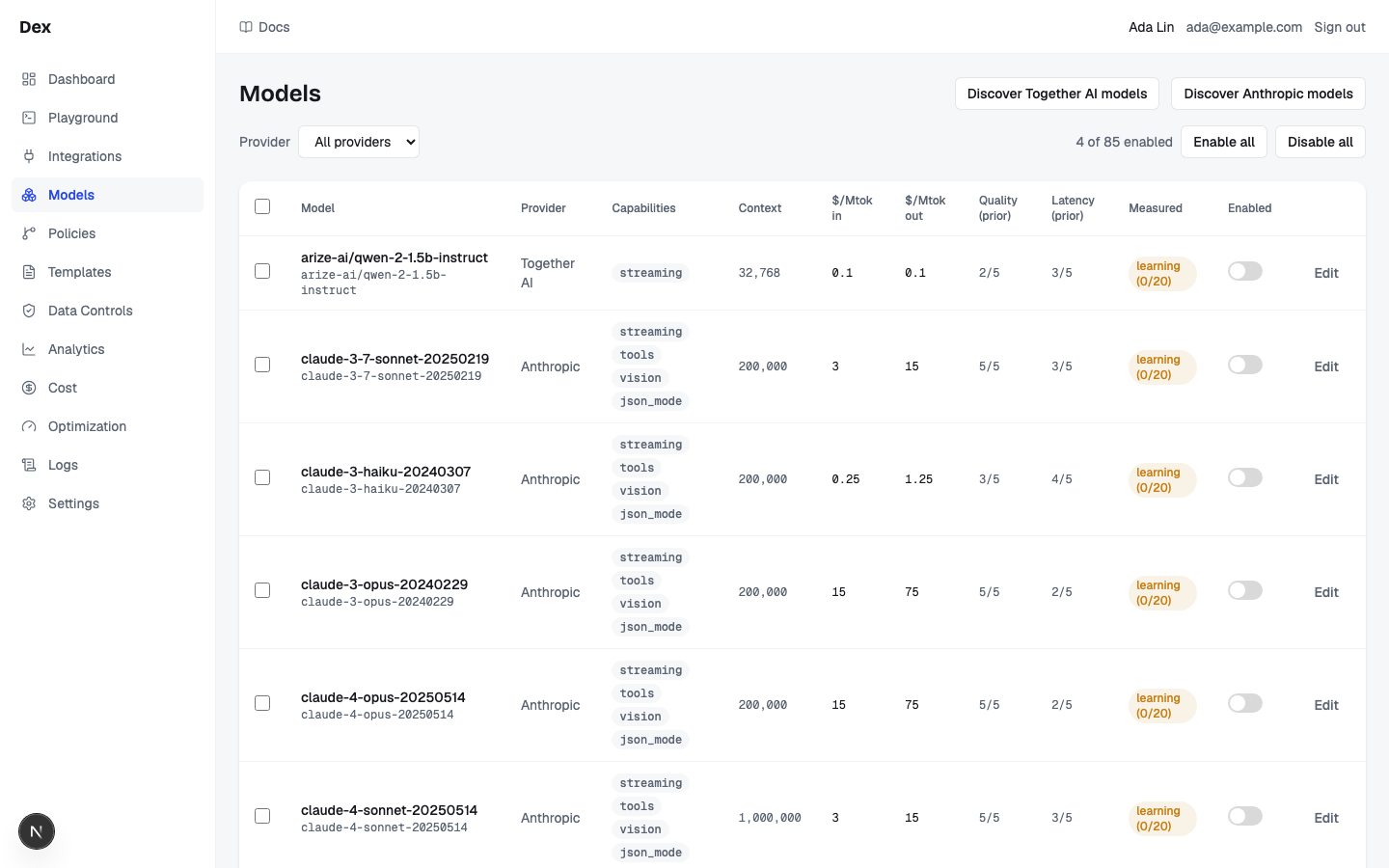
A request can only ever be routed to a model that is enabled on this page. Rows arrive from Discover, disabled, with their prices, context window, and capabilities filled in. There are no tabs and no URL parameters; the Provider filter is local to the page.
| Region | What it shows |
|---|---|
| Header row | Models on the left. On the right, one button per connected provider, for example Discover OpenAI models or Discover Anthropic models. After a run, a note line appears under the button. With no providers connected, a line under the header reads Connect a provider in Integrations to populate the registry. (plain text, not a link). |
| Filter and bulk toolbar | Shown once at least one provider exists. Left: Provider with All providers plus one option per connected provider (OpenAI, Anthropic, Google Gemini, Grok (xAI), OpenRouter, Together AI, Azure AI Foundry, Google Vertex AI, Amazon Bedrock); changing it clears ticked rows. Right, once the registry has a model: a status line such as 0 of 57 enabled or 2 selected, the buttons Enable all and Disable all (they read Enable selected and Disable selected while rows are ticked), and Clear selection while rows are ticked. A note such as Enabled 12 models appears under the buttons after a bulk action. |
| Models table | Scrolls horizontally. Columns: select-all checkbox, Model (display name in bold, the model key in mono beneath), Provider, Capabilities (one mono badge each: vision, tools, json_mode, streaming), Context, $/Mtok in, $/Mtok out, Quality (prior), Latency (prior), Measured, Enabled (a switch), and an unlabelled column holding Edit. |
| Column tooltips | Hover the headers. Quality (prior): Operator-set prior (price band at discovery). Not a measurement. Latency (prior): Operator-set prior. Not a measurement. Measured: Measured routing signal for this model: samples and the total score adjustment. A learning model is never penalised. |
| Empty row | No models yet. Connect a provider above and click Discover. when the registry is empty; No models match this filter. when the filter hides every row. |
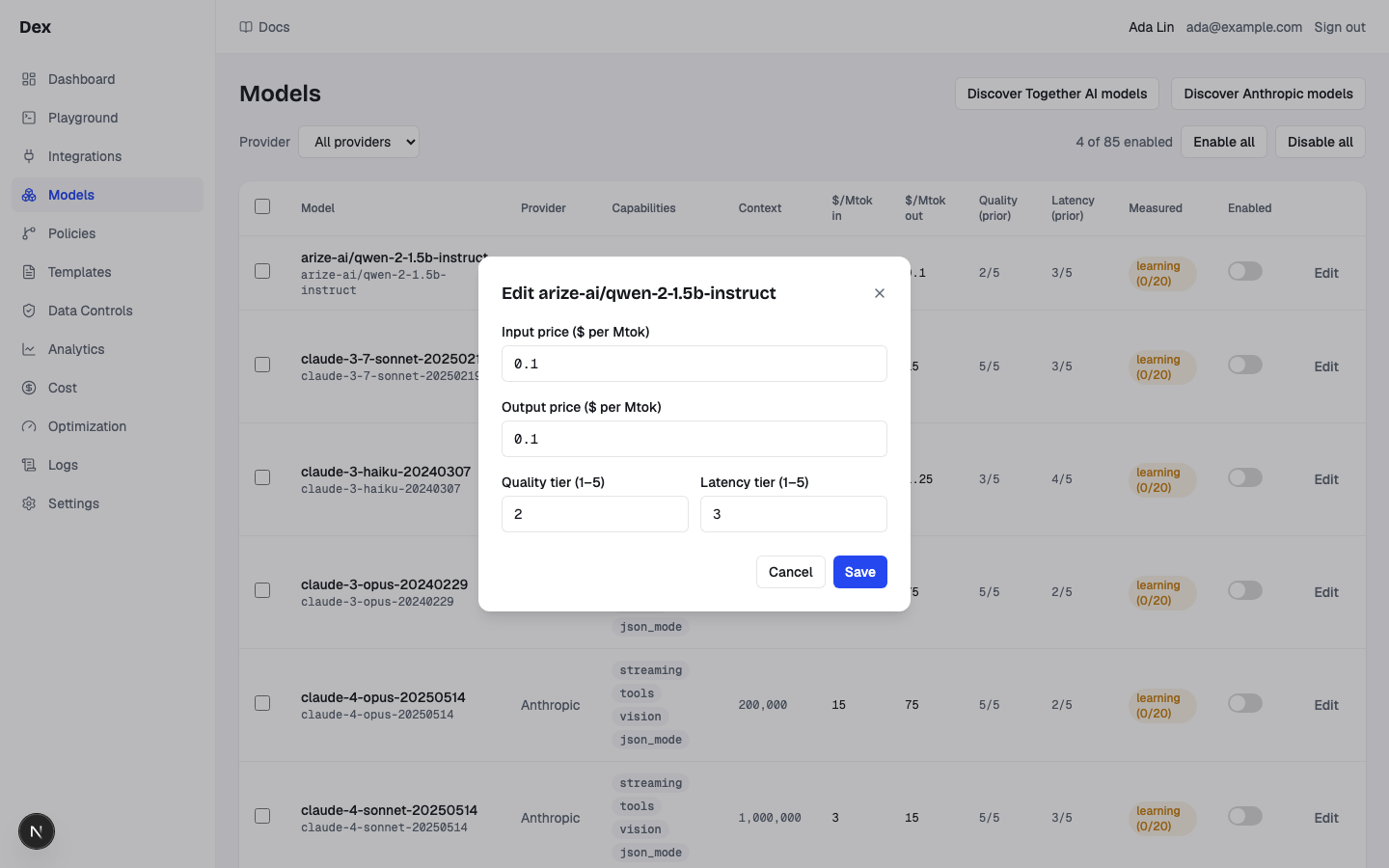
| Edit dialog | Opened by Edit. Title Edit gpt-4o-mini(the model's display name). Fields Input price ($ per Mtok), Output price ($ per Mtok), Quality tier (1–5), Latency tier (1–5); a red error line; buttons Cancel and Save. |
Duplicate provider options
Azure AI Foundry, Google Vertex AI, and Amazon Bedrock can be connected more than once on Integrations. Each connection is identified by its saved name or endpoint in Provider; each option targets that connection.
What you can do
| Action | What happens | What you see | Confirmation |
|---|---|---|---|
Discover OpenAI models | Fetches the LiteLLM catalogue for that provider, inserts every chat model not yet in the registry (disabled), refreshes prices, context, and capabilities on all of that provider's rows, derives tiers for rows it owns, and disables (never deletes) rows LiteLLM no longer lists. The list refetches. | Discovering… while it runs, then Added 57 from LiteLLM (disabled — enable to route) · updated 57. The note gains · disabled: 3 when rows were disabled and · not in LiteLLM: 3 when keys went unmatched, with the keys listed in mono beneath. On failure: Discover failed: provider not found. | no confirmation |
Row switch (Enabled) | Flips enabled for that one model. Disabling removes it from the routing pool at once and purges its response-cache entries. | The switch is greyed while saving. On error, red text under it: the server message or toggle failed. | no confirmation |
Enable all / Disable all (Enable selected / Disable selected while rows are ticked) | Acts on every filtered row across pages, or on the selected rows still in that filtered set. Rows that vanished or that you do not own are skipped, so the note can count fewer than you ticked. Selection is cleared afterwards; each written model's cache entries are purged. | Enabling… or Disabling…, then Enabled 8 models or Disabled 1 model. On error, red text: the server message or enable failed / disable failed. | Confirm the captured filtered or selected model count |
Checkboxes (Select all models in view, Select gpt-4o-mini) | The header box ticks or unticks every filtered row across pages (half-filled when only some are ticked); a row box ticks one row. | Status line becomes 2 selected; bulk buttons switch to their Enable selected / Disable selected labels. | — |
Clear selection | Empties the ticked set. | Status line returns to 0 of 57 enabled. | — |
Edit | Opens the dialog pre-filled with the row's prices and tiers. | The Edit gpt-4o-mini dialog. Cancel, Close, or a click outside discards edits. | — |
Save (dialog) | Validates the four fields, then writes them. An edited tier marks the row manual so Discover never rewrites its tiers; an edited price appends a new pricing version; the model's cache entries are purged. | Saving…, then the dialog closes. Validation or server errors appear on the red line, for example Input price must be a decimal number like 1.25 or save failed. | no confirmation |
Step-by-step
Populate the registry from a newly connected provider.
Connect the provider on
Integrations.See Integrations. Until a provider exists, this page shows
Connect a provider in Integrations to populate the registry.Open
Modelsand clickDiscover OpenAI models.Read the note, for example
Added 57 from LiteLLM (disabled — enable to route) · updated 57.Set
ProvidertoOpenAI.The status line reads
0 of 57 enabled.Tick the rows you want and click
Enable selected.For example
gpt-4o-miniandgpt-4o: the status line reads2 selectedwhile ticking and the note readsEnabled 2 modelsafterwards.
Enable everything a provider offers, then prune.
Set
ProvidertoAnthropic.Click
Enable all.The note reads
Enabled 8 models.Flip the switch on each row you do not want in play.
Each switch saves on its own; a failure on one row does not affect the others.
Override a model's priors and price.
Click
Editon thegpt-4o-minirow.The
Edit gpt-4o-minidialog opens with the current values filled in.Set
Input price ($ per Mtok)to0.15andOutput price ($ per Mtok)to0.6.Plain decimals only: no currency sign, no thousands separators, up to six decimal places.
Set
Quality tier (1–5)to3andLatency tier (1–5)to5.Click
Save.From now on
Discoverkeeps syncing this row's prices, context, and capabilities but never rewrites its tiers.
Re-sync prices after a provider changes them.
Click
Discover OpenAI modelsagain.The note's
updated 57part counts the rows refreshed. Rows LiteLLM dropped show as· disabled: 3and· not in LiteLLM: 3, with their keys listed beneath.Re-enable any disabled row you still need with its switch.
A renamed or self-hosted model that LiteLLM does not list is disabled, not removed.
Examples
Kill switch during a provider incident
- What you do
Set
Providerto the misbehaving provider and clickDisable all.- What Cloud Score does
Stops considering those models for every new routing decision at once and purges their cached responses.
- What you see
Disabling…, thenDisabled 12 modelsand a status line of0 of 12 enabled. ClickEnable allwhen the incident is over.
A cost-first workspace
- What you do
Connect
OpenAIandGoogle Gemini, click both Discover buttons, and enable onlygpt-4o-miniandgemini-2.0-flash.- What Cloud Score does
Routes requests with no required capability between the two on price, speed, and quality. A request that needs
visioncompetes only among rows carrying that badge.- What you see
gpt-4o-miniat4/5underLatency (prior)andgemini-2.0-flashalso at4/5, both derived from the name tokens in their model keys.
Reading the numbers
Prices are list prices, not estimates, so there is no (est.) on this page. The two tier columns are what Cloud Score assumes; Measured is what the router observed. See Models, tiers, and scoring for how they meet in the score.
| Label | Meaning | Unit / format | Shows — when |
|---|---|---|---|
| Context | The largest request (estimated input plus expected output) the model accepts. A model is dropped from a request's candidates when the request would not fit. | Whole tokens with separators, for example 128,000 | Never; a freshly inserted row shows 128,000 until Discover fills it. |
| $/Mtok in | Input (prompt) price in US dollars per million tokens. | Decimal string, for example 2.5, 0.15, 0 | Never; a model with no price shows 0, and rows Discover just inserted start at 0 until synced. |
| $/Mtok out | Output (completion) price in US dollars per million tokens. | As above | Never; shows 0 when unknown. |
| Quality (prior) | How good Cloud Score assumes the model is, 5 best. Discover derives it from the output-price band: 10 and above gives 5, 3 and above 4, 0.5 and above 3, 0.1 and above 2, otherwise 1. Editing it makes the value permanent. | 3/5 | Never. |
| Latency (prior) | How fast Cloud Score assumes the model is, 5 fastest. Discover derives it from the key's name: nano gives 5; mini, haiku, or flash give 4; pro or opus give 2; otherwise 3. Editing it makes the value permanent. | 4/5 | Never. |
| Measured | What the router observed in the stats window: completed samples and the total score adjustment from health, reliability, and latency. Adjustments only ever subtract from a score, are never money, and never change a tier. A learning model has too few samples to be judged (floor defaults to 20) and is exempt from penalties, not unhealthy. | 240 samples · Δ −0.045 in mono (three decimals), or the badge learning (12/20) while below the sample floor. Hover for 12 of 20 samples. Not penalised until the floor is reached. | Three cases. Every cell, when the backend returns no routing signals; hover explains that nothing is zero, only unmeasured. One cell, when that model has no signal; hover reads No measured signal for this model yet: no completed requests in the stats window. A single delta inside an active cell, when it was not recorded. |
| Toolbar status | How many rows in view are enabled, or how many are ticked. Both count only the rows under the current filter, not the whole registry. | 12 of 57 enabled or 2 selected | Never; hidden until the registry has at least one model. |
Good to know
Paging, selection and exact prices
The table shows 50 rows per page after filtering and sorting. Selection covers the full filtered set, including other pages. Bulk Enable or Disable opens a confirmation naming the captured population; Cancel writes nothing. Prices remain exact Decimal strings for sorting and display, and measured values without evidence show a dash with its cause. A failed refresh retains the last loaded rows with Retry.
Validation in the Edit dialog
Prices must be non-negative decimals with at most six decimal places, no leading dot, no currency sign, no thousands separators. Tiers must be whole numbers from 1 to 5. Otherwise the red line reads one of Input price must be a decimal number like 1.25, Output price must be a decimal number like 1.25, Quality tier must be a whole number from 1 to 5, or Latency tier must be a whole number from 1 to 5. Only these four fields are editable; display name, capabilities, context window, and max output tokens are not.
What Discover touches, and what it never touches
Saving a tier from the dialog reclaims the row from sync for good, even when the price is 0. Prices, context, and capabilities keep syncing on every Discover; each price change appends a new pricing version, and older requests stay charged at the version they used. Only Discover disables rows LiteLLM no longer lists; the unattended nightly price refresh never disables anything, no sync ever deletes a row, and a price that moved more than tenfold away from the stored value leaves the row untouched (the note has no field for it).
Every change purges that model's cache
A row switch, a bulk action, or a saved edit purges the model's response-cache entries, so expect a dip in cache hit rate after bulk changes. See Caching and deduplication.
No confirmation on the switch
Disabling the last enabled model makes every request fail with no_candidates.
Azure has no Discover
Discover Azure AI Foundry models always answers Discover failed: Azure deployments must be added manually — deployment names are specific to your resource. Azure deployments are registered by your operator through the API; there is no form for them here.
Related
- Optimization settingsSet the reference model, the workspace-default response cache, and each mechanism's mode and confidence floor, confirm promotions and check a decision before traffic feels it, and read the routing signals.
- Response cacheThe Response cache section on the Settings tab of Optimization settings: how many answers the response cache holds, whether semantic lookups can use the vector index and the embedder, which entries are earning hits, and how to purge by scope.
- PoliciesThe workspace rulebook: when a request matches a policy's conditions, Cloud Score biases scoring, fences providers, forces a model, caps cost, blocks the request, or switches on the response cache.
- Govern which models a team can useGive a team one API key, let its requests reach only the models and providers you approve, and prove it in the Playground and in Logs.
- TroubleshootingThe messages Cloud Score puts in front of you, grouped by the page that shows them, with what caused each one and what to do next.
- Statuses and badgesEvery status word and badge Cloud Score shows, what each one means, and the page it appears on.