API keys
Issue the platform keys that authenticate every gateway request, and set what each key carries: a monthly budget, body storage, a security profile, sandbox rights, and cost attribution defaults.
On this page
What you see
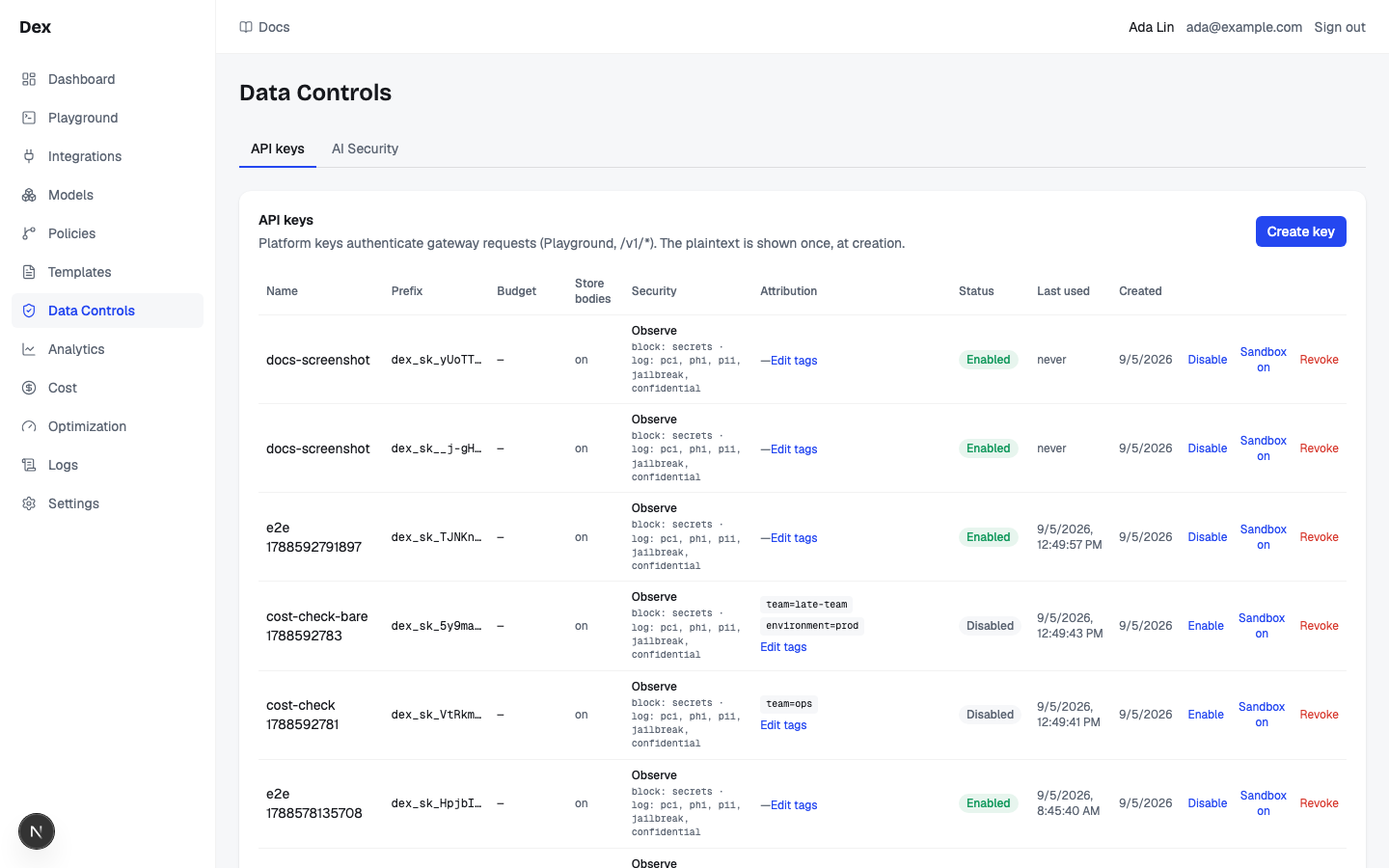
API keys lives under Admin in the sidebar. Every request to the gateway, from the Playground or from your own code, carries one of these keys. The plaintext is shown once, at creation; the table only ever shows the prefix.
| Region | What it shows |
|---|---|
| Page header | The heading API keys. Security profiles are on their own page, Gateway › Guardrails. |
| Card heading | API keys with the line Platform keys authenticate gateway requests (Playground, /v1/*). The plaintext is shown once, at creation. and the Create key button at the top right. |
| Key table | One row per key, scrolling sideways on narrow screens. Columns: Name, Prefix, Legacy cap, Store bodies, Security, Attribution, Status, Last used, Created, and an unlabelled actions column. A row reads, for example, dex_sk_AbCdE…, $1,000.00/mo, on, a profile name over its block: … line, chips such as team=payments, the badge Enabled (plus Sandbox on sandbox keys), and never until the key serves a request. |
| Actions column | Buttons Change assignment and Disable or Enable, then a ⋯ menu with Edit tags, Sandbox on or Sandbox off, and a red Revoke. Errors appear in red under the buttons. |
| Empty state | No API keys yet — create one to call the gateway. |
What you can do
| Action | What happens | What you see | Confirmation |
|---|---|---|---|
Create key | Opens the creation form. | The Create API key dialog with Name, Monthly budget (USD, optional), Store request/response bodies (checked), Sandbox key — may hand-pick policies per request (playground) (unchecked), Security profile, and Cost attribution defaults (optional) with Team, Application, Environment. | no confirmation |
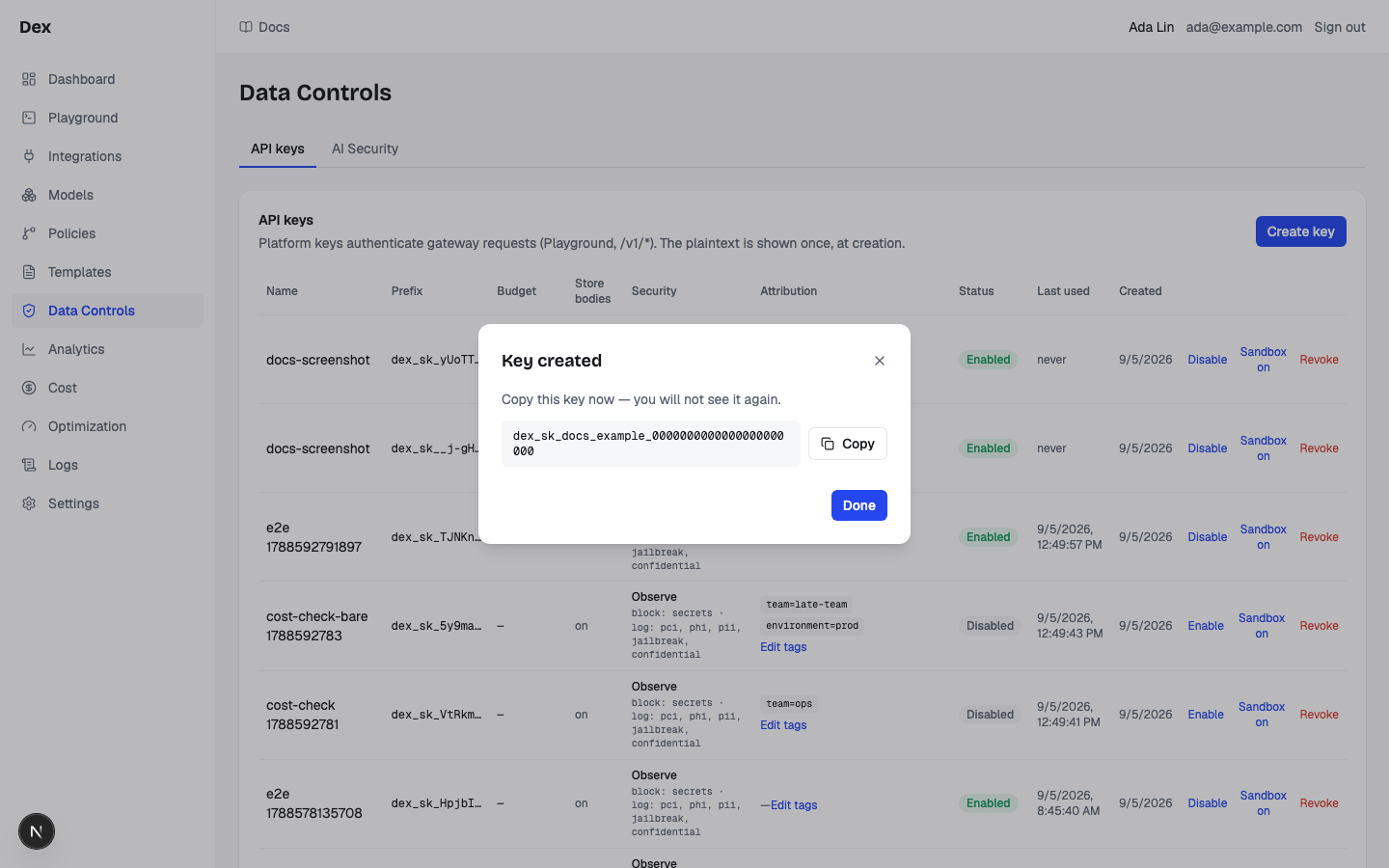
Create | Issues the key with the name, budget, switches, profile choice, and the non-blank attribution fields. | Button reads Creating…, then the dialog becomes Key created with the full key, a Copy button, and Done. The list refreshes. On failure a red line shows the server message or create failed. | no confirmation |
Copy / Done | Copies the plaintext to the clipboard; closes the dialog, after which the plaintext is gone for good. | Copied with a check icon for 1.5 seconds; then the table, with the new row showing only its prefix. | no confirmation |
Disable / Enable | Turns the key off or on. A disabled key is refused by the gateway. | The link shows … while pending, then the badge flips between Enabled and Disabled. On failure: the server message or toggle failed. | no confirmation |
Sandbox on / Sandbox off | Lets the Playground hand-pick which enabled policies apply per request on this key, or stops that. A non-sandbox key that tries gets a 403: policy selection requires a sandbox API key. | The Sandbox badge appears or disappears; … while pending; same error copy as Disable. | no confirmation |
Revoke | Deletes the key, but only if it has never served a request. | The link reads Revoking…, then the row disappears. If the key has history, red text under the row: key has request history — disable it instead of deleting. Other failures show the server message or revoke failed. | asks first in Revoke API key?, naming the key and explaining future requests; Cancel makes no change |
Edit tags | Opens the attribution editor for that key. | A dialog titled Attribution — billing-service-prod (your key name) with the same Cost attribution defaults (optional) block, Cancel, and Save. | no confirmation |
Save | Merges the three visible fields into existing defaults; blank visible fields are removed, while agent, end_user and future fields survive. | Saving…, then the dialog closes and the chips refresh. On failure: the server message or save failed. | Change attribution defaults? when replacing or removing a saved default |
Step-by-step
Issue a production key with a budget and attribution defaults.
Click
API keysunderAdminin the sidebar.The key table opens. With no keys it reads
No API keys yet — create one to call the gateway.Click
Create key.The
Create API keydialog opens.Type a
Name, for examplebilling-service-prod.Createstays disabled until the name is non-empty.Enter
500inMonthly budget (USD, optional).Leave it empty to issue a key with no cap. Negative values are rejected by the server.
Leave
Store request/response bodieschecked andSandbox key — may hand-pick policies per request (playground)unchecked.Uncheck body storage to keep prompt and answer excerpts out of the request log; classification, trace, usage, and cost are still recorded.
Leave
Security profileonObserve (default).The chips under the select show what the chosen profile does; choosing
No guardrails (requests are not scanned)shows the warningNo guardrailsinstead. If a profile enforces output security, a note appears:This profile enforces output security, so responses on this key are buffered — clients stop receiving live tokens.Under
Cost attribution defaults (optional), fillTeam,Application,Environment.For example
payments,billing-service,prod. The helper readsApplied to requests on this key that carry no metadata or X-Dex-* tag of their own.Click
Create.The dialog becomes
Key created:Copy this key now — you will not see it again.Click
Copy, store thedex_sk_value in your secret manager, then clickDone.The new row shows
$500.00/mounderLegacy cap,onunderStore bodies, the attribution chips,Enabled, andneverunderLast used.
Disable, then retire, a compromised key.
On the key's row, click
Disable.The badge turns
Disabled. Gateway calls with this key now fail. This is the supported way to retire a key that has been used.Optionally open the row's
⋯menu, clickRevoke, and confirm the named key in Revoke API key?.The link reads
Revoking…. A key that has never served a request disappears from the table.Read the red text if the row stays.
key has request history — disable it instead of deletingmeans the audit trail is preserved on purpose. Leave the key disabled.
Change a key's attribution defaults.
Open the key's
⋯menu and clickEdit tags.The
Attribution — billing-service-proddialog opens with the current values.Edit
Team,Application, orEnvironment.Clear a field to unset it. Values are trimmed and capped at 120 characters on the server.
Click
Save.Saving…, then the chips refresh. Where attribution is read live, earlier requests without their own tags report under the changed defaults. Replacing or removing an existing default first asks Change attribution defaults?.
Examples
One key per consuming team, each with a spend cap
- What you do
Create
growth-prodwithMonthly budget (USD, optional)set to2000,Teamgrowth, andEnvironmentprod. Hand the key to the growth team.- What Cloud Score does
Tags every request on the key with
team=growthandenvironment=produnless the request carries its own tag, and refuses requests once the calendar month's spend reaches the cap withmonthly budget exhausted: spent $X of $Y.- What you see
$2,000.00/mounderLegacy cap, the two chips underAttribution, and the key's spend in theAPI keybreakdown on Usage & cost.
A Playground key that skips security scanning
- What you do
Create
playground-sandboxwithSandbox key — may hand-pick policies per request (playground)checked andSecurity profileset toNo guardrails (requests are not scanned).- What Cloud Score does
Lets the Playground narrow the enabled policies per request, scans nothing on this key, and still applies any budget you set.
- What you see
The warning
No guardrailsunderSecurityand aSandboxbadge next toEnabled. To put it back on the built-in profile later, useAttach a key…in that profile's editor onGateway›Guardrails.
Reading the numbers
| Label | Meaning | Unit / format | Shows — when |
|---|---|---|---|
| Prefix | The first 12 characters of the key (dex_sk_ plus 5 more). The only part of the key the server keeps in the clear; the key itself is stored only as a SHA-256 hash. | Monospace, followed by an ellipsis | Always present |
| Legacy cap | The create-time legacy cap; manage current enforced key limits on Budgets. | $1,000.00/mo; 2 to 6 decimals, trailing zeros trimmed to 2 | — when no budget is set. Never a zero: $0.00/mo would mean an explicit zero budget. |
| Store bodies | Whether request and response excerpts and the intent are persisted for this key's requests. | on / off | Always present |
| Security | The bound security profile and the strongest action per category. | Profile name plus block: … · redact: … · log only (not enforced): … (category ids), or Disabled, not enforced for a disabled profile | No guardrails, with a warning icon, when no profile is bound. The profile name alone, without the line, while the profile list loads or when the bound profile is not in it |
| Attribution | Stored cost attribution defaults for team, application, and environment. | Chips team=x, application=y, environment=z | — when no non-empty tag is stored |
| Last used | When the key last authenticated a request. | Local date and time | never when the key has not served a request |
Good to know
Legacy caps and historical attribution
Legacy cap displays the exact create-time monthly cap, including sub-cent values in its help. Use Budgets → key scoped limits to manage enforced limits. Edit tags warns that earlier requests without their own team, application or environment tags report under changed defaults. Replacing or removing an existing default requires Change attribution defaults?; Cancel retains the draft and writes nothing. The form preserves agent, end_user and other defaults it does not edit.
Shown once means finish with Done
Create locks dismissal while pending. Key created stays open after success: Escape, outside clicks and Close cannot discard the one-time value. Copy it to your secret manager, then choose Done. Closing removes the plaintext from local state.
At request time the key decides five things for the request that carries it.
| The key carries | Effect on every request that uses it |
|---|---|
| Security profile | Prompts and answers are scanned under the bound profile. Creating a key without an explicit choice binds the built-in Observe (default) profile; only No guardrails (requests are not scanned) opts out. |
| Monthly budget | Spend on the key is capped for the calendar month. Sandbox keys cannot skip this gate. |
| Store bodies | Off means no intent or input and output excerpts on the request row, and the request is not eligible for the response cache (reason store_bodies_off). |
| Sandbox | The Playground may narrow the enabled policies per request. A testing affordance, not a bypass. |
| Attribution defaults | Lowest-precedence source of the request's team, application, and environment tags: request body metadata wins over X-Dex-* headers, which win over the key defaults. |
The plaintext is shown exactly once.
Closing Key created with Done or its close button discards the key permanently. Only the hash and the 12-character prefix are stored, so a lost key means a new key.
Revoke is refused for keys with history.
Revoke asks in Revoke API key?, then returns key has request history — disable it instead of deleting for any key that has served a request. Disable is the supported path; it keeps the audit trail intact.
A Cloud Score key inside a prompt is a secret.
The Secrets detectors recognise dex_sk_. On the built-in Observe (default) profile Secrets are set to block, so pasting a Cloud Score key into a prompt blocks the request.
Validation.
Createis disabled untilNameis non-empty; names are capped at 255 characters on the server.Monthly budget (USD, optional)accepts 0 or more in steps of 0.01 and is sent exactly as typed; a negative value is rejected with a 422 and the dialog shows the server message.- Attribution fields are only
Team,Application, andEnvironment; values are trimmed and capped at 120 characters, and blank means unset.
Getting back onto Observe.
There is no key-side control to re-select the default profile once a key was created with No guardrails (requests are not scanned) or detached from its profile. Open the built-in profile on Gateway › Guardrails and use Attach a key….
Old links still work.
/data-controls and /settings?tab=keys redirect to /admin/keys. The Playground links here as Admin › API keys, and the Developer page as Admin → API keys.
Related
- AI SecurityBuild versioned security profiles that log, redact, or block jailbreaks, PII, secrets, PHI, PCI, and confidential keywords in prompts and answers, test them with Scan rules, and attach them to API keys.
- Usage & costWhere tokens and money go, by team, user, agent, model, provider, key and prompt size: five scope tiles, usage over time, token composition, share of requests against share of spend, and one breakdown table with a drawer per row.
- BudgetsCap monthly model spend for the workspace, an API key, a team, an application, an agent, or an environment, and choose whether each budget warns or blocks at 100 %.
- ObservabilityThe per-request audit trail and the gateway's health: filter the request list, open a request for its route, attempts, cost and savings receipt, and read latency, outcomes and retries on Gateway health.
- Developer and platform settingsAdmin › Developer generates a copy-paste integration snippet for your language and client; Admin › Organization sets the two workspace routing knobs: the classifier model with its timeout, and the cost, latency, and quality scoring weights.
- Attribute cost to teams and appsTag every request with team, application, agent, environment, and end_user so Usage & cost can break spend down by them as reported tags, budgets can cap a team or an app, and alert rules can watch them.