Classification
How Cloud Score labels every request with a task type, a complexity from 1 to 5, and the capabilities it needs, where that label comes from, and which pages use it.
On this page
What it is
Classification is the third stage of the pipeline described in How Cloud Score routes a request. Before any model is chosen, Cloud Score reads the prompt and records three things about it: what kind of work it is (the task type), how hard it is (the complexity, 1 to 5), and which model features it needs (the required capabilities). It also records where that answer came from: a stored result, the classifier model, or built-in rules.
Everything after this stage reads the label. Match uses the capabilities to decide which enabled models can serve the request, Policies can condition a rule on task type, complexity, or capability, and Cost breaks spend down by task.
Routing never waits on the classifier.
If the classifier model is slow, errors, or is not configured, Cloud Score falls back to its built-in rules and keeps going. The request is never blocked or failed because of classification.
The three outputs
Task type is one of nine values. The table lists them in the order the built-in rules test them, with the cue words each rule looks for; the first rule that matches wins.
| Task type | What the built-in rules look for |
|---|---|
summarization | Words such as summarize, summary, or tl;dr. |
extraction | Words such as extract, parse, pull out, as JSON, to JSON, or JSON object. |
classification | Words such as classify, categorize, which category, label this, label these, label each, or sentiment. |
code | Words such as code, function, class, bug, refactor, debug, compile, regex, or a language name (Python, JavaScript, TypeScript, SQL). |
translation | Words such as translate or translation. |
reasoning | Words such as why, prove, derive, step-by-step, or reason through. |
chat | No cue word matched and the text looks like a transcript with two or more user: or assistant: lines. |
generation | No cue word matched and the text is not a transcript. This is the default. |
other | The built-in rules never pick it; only the LLM classifier does. |
Complexity is an integer from 1 to 5, where 5 is the hardest. The LLM classifier is asked for a whole number in that range; anything outside it is rejected and the built-in rules decide instead. The rules grade by length and then bump for reasoning:
| Estimated prompt length | Complexity from the rules |
|---|---|
| Up to about 200 tokens | 1 |
| Up to about 2,000 tokens | 3 |
| Longer | 4 |
| Any length, when the text asks to explain why, prove, derive, analyse, compare, go step by step, or do multi-step work | The length grade plus 1, capped at 5 |
Required capabilities are the model features the request cannot do without. The meanings below are the ones the app shows next to each capability.
| Capability | Meaning | How a request gets it |
|---|---|---|
vision | Accepts images in the prompt | The rules add it when the prompt contains an image. |
json_mode | Can be forced to emit valid JSON | The rules add it when the request asks for a JSON response format. |
tools | Supports tool / function calling | The rules never infer it; it comes from the classifier model or from your application. |
streaming | Can stream the response incrementally | The rules never infer it; it comes from the classifier model or from your application. |
Where a classification comes from
Cloud Score tries three sources in a fixed order and records which one answered as the source of the classification.
cache
a stored result for this exact text
llm
one call to the classifier model
heuristic
built-in rules, always available
| Source | When it answers | What it costs you |
|---|---|---|
cache | The exact same text was classified before in your workspace and the stored result has not expired (kept for 30 days by default). Results are private to your workspace; another workspace's classification never steers yours. | Nothing. |
llm | No stored result. Cloud Score sends the first 4,000 characters of the prompt to the classifier model and asks for the task type, complexity, and capabilities as JSON. The call gets the configured timeout, or less if the request's own deadline is closer. | The call's tokens are recorded as platform overhead on the request, never inside its cost. |
heuristic | Anything went wrong on the way: the cache was unavailable, the classifier timed out, its answer could not be parsed, or no classifier could be resolved at all. | Nothing. |
On the route board, the Classify station summarises the result as the task type and the source separated by a dot, for example summarization · llm or generation · heuristic. The Observability Request drawer's Classification block adds the complexity, for example summarization · complexity 2 · via llm.
No connected OpenAI provider means rules only.
When you have not picked a classifier model, Cloud Score resolves a default from your first connected OpenAI provider. A workspace without one has no default: every request is classified by the built-in rules and the Classify station always shows heuristic. Nothing fails and no error is shown; the Heuristic fallback badge on Admin › Organization tells you it is happening.
The rules are literal.
The built-in rules stop at the first cue word they find, in table order. A prompt that says summarize this Python function is summarization, not code, because the summarization rule is tested first. The classifier model reads the whole request and is not bound by that order.
Choosing the classifier
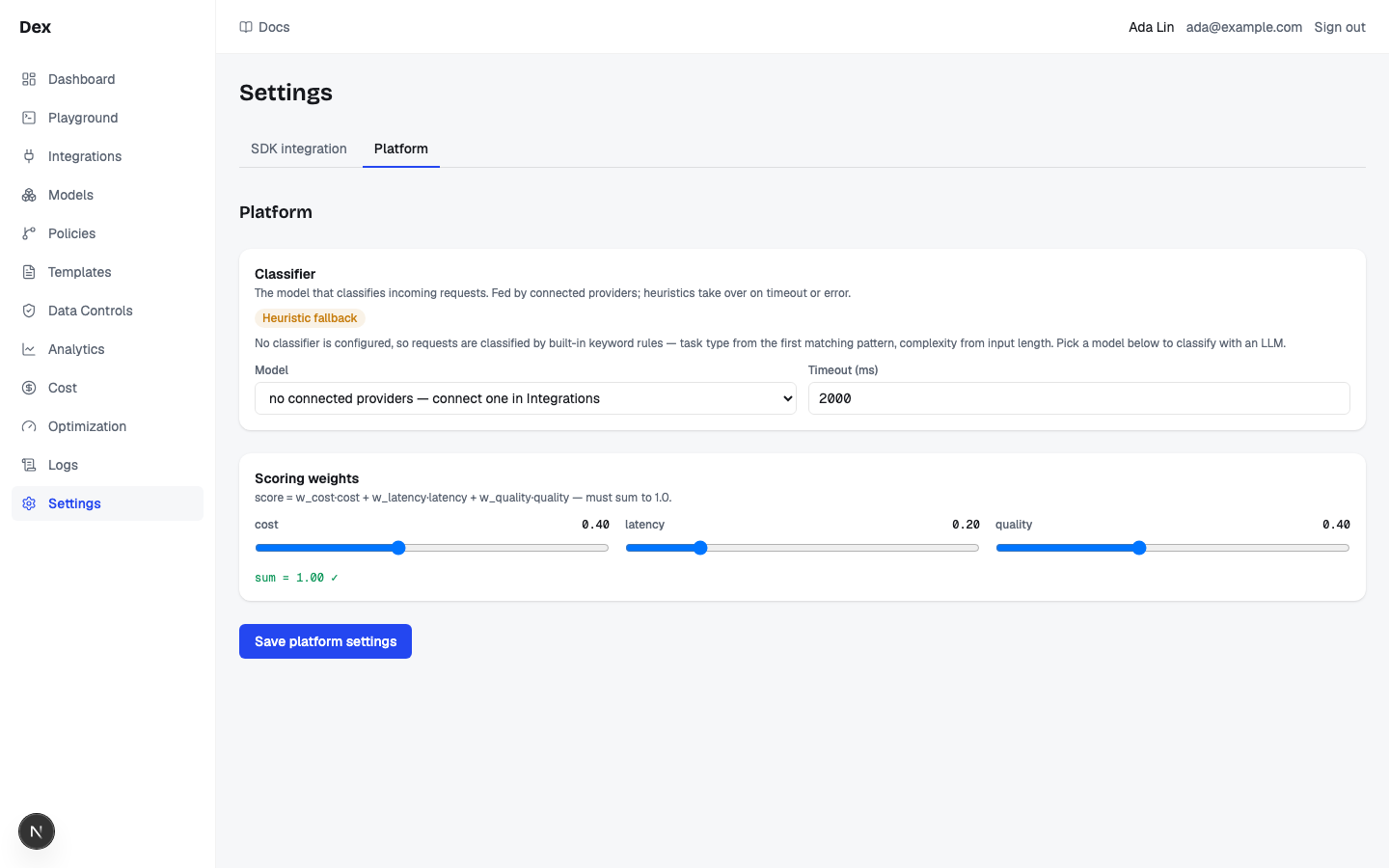
The classifier is configured once per workspace on Admin › Organization, in the Classifier card. Its description reads The model that classifies incoming requests. Fed by connected providers; heuristics take over on timeout or error.
| Field | What it sets | Rules |
|---|---|---|
Model | The model that receives the classification call. Options read {model_key} — {provider name}, for example gpt-4o-mini — OpenAI. | Only models whose provider is connected are listed, whether or not they are enabled for routing. The first option reads select a model, or no connected providers — connect one in Integrations when no connected provider has models. |
Timeout (ms) | How long the classifier call may take before the built-in rules take over. | 100 to 60,000 ms in steps of 100. The resolved default is 2,000 ms. The call is also cut short when the request's own deadline is nearer. |
Two notes can appear above the form. Showing the resolved default — nothing saved yet. Save to persist. means no classifier is stored and Cloud Score is showing the one it resolved on its own: an enabled model on your first connected OpenAI provider with a 2,000 ms timeout. The warn badge Heuristic fallback followed by No classifier is configured, so requests are classified by built-in keyword rules — task type from the first matching pattern, complexity from input length. Pick a model below to classify with an LLM. means nothing is stored and no default could be resolved.
Save platform settings writes the classifier together with the scoring weights on the same tab (the button reads Saving… while it runs, and stays disabled until the weights sum to 1.00). There is no confirmation.
Saving with no model never removes a stored classifier.
Leaving Model on select a model and saving keeps whatever classifier was stored before and saves only the weights. The classifier cannot be removed from this page. A model whose provider is not connected in this workspace is rejected with provider not found.
In the product
| Term or stage | Where you meet it |
|---|---|
| Task type and source, live | Playground: the Classify station on the route board as the request runs, for example summarization · llm. |
| Task type, complexity, and source, recorded | Observability › the Request drawer › Classification, as summarization · complexity 2 · via llm, or none when no classification was recorded. |
| Task type and complexity in your application | The native response envelope's routing block: task_type, complexity, and classifier (the source). |
| Required capabilities | Match keeps only enabled models on Models that have every required capability and enough context window; its station reads, for example, 2 models. No match ends the request with no enabled model matches the required capabilities and context window. |
| Policy conditions | Policies › New policy › Conditions (all must match): Task type, Complexity min (1–5), Complexity max (1–5), and Required capability. |
| Policy preview | Policies › Test against a sample: Run test classifies Sample input with the built-in rules only and prints Classified summarization, complexity 1. |
| Spend by task | Usage & cost: the Task type chip under More narrows every block and the breakdown to one task type. |
| Classifier model and timeout | Admin › Organization › Classifier; the provider it runs on is connected under Providers. |
| Output budget history | The Output budget mechanism on Optimization settings › Settings predicts answer length from your workspace's past requests of the same task type. |
The policy preview and a real request can disagree.
Test against a sample never calls the classifier model, sends no images, and asks for no JSON, so it always classifies with the rules and never adds a capability. A policy conditioned on Required capabilitycannot match in the preview, and a task type the model would assign differently shows up as the rules' choice instead.
Example
A summary prompt meets a policy on task type
- What you do
On
Policies, create a policy with aName,Task typeset tosummarization, andPrefer tierset tocost, thenSave policy. In thePlayground, send Summarize this quarterly update in three bullet points.- What Cloud Score does
Finds no stored result, asks the classifier model, and records
summarizationwith a low complexity and no required capabilities. Had the call timed out, the rules would have reached the same task type from the word summarize. The policy's condition matches, so scoring runs with the cost-first weights 0.7 / 0.1 / 0.2 instead of the workspace default. A request classified ascodewould pass the policy untouched.- What you see
Classifyreadssummarization · llm,Policycounts the policy, and the decision summary inDetails›Routingnames the cheapest capable model. Pasting the same prompt intoSample inputand clickingRun testprintsClassified summarization, complexity 1,Allowed, andweights c/l/q 0.7/0.1/0.2.
To see what the same prompt does under a caller-side preset instead of a policy, read Routing strategies: a named strategy overrides the policy's tier, while auto inherits it.
Related
- Developer and platform settingsAdmin › Developer generates a copy-paste integration snippet for your language and client; Admin › Organization sets the two workspace routing knobs: the classifier model with its timeout, and the cost, latency, and quality scoring weights.
- PoliciesThe workspace rulebook: when a request matches a policy's conditions, Cloud Score biases scoring, fences providers, forces a model, caps cost, blocks the request, or switches on the response cache.
- ObservabilityThe per-request audit trail and the gateway's health: filter the request list, open a request for its route, attempts, cost and savings receipt, and read latency, outcomes and retries on Gateway health.
- PlaygroundCompare original and optimized prompts, choose which version to route, then inspect the answer and recorded execution evidence.
- ModelsThe registry of every model Cloud Score may route to: discover a provider's catalogue, enable the models allowed to compete, and override prices and tiers.
- Usage & costWhere tokens and money go, by team, user, agent, model, provider, key and prompt size: five scope tiles, usage over time, token composition, share of requests against share of spend, and one breakdown table with a drawer per row.