Policies
The workspace rulebook: when a request matches a policy's conditions, Cloud Score biases scoring, fences providers, forces a model, caps cost, blocks the request, or switches on the response cache.
On this page
What you see
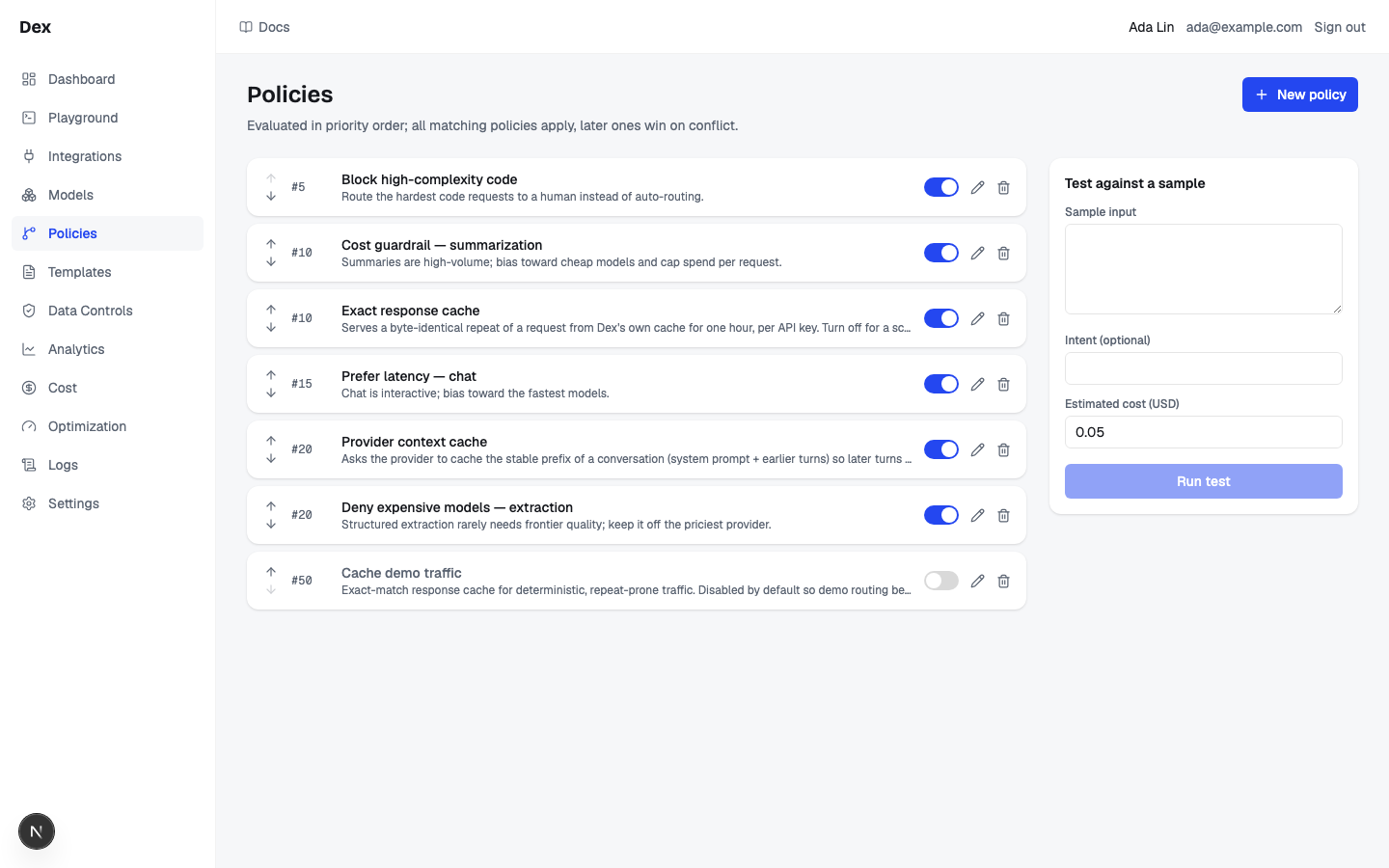
A policy is a rule of the form conditions (all must match) then actions. On every gateway request Cloud Score classifies the prompt, evaluates each enabled policy in priority order, and applies every match. The page is listed in the sidebar as Gateway › Routing policies. Its Policies tab has a policy list on the left, a test panel on the right, and a builder dialog for creating or editing one policy. The Enginetab next to it shows the routing engine's effective configuration.
Prompt Optimization does not require a policy. It defaults ON with a workspace setting and request override, and accepts any prompt length. In Playground, prepare a comparison and explicitly choose the original or optimized prompt before routing. Legacy compression policy actions are retired; routing and security policies still apply and can block the request. See the Playground for the switch, actual prompt comparison and measured token savings.
| Region | What it shows |
|---|---|
| Header row | Policies on the left, New policy on the right. Beneath, the one-line rule of the page: Evaluated in priority order; all matching policies apply, later ones win on conflict. |
| Policy list | One card per policy, enabled and disabled alike, ordered by priority ascending. Each card has an up and a down arrow, a mono priority badge such as #100, the name (greyed when disabled) with the description truncated beneath it (hover for the full text), a switch, a pencil (edit) button, and a trash (delete) button. While loading the column reads Loading…; with no policies it reads No policies yet. Create one to get started. |
| Test against a sample | A card headed Test against a sample with Sample input (a text area), Intent (optional), Estimated cost (USD) (defaults to 0.05), and a full-width Run test button. It stacks under the list on narrow screens. |
| Test result | Appears under the button after a successful test: a line such as Classified code, complexity 1, then a green Allowed pill or a red Blocked pill (with the block message after a colon when the policy set one), then only the lines that apply: weights c/l/q 0.1/0.2/0.7, force → gpt-5-mini, max cost $0.005, allow: openai, openrouter, deny: openrouter, together. |
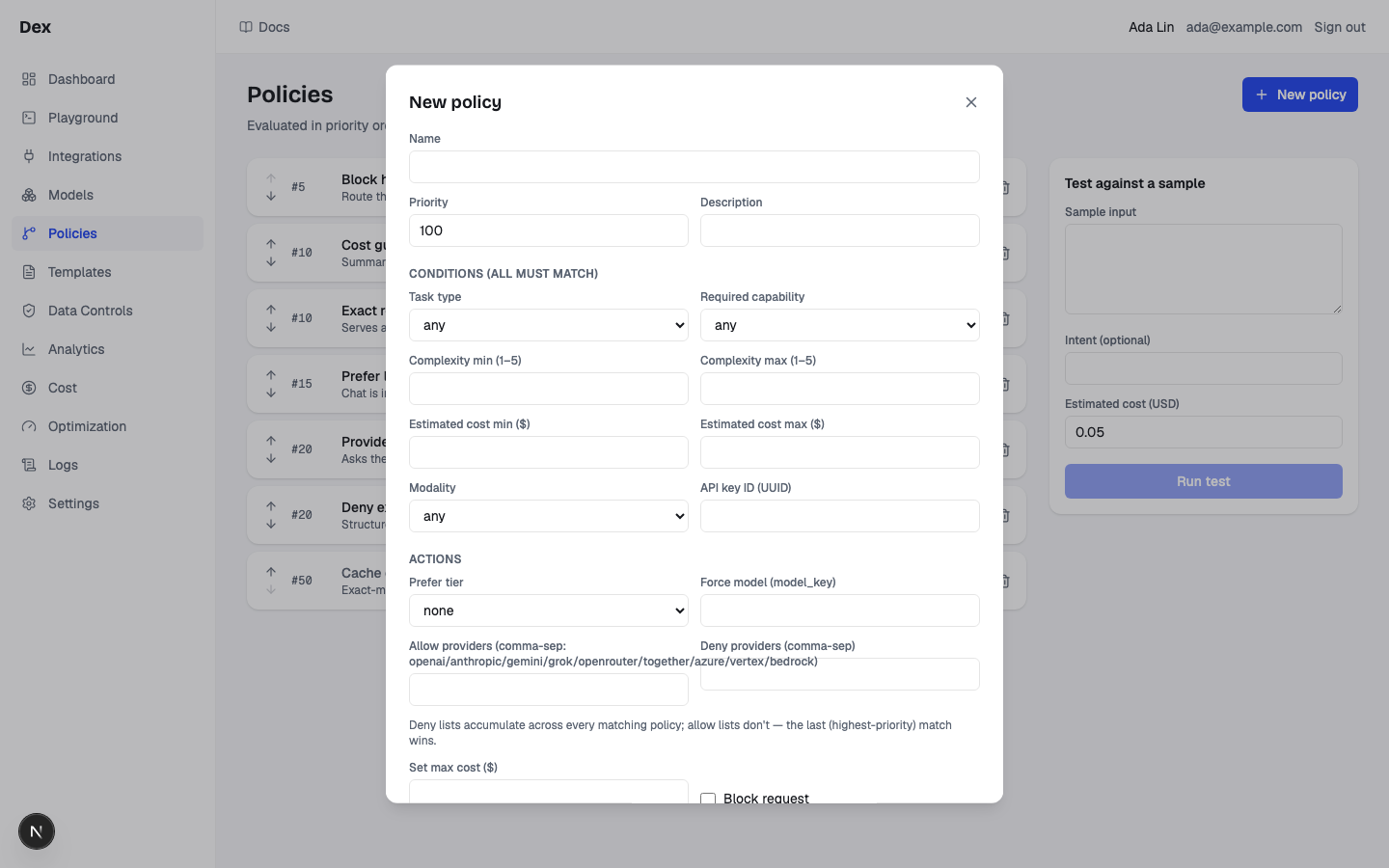
| Builder dialog, top fields | Titled New policy or Edit policy, with a Close button. Fields Name, Priority (a number, 100 for a new policy), and Description. |
Builder dialog, Conditions (all must match) | Task type (any, chat, classification, code, extraction, generation, other, reasoning, summarization, translation); Required capability (any, json_mode, streaming, tools, vision); Complexity min (1–5); Complexity max (1–5); Estimated cost min ($); Estimated cost max ($); Modality (any, text, multimodal); API key ID (UUID). A blank field is no constraint. |
Builder dialog, Actions | Prefer tier (none, cost, latency, quality); Force model (model_key); Allow providers; Deny providers; the helper line Deny lists accumulate across every matching policy; allow lists don't — the last (highest-priority) match wins.; Set max cost ($); the Block request checkbox, which reveals Block message; and Response caching with the options inherit (off unless a broader policy enables it), off — force-disable, exact — serve identical repeats, and semantic — also serve close matches. Choosing exact or semantic reveals Cache TTL (seconds) (empty means 3600) and Cache scope (per API key, shared across your keys); semantic also reveals Similarity bar (0–1) (empty means 0.90). |
| Builder dialog, footer | A red error line when a save fails (Save failed or the server's message), then Cancel and Save policy. |
What you can do
| Action | What happens | What you see | Confirmation |
|---|---|---|---|
New policy | Opens the builder with an empty draft: no name, priority 100, enabled, no conditions, no actions. | The New policy dialog. | — |
Pencil button (Edit Code gets quality) | Opens the builder pre-filled with that policy. | The Edit policy dialog. | — |
Save policy | Creates or updates the policy. Inert while the name is empty. | Saving…, then the dialog closes and the list refreshes. On failure the dialog stays open with Save failedor the server's validation message. | no confirmation |
Cancel / Close | Closes the editor when unchanged; changed fields require Discard changes?. | Keep editing returns to the draft; Discard closes it. | Discard changes? when the draft differs |
Switch (Toggle Code gets quality) | Flips enabled and saves the whole policy. A disabled policy is skipped by routing and by the test panel. | The name turns grey when off; the switch is inert while saving. On error: toggle failed under the card. | no confirmation |
Trash button (Delete Code gets quality) | After confirmation, hard-deletes the captured policy and its version history. | The card disappears. On error: delete failed under the card. | Delete policy? names the captured policy; Cancel makes no change |
Up and down arrows (Move Code gets quality up, Move Code gets quality down) | Moves the card one place, then rewrites every policy's priority to 10, 20, 30 and so on in the new order, saving each changed row in sequence with its expected version. A conflict stops remaining writes and reloads the server state. The first card's up arrow and the last card's down arrow are always inert; all arrows are inert while a reorder runs. | New #10, #20, #30 badges. On a partial failure: reorder failed under the list, and the list reloads whatever landed. | no confirmation |
Run test | Classifies the sample with the built-in heuristic rules (no model call), evaluates every enabled policy against it, and reports the outcome. Inert while the sample is empty. | Testing…, then the test result block. On error: test failedor the server's message. | — |
Step-by-step
Create a policy that sends code requests to the best model, and check it.
Click
Routing policiesunderGatewayin the sidebar, thenNew policy.On a fresh workspace the list reads
No policies yet. Create one to get started.Set
NametoCode gets quality; leavePriorityat100.Under
Conditions (all must match), setTask typetocode.Under
Actions, setPrefer tiertoquality.Click
Save policy.The dialog closes. The card
#100Code gets qualityappears with its switch on.In
Test against a sample, paste a prompt intoSample inputand clickRun test.For
Refactor this Python function to remove the nested loopsthe result readsClassified code, complexity 1,Allowed, andweights c/l/q 0.1/0.2/0.7.
Cap and fence one API key, then order and pause the rule.
Click
New policy; setNametoMarketing key is cappedandPriorityto10.Paste the key's UUID into
API key ID (UUID).The value must be a UUID; anything else is rejected when you save.
Set
Set max cost ($)to0.005andDeny providerstoopenrouter, together.Provider names are split on commas and trimmed. Use the type names listed in the allow-list label.
Click
Save policy.Click the card's up arrow until it sits where you want.
Each move rewrites every policy's priority to
#10,#20,#30and so on, including cards you did not touch.Flip the switch to pause the rule without deleting it.
The name turns grey. Flip it again to resume.
Turn on semantic caching for summaries.
Click
New policy; setNametoCache summariesandTask typetosummarization.Set
Response cachingtosemantic — also serve close matches.Three fields appear:
Cache TTL (seconds)(empty means3600),Cache scopeonper API key, andSimilarity bar (0–1)(empty means0.90).Click
Save policy.Send two similar summarisation prompts from the
Playground.On the second request the
Resolvestation reports a semantic hit with its similarity. See Playground.
Block image requests workspace-wide.
Click
New policy; setNametoNo images yetandPriorityto5.A low number runs before every other policy.
Set
Modalitytomultimodal.The gateway marks a request multimodal when it carries images.
Tick
Block requestand typeVision is not enabled for this workspaceintoBlock message.Click
Save policy.Run testcannot check this rule: the sample panel always tests astextmodality.
Examples
Code gets quality, summaries stay cheap
- What you do
Save
Code gets quality:Task typecode,Prefer tierquality. Enabled models: gpt-5-mini, claude-haiku-4-5, gpt-5.- What Cloud Score does
Scores code requests with weights 0.1/0.2/0.7 instead of the default 0.4/0.2/0.4, so gpt-5 wins (score 0.700 against 0.550). Summaries do not match the condition and keep the default weights. A caller sending strategy
balancedpins 0.4/0.2/0.4 and gpt-5-mini wins again; a caller onautoinherits the policy.- What you see
In the test panel,
weights c/l/q 0.1/0.2/0.7. In the Playground's decision summary (Details›Routing), gpt-5 as the routed model with its score.
A data-governance fence for the legal team
- What you do
Save a policy at
Priority30withAPI key ID (UUID)set to the legal key,Deny providersopenrouter, together, andSet max cost ($)0.02. A colleague later saves a40policy withAllow providersset toopenai, openrouter.- What Cloud Score does
For legal traffic the allow gate keeps openai and openrouter, then the deny gate removes openrouter: deny lists union across matches and a later policy cannot un-deny a provider. Candidates estimated above 2 cents are dropped; if the caller also sends a max cost of 0.01, the lower cap applies.
- What you see
On a request with that key, the
Selectstation's filter counts show the providers removed; only OpenAI models remain in the candidates table.
Cache summaries, carve one key back out
- What you do
Save
Cache summaries(Task typesummarization,Response cachingsemantic — also serve close matches,Cache TTL (seconds)3600,Cache scopeper API key,Similarity bar (0–1)0.90). Then a second policy at a higher number withAPI key ID (UUID)set to one key andResponse cachingoff — force-disable.- What Cloud Score does
Request 1 misses and is stored. An identical request seven minutes later is an exact hit at $0. A paraphrase scoring 0.94 is a semantic hit. A request with a non-zero temperature is not eligible and routes live. The carved-out key never reads or writes the cache: the later match overwrites the cache mode field by field.
- What you see
Resolvereadsmiss_absenton the first request and a hit afterwards. The test panel shows nothing for this policy: cache actions are not part of its result. See Caching and deduplication.
A block at #5 beats everything after it
- What you do
Save
No images yetatPriority5:Modalitymultimodal,Block requestticked,Block messageVision is not enabled for this workspace. KeepCache summariesat#100.- What Cloud Score does
Stops evaluating at the first matching block, so a summarisation request that carries an image is refused before any provider is called and the cache policy at #100 is never consulted. Without a message the refusal would read
blocked by policy 'No images yet'.- What you see
The
Policystation readsblockedandRecordreadsblocked. The caller receivesVision is not enabled for this workspace; on the OpenAI-compatible endpoint that is an HTTP 403.
Reading the numbers
Nothing on this page is an estimate of spend, so there is no (est.) marker. The test result prints only the lines that a matching policy produced; a missing line means no policy set that action.
| Label | Meaning | Unit / format | Shows — when |
|---|---|---|---|
| #100 | The policy's evaluation order. Lower numbers run first; when two matching policies set the same single-valued action, the higher number overwrites. Ties break by policy id. A new policy starts at 100; reordering renumbers every policy to 10, 20, 30 and so on. | Whole number prefixed with a hash sign, in mono | Never. |
| Classified code, complexity 1 | What the built-in heuristic classifier decided for the sample: the task type from keyword rules, and complexity 1, 3, or 4 by length plus 1 when reasoning words appear, capped at 5. A real request may be classified by a model instead and get a different answer. | Task type name; whole number 1 to 5 | Only shown after a successful test. |
| Allowed / Blocked | Whether any matching enabled policy blocked the sample. The message after the colon is the policy's Block message, or blocked by policy '{name}' when it has none. | Green or red pill | Only shown after a successful test. |
| weights c/l/q 0.1/0.2/0.7 | The cost, latency, and quality weights a Prefer tier would apply: cost gives 0.7/0.1/0.2, latency 0.1/0.7/0.2, quality 0.1/0.2/0.7. | Three decimals separated by slashes | Hidden when no matching policy set a tier. |
| force → gpt-5-mini | The model every matching request is pinned to; scoring is skipped. | A model_key | Hidden when no matching policy forces a model. |
| max cost $0.005 | The per-request ceiling; candidates estimated above it are dropped. | Decimal string after $, printed as stored | Hidden when no matching policy set a cap. Reads $0 only when a policy actually set 0. |
| allow: openai, openrouter | The provider types the request is restricted to. A later matching policy replaces the whole list. | Sorted, comma-separated provider types | Hidden when no allow list fired. |
| deny: openrouter, together | The provider types the request may never use, unioned across every matching policy. | Sorted, comma-separated provider types | Hidden when the deny set is empty. |
| Estimated cost (USD) | The figure the sample's cost conditions are compared against. On a real request this is the cheapest candidate's pre-flight estimate, not the eventual winner's. | Decimal, default 0.05 | Never; an empty field is sent as 0. |
Good to know
Delete the captured policy deliberately
The trash button opens Delete policy? with the policy name and consequence. Cancel writes nothing. Confirming removes the policy and its history. Use the switch to pause a rule instead. Dirty editors keep their fields until you choose Discard; unknown stored conditions and actions survive normal edits.
How matches combine
- Enabled policies run in priority order, lowest number first. Every match applies; for a single-valued action, the later match overwrites.
- Deny lists accumulate across matches and can never be undone by a later policy. An allow list is replaced by the later match.
- A block stops evaluation at once. Nothing after it applies, including a later
off — force-disablecache action, and a blocked request is never served from the cache. - Gates run in this order in
Select: failover exclusions, allow, deny, forced model, cost cap. A forced model that is denied, not allowed, disabled, or over the cap ends the request withno_candidates.
What callers can and cannot override
- A caller's strategy
autoinheritsPrefer tier; every other strategy value replaces it. Strategies change scoring only: blocks, allow and deny lists, forced models, and cost caps still bind. See Routing strategies. - A caller's model override takes precedence over
Force model (model_key). When both the caller and a policy cap cost, the lower cap applies. - An API key flagged
Sandbox key — may hand-pick policies per request (playground)inAdmin›API keysmay choose which enabled policies apply to a Playground request. The budget gate always runs regardless.
Validation
- Only
Nameis checked before sending, and only that it is not empty. The server rejects, with its message shown in the dialog: a name outside 1 to 255 characters, complexity outside 1 to 5, negative costs or TTL, a similarity bar outside 0 to 1, and anAPI key ID (UUID)that is not a UUID. ClearingPrioritysaves 0, not blank. - No check that a min is at or below its max: a contradictory pair simply never matches.
- Allow providers and Deny providers use choices from the provider registry. Unknown stored values remain visible and survive ordinary edits; a mismatched allow entry can leave no candidates.
Force model (model_key)is not checked against the registry. It must be the exact key of an enabled model on Models, or every matching request fails withno_candidates.Block messageand the cache sub-fields keep their values in the draft when hidden and are still sent; the server ignores them while their parent control is off, so they may reappear filled in when you reopen the editor.- Two people editing the same policy do not see a conflict; the later save replaces the earlier one.
Limits of the test panel
- Classification uses the built-in heuristic rules, never a model, so the task type and complexity can differ from a real request. See Classification.
- The sample carries no API key, is always
textmodality, and has no required capability, so policies conditioned onAPI key ID (UUID),Modalitymultimodal, or anyRequired capabilitynever match in a test. - The builder offers no intent condition, so
Intent (optional)cannot change which policies match. - Disabled policies are invisible to the test. Cache actions are not reported in the result.
Caching needs more than a policy
inherit (off unless a broader policy enables it)defers to theResponse cacheworkspace default on theOptimizationpage. A policy's cache mode always wins over that default.- A cached answer is only possible when the workspace cache is on, the request's key stores bodies, the prompt was not redacted, no tools are present, and temperature is zero.
- Semantic matching needs a connected OpenAI provider for embeddings; without one the
Optimizationpage showsSemantic matching unavailableand only exact lookups run. The effective bar is the higher of the policy'sSimilarity bar (0–1)and the workspace bar: a policy can raise it, never lower it. Semantic lookup is also skipped, exact only, when the request has a response format, a model override, explicit required capabilities, or a policy-forced model.
Related
- API keysIssue the platform keys that authenticate every gateway request, and set what each key carries: a monthly budget, body storage, a security profile, sandbox rights, and cost attribution defaults.
- Optimization settingsSet the reference model, the workspace-default response cache, and each mechanism's mode and confidence floor, confirm promotions and check a decision before traffic feels it, and read the routing signals.
- Response cacheThe Response cache section on the Settings tab of Optimization settings: how many answers the response cache holds, whether semantic lookups can use the vector index and the embedder, which entries are earning hits, and how to purge by scope.
- BudgetsCap monthly model spend for the workspace, an API key, a team, an application, an agent, or an environment, and choose whether each budget warns or blocks at 100 %.
- ObservabilityThe per-request audit trail and the gateway's health: filter the request list, open a request for its route, attempts, cost and savings receipt, and read latency, outcomes and retries on Gateway health.
- Developer and platform settingsAdmin › Developer generates a copy-paste integration snippet for your language and client; Admin › Organization sets the two workspace routing knobs: the classifier model with its timeout, and the cost, latency, and quality scoring weights.