AI Security
Build versioned security profiles that log, redact, or block jailbreaks, PII, secrets, PHI, PCI, and confidential keywords in prompts and answers, test them with Scan rules, and attach them to API keys.
On this page
What you see
AI Security lives under Gateway › Guardrails in the sidebar. The Guardrails page opens with the Top guardrail violations card for the Last 30 days · UTC, then the profile list. The card ranks each guardrail (a security category of the profiles on your API keys) by the requests that tripped it, with Violation count and Total invocations; a request that trips two guardrails counts once in the total. It reads No guardrail detections in this range. when nothing was detected, and No security profile is enabled on any API key. before any profile is attached. The same card is in the saved-dashboard widget catalog.
A profile is a named, versioned bundle of per-category rules, locales, keywords, and a fail mode. Every request on a key bound to an enabled profile is scanned in both directions. Opening a profile replaces the list with the editor in place; a page reload returns to the list.
| Region | What it shows |
|---|---|
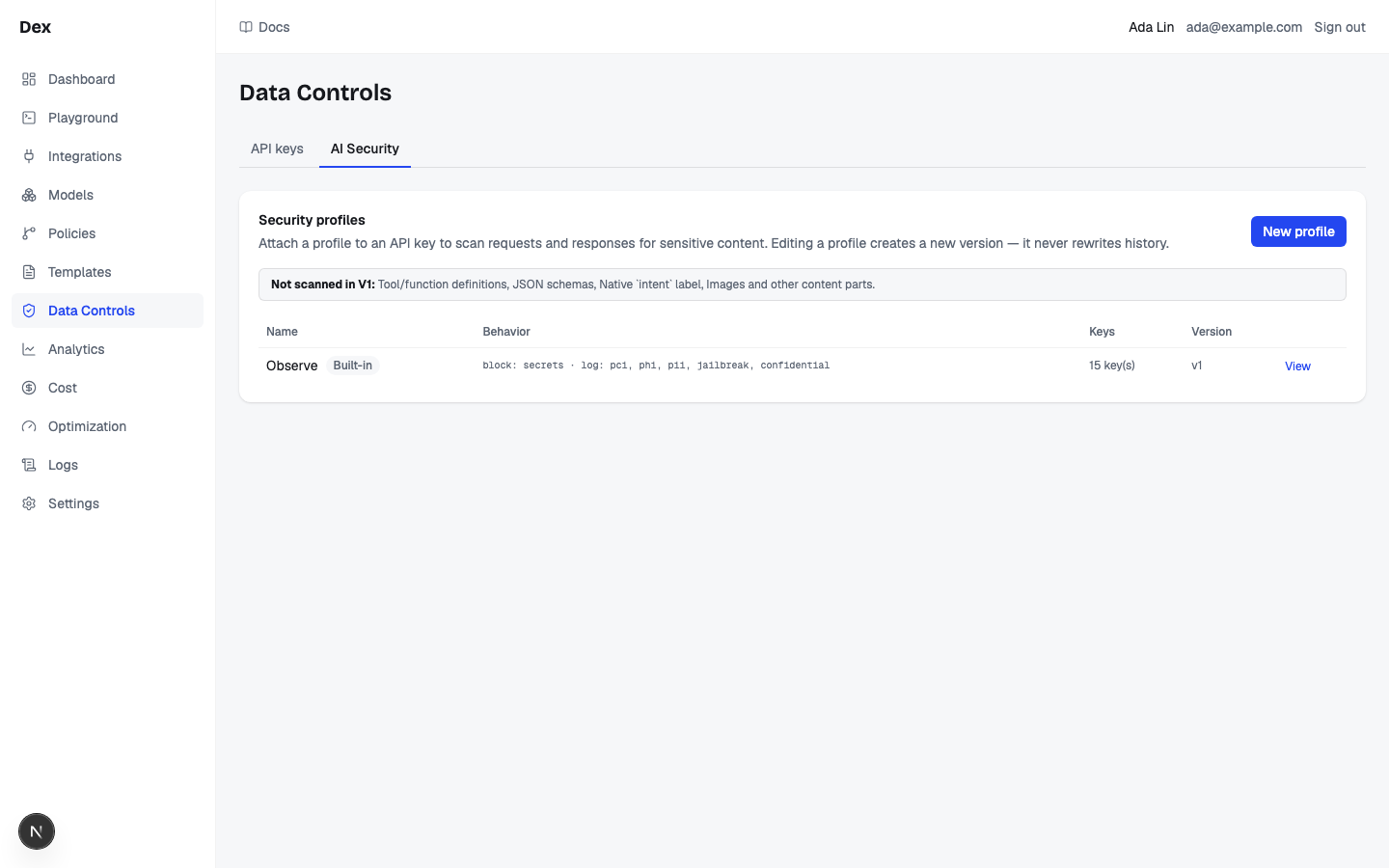
Security profiles | Card heading, with the description Attach a profile to an API key to scan requests and responses for sensitive content. Editing a profile creates a new version — it never rewrites history. and the New profile button top right, disabled until the category catalog loads. |
Not scanned in V1: | An info box listing the channels the scanner never inspects: Tool/function definitions, JSON schemas, Native `intent` label, Images and other content parts, Tool-call arguments and message names. Hover an item for the reason, for example Forwarded to the provider unscanned in V1. or OpenAI-compatible endpoint: forwarded to the provider unscanned in V1. |
| Profile table | Columns Name, Behavior, Keys, Version, then actions. The workspace profile carries the badge Built-in; a disabled profile carries the badge Disabled. Behavior is a monospace line of the strongest action per category, block: … · redact: … · log only (not enforced): … with category ids, or all off. A disabled profile reads Disabled, not enforced with a warning icon instead, whatever its rules say. Actions are View (built-in) or Edit and Delete (custom). |
| Empty row | No security profiles yet. |
| Region | What it shows |
|---|---|
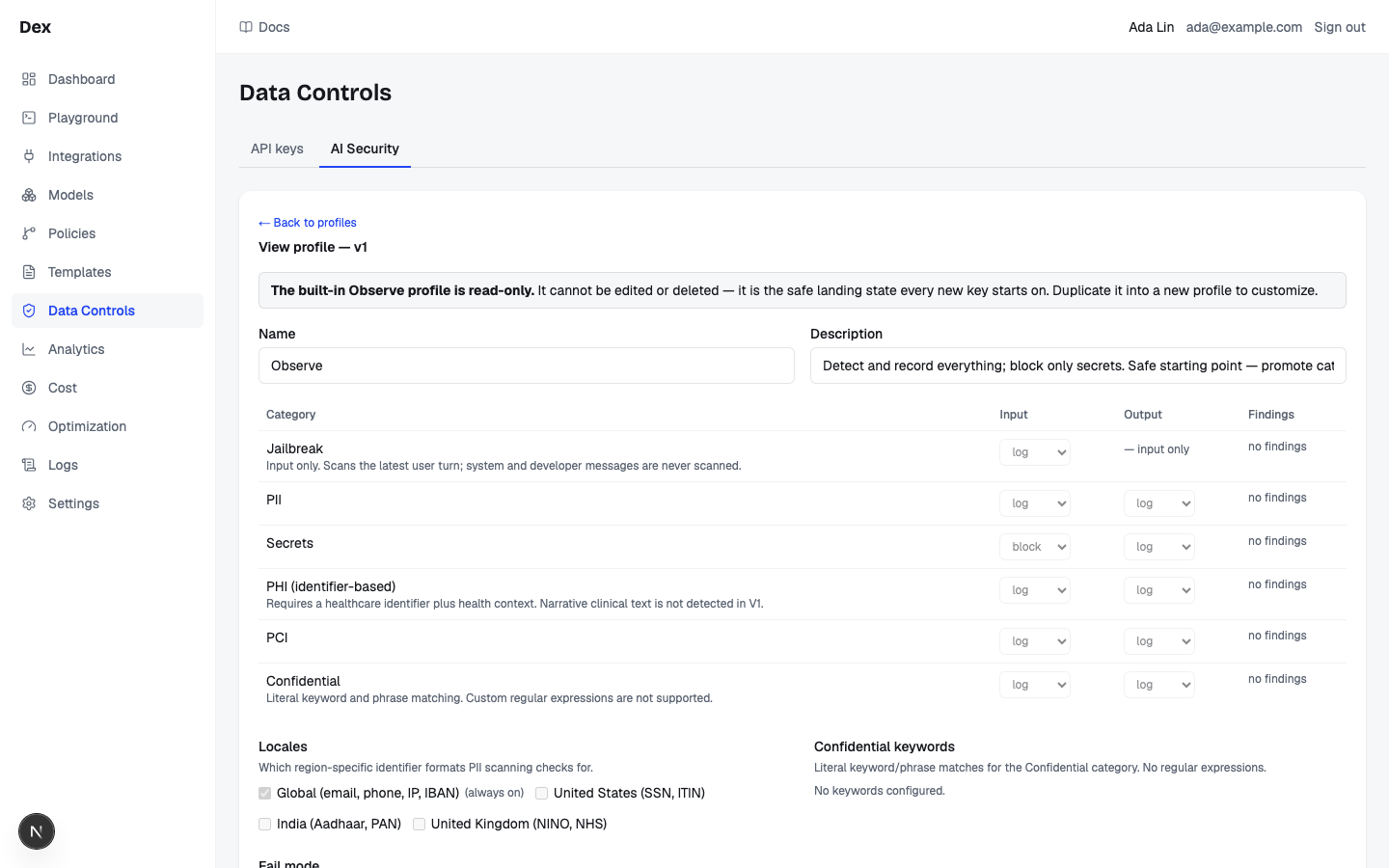
← Back to profiles | Returns to the list. Unsaved edits are discarded without a prompt. |
| Heading | Edit profile — v2 for a custom profile or View profile — v1 for the built-in one; the number is the current version. Custom profiles have the primary button Save (creates new version). |
| Built-in notice | Only on the built-in profile: The built-in Observe profile is read-only. It cannot be edited or deleted — it is the safe landing state every new key starts on. Duplicate it into a new profile to customize. |
| Disabled notice | Only on a disabled profile: This profile is disabled. Requests on keys attached to it are not scanned, whatever the rules below say. |
Name and Description | Two text inputs, disabled on the built-in profile. |
| Streaming warning | Appears whenever any category other than Jailbreak has Output set to Redact or Block: Output enforcement buffers the response. Clients using a key on this profile stop receiving live tokens — time-to-first-token becomes time-to-full-response. Categories set to Log keep live streaming. |
| Action legend | One line above the rules table: Off: Not scanned. Log: Detect and record only. The request is sent unchanged. Redact: Replace matches with placeholders before they are sent. Block: Stop the request. |
| Rules table | Columns Category, Input, Output, Findings, one row per category (see the next table). Each direction is a select with Off, Log, Redact, Block. |
Locales | Helper Which region-specific identifier formats PII scanning checks for. Checkboxes: Global (email, phone, IP, IBAN) badged (always on), United States (SSN, ITIN), India (Aadhaar, PAN, mobile), United Kingdom (NINO, NHS). |
Confidential keywords | Helper Literal keyword/phrase matches for the Confidential category. No regular expressions. An input with placeholder Keyword or phrase, an Add button, and one pill per keyword with a × remove button. Empty state No keywords configured. On a custom profile with keywords whose Confidential Input is Log, a warning reads These keywords are only recorded and will not stop requests. Confidential input is set to Log. (with Off: These keywords are not scanned and will not stop requests. Confidential input is set to Off.) above a Block these keywords button. |
Fail mode | Radios Fail open (allow if incomplete) and Fail closed (block if incomplete). Helper: What happens when a scan cannot run or cannot finish: an internal error, or more than 512,000 characters of text (the most each category scans). Fail open lets the request continue; fail closed blocks it. |
Attached keys | Helper API keys using this profile right now. Changes above apply to all of them the moment you save. Each key is listed as name plus prefix with a Detach link; empty state No keys attached. Below it, a select whose placeholder is Attach a key lists every key not on this profile. |
Scan rules | A dry-run card, shown on the built-in profile too. Description Dry-run the rules above — including anything not saved yet — against sample text. and disclaimer Simulation only. Nothing here is stored, and production enforcement is unchanged until you save this profile. Under Sample text: a direction toggle Input / Output, a textarea with placeholder Paste text to test the rules above… and a counter that starts at 0/20000, and the Scan button. |
| Scan result | A verdict badge (Would block, Would redact, Detected, not enforced, or No findings) followed by the matched category labels; a findings table with Category, Entity, Matches, Confidence, Detector, or No detectors matched this text.; and, when the text changed, a Redaction diff with Before and After panes. |
| Footer note | Custom profiles only: Saving creates a new immutable version (currently v2). Existing security_events keep pointing at the version that produced them. |
| Category | Directions | Note under the label |
|---|---|---|
Jailbreak | Input only; the Output cell is the fixed text — input only. | Input only. Scans the latest user turn; system and developer messages are never scanned. |
PII | Input and output. The only category that reads Locales. | none |
Secrets | Input and output. | none |
PHI (identifier-based) | Input and output. | Requires a healthcare identifier plus health context. Narrative clinical text is not detected in V1. |
PCI | Input and output. | none |
Confidential | Input and output. Matches the keyword list. | Literal keyword and phrase matching: case-insensitive, whole words, any spacing between words. Custom regular expressions are not supported. |
What you can do
| Action | What happens | What you see | Confirmation |
|---|---|---|---|
New profile | Opens a local draft named New profile with the catalog default rules, the global locale, no keywords, and fail mode open. | The editor opens on the new profile. The button stays disabled until the category catalog loads. | no confirmation |
Edit / View | Opens the editor for a custom or built-in profile. | Heading Edit profile — v1 or View profile — v1; Loading… until the profile and catalog load. | no confirmation |
Delete | Deletes a custom profile with no attached keys. | The row disappears. With attached keys, a confirmation explaining the attached-key count and requiring detachment first and nothing is sent. Backend refusals appear in red, for example the built-in Observe profile cannot be deleted. | Delete profile? names the profile; attached keys block deletion |
Input / Output select | Sets the action for that direction. A category is enabled when either side is not Off. | An unsaved change; the streaming warning may appear. | — |
| Locale checkbox | Toggles a regional pack. Global (email, phone, IP, IBAN) cannot be unchecked. | An unsaved change. | — |
Add | Trims the keyword and adds it if it is not blank or already present. Enter does the same. | A pill appears; the input clears. | — |
× | Removes that keyword. | The pill disappears. | — |
Block these keywords | Sets Confidential Input to Block, which also enables the category. Output is unchanged. | An unsaved change; the keyword warning disappears. | — |
Fail open (allow if incomplete) / Fail closed (block if incomplete) | Sets the fail mode. | An unsaved change. | — |
Save (creates new version) | Saves name, description, rules, locales, keywords, and fail mode as a new immutable version and applies it to every attached key at once. | The button reads Saving…, then the heading version increments. Errors in red: a profile with that name exists or save failed. | asks first only when a category newly gains Block and keys are attached: This will start blocking PCI on 1 API key(s) immediately. Requests that match will be blocked. Continue? |
Detach | After confirmation, removes the profile from that captured key. The key is then not scanned at all. | The key leaves the list; on failure detach failed or the backend message in red above the list. | no confirmation |
Attach a key | Binds the chosen key to this profile. Works on the built-in profile too. | The key moves into the list and the select resets; on failure attach failed. | no confirmation |
Input / Output (scan direction) | Chooses which direction's rules the scan applies. | The toggle state changes. | — |
Scan | Dry-runs the editor's current rules, locales, keywords, and fail mode, saved or not, against the sample text. Stores nothing. | Scanning…, then the verdict badge, findings table, and redaction diff. | no confirmation |
← Back to profiles | Returns to the list. | A changed draft stays until you choose Keep editing or Discard. | Discard changes? for unsaved edits |
Step-by-step
Move a key from observing PCI to redacting it, then to blocking it.
Click
GuardrailsunderGatewayin the sidebar.Click
New profile.The editor opens on
New profilewith the default rules copied in.Rename it in
Name, for exampleSupport tickets — strict.On the
PCIrow setInputandOutputtoRedact.The box
Output enforcement buffers the response.appears. Optionally tickUnited States (SSN, ITIN)underLocales.In
Scan rules, pasteCard 4539578763621486 exp 12/27, keepInput, and clickScan.Expect
Would redactwith aPCIfinding whose entity isCREDIT_CARD, and aRedaction diffwhoseAfterpane reads[REDACTED:CREDIT_CARD].Click
Save (creates new version).The first Save creates v1 and shows Saved as v1; later saves append immutable versions.
Under
Attached keys, pick the key inAttach a key.Responses on that key are buffered from now on.
Later, set
PCIInputtoBlockand save again.Confirm the attached-key count in the app dialog
This will start blocking PCI on 1 API key(s) immediately. Requests that match will be blocked. Continue?
Add a confidential-project keyword list and block it on input.
On
GuardrailsclickEditon a custom profile.In
Confidential keywords, typeProject Falconand press Enter or clickAdd.Repeat for
codename-atlas. Matching is case-insensitive and literal. While ConfidentialInputisLog, as it is on a new profile, the warningThese keywords are only recorded and will not stop requests. Confidential input is set to Log.appears with aBlock these keywordsbutton.On the
Confidentialrow setInputtoBlockandOutputtoLog.Block these keywordssetsInputthe same way, and the warning disappears. No streaming warning appears, because the output action is only Log.In
Scan rules, pasteStatus update on Project Falconand clickScan.Expect
Would blockwith the categoryConfidential.Click
Save (creates new version).
Put a key back on the built-in Observe profile after it was detached or created with no scanning.
On
GuardrailsclickViewon the profile badgedBuilt-in.Every rule, locale, and radio is disabled, and there is no save button, but
Attach a keyandScan rulesstill work.Under
Attached keys, choose the key inAttach a key.The key moves into the list. This is the only place in the app that puts a key back on Observe: the API keys page has no control for it.
Examples
Observe first, then enforce PII
- What you do
Leave every key on the built-in profile for two weeks and watch the
PIIrow'sFindingscell reach14 in 24h · 92 in 7d. Then create aCustomer supportprofile withPIIset toRedacton bothInputandOutput, tickUnited States (SSN, ITIN), verify withScan rules, save, and attach the support key.- What Cloud Score does
Scans every request and answer on that key, replaces matched spans with placeholders, records a metadata-only security event per finding, and buffers the response before delivering it.
- What you see
The profile row's
Behaviorreadsredact: piiamong the others andKeysreads1 key(s). In the editor the boxOutput enforcement buffers the response.stays visible.
The test card that finds nothing
- What you do
On a profile with
PCIset toBlock, paste4111111111111111intoSample textand clickScan. Then replace it with4539578763621486and scan again.- What Cloud Score does
Scores the published test number at 0.35, below the fixed 0.5 minimum confidence, so it is dropped. The Luhn-valid non-test number scores above the threshold.
- What you see
First
No findingsandNo detectors matched this text., thenWould blockwith aPCIrow showing entityCREDIT_CARD, detectorregex+luhn+bin, and a rounded percentage underConfidence.
Reading the numbers
| Label | Meaning | Unit / format | Shows — when |
|---|---|---|---|
Behavior | The strongest action per enabled category across both directions (block beats redact beats log). | block: … · redact: … · log only (not enforced): … with category ids | all off when no category is enabled; Disabled, not enforced when the profile is disabled. |
Keys | How many API keys are bound to the profile. | 2 key(s) | Never; shows 0 key(s), a real count. |
Version | The current immutable version number; saving adds one. | v3 | v0 only if a profile somehow has no version. |
Findings | Security events this profile recorded for that category, across all its versions and every key that used it. Events, not requests. | 14 in 24h · 92 in 7d; hover for the 24 h split by action, for example log 3 · block 1 | no findings when the 7-day total is 0. The 24 h count can be 0 while 7 d is not. |
Confidence | Detector confidence for that entity, the maximum across its matches. | Rounded percentage | Never; present on every finding. |
Matches | Number of spans found for that category and entity. | Integer | Never; present on every finding. |
Entity / Detector | The detector's entity code and detector id. | CREDIT_CARD / regex+luhn+bin | Never; present on every finding. |
| Sample text counter | Characters typed so far against the hard cap. | 0/20000 | Never; always shown under the textarea. |
Good to know
Local drafts and current scan results
New profile is a local draft until the first Save; Cancel creates nothing. Later saves create immutable versions and unchanged drafts cannot be saved again. A newly blocking category uses the fresh attached-key count in confirmation. Editing text, direction or rules marks prior scan results Out of date — scan again. PHI (identifier-based) requires healthcare identifiers and context; it does not claim narrative clinical detection.
The built-in Observe profile
Provisioned per workspace at signup and described as Detect and record everything; block only secrets. Safe starting point — promote categories to redact or block once you have seen real counts. Every category is enabled, Input is Log except Secrets, which is Block, and Output is Log. It cannot be edited or deleted; a save attempt returns the built-in Observe profile cannot be edited — duplicate it instead. New keys land on it unless created with No guardrails (requests are not scanned).
Redaction style and minimum confidence are fixed here.
Rules built in this editor always use the placeholder style, for example [REDACTED:CREDIT_CARD], and a minimum confidence of 0.5; neither has a control on this page. Published test card numbers such as 4111111111111111 and 4242424242424242 score 0.35 and therefore return No findings under every profile you can build. Redaction is irreversible.
Output enforcement buffers the response.
As soon as any category other than Jailbreak has Output on Redact or Block, clients on attached keys stop receiving live tokens and get the full answer at once. Log keeps streaming. The same warning appears in the Create API key dialog as This profile enforces output security, so responses on this key are buffered — clients stop receiving live tokens.
Confirm profile and key consequences
- Delete profile? names the captured profile; attached profiles cannot be removed.
- Detach names the key and explains that it will have no scanning. Attach names the key and any reassignment.
- Back to profiles protects changed drafts with Keep editing or Discard.
Versions and the save prompt
Save (creates new version) appends an immutable version and applies it to every attached key immediately; older security events keep pointing at the version that produced them. The prompt This will start blocking PCI on 1 API key(s) immediately. Requests that match will be blocked. Continue? fires only for categories that newly gain Block in either direction compared with the last saved version, and only when at least one key is attached. Profile names are unique per workspace: a profile with that name exists appears on create or rename.
Scan rules limits
Scan is disabled while the text is blank, the textarea stops at 20,000 characters, and the endpoint allows 60 scans per minute per user; above that you see Too many scans — wait a moment and try again. If the backend cannot be reached: Could not reach the scan service. A truncated scan adds Input was truncated before scanning — results may be incomplete.; a detector error adds Scan degraded for: PII, with the suffix — fail-closed may have forced a block above.when the fail mode is closed. The scan always reflects the editor's unsaved state. There is deliberately no per-key report-only bypass; the scan is the way to test a profile. Editing rules, direction or text after a scan marks its result Out of date — scan again.
Fail mode in practice
Fail open (allow if incomplete) lets the request proceed with the failed category not run. Fail closed (block if incomplete) blocks when the degraded category was set to Block; a failed redaction blocks regardless, and truncation promotes Redact and Block categories to a block. Categories on Log are never promoted.
What the detectors can and cannot do
- Detection is deterministic (regex, checksum, keyword); spaced digits, base64, or homoglyphs evade it.
Jailbreakscans only the latest user turn.PHI (identifier-based)needs an identifier plus health context; narrative clinical text is not detected.- Keywords are trimmed, de-duplicated, capped at 500, and matched literally on word boundaries. Only
PIIreads theLocalessection. - Secrets detectors recognise
dex_sk_: pasting a Cloud Score key into a prompt on a profile withSecretsonBlock, the Observe default, blocks the request. - Security events store category, entity, direction, action, confidence, match count, and detector, never the matched text. The
Findingscolumn is the only place they appear on this page. - Redacted requests are cache-ineligible, and cached answers are re-scanned under the serving key's profile when served (see Caching and deduplication).
Related
- ObservabilityThe per-request audit trail and the gateway's health: filter the request list, open a request for its route, attempts, cost and savings receipt, and read latency, outcomes and retries on Gateway health.
- Protect sensitive data in prompts and answersBuild an AI Security profile that redacts card numbers and blocks a confidential codename, attach it to a key, prove it in the Playground, and audit every verdict in Logs.
- Statuses and badgesEvery status word and badge Cloud Score shows, what each one means, and the page it appears on.
- TroubleshootingThe messages Cloud Score puts in front of you, grouped by the page that shows them, with what caused each one and what to do next.
- Send requests through Cloud ScoreCall POST /v1/requests with a gateway key: the request fields, the response envelope, status versus HTTP code, error types, SSE streaming, and the two GET endpoints.
- Response cacheThe Response cache section on the Settings tab of Optimization settings: how many answers the response cache holds, whether semantic lookups can use the vector index and the embedder, which entries are earning hits, and how to purge by scope.