Budgets
Cap monthly model spend for the workspace, an API key, a team, an application, an agent, or an environment, and choose whether each budget warns or blocks at 100 %.
On this page
What you see
A budget is a monthly cap on model spend at one scope. Every request is checked against all the budgets that apply to it before a provider is called: an estimate is reserved while the request runs and settled to the actual spend afterwards. The tab has no range control and no filter bar; what it shows is always the current period.
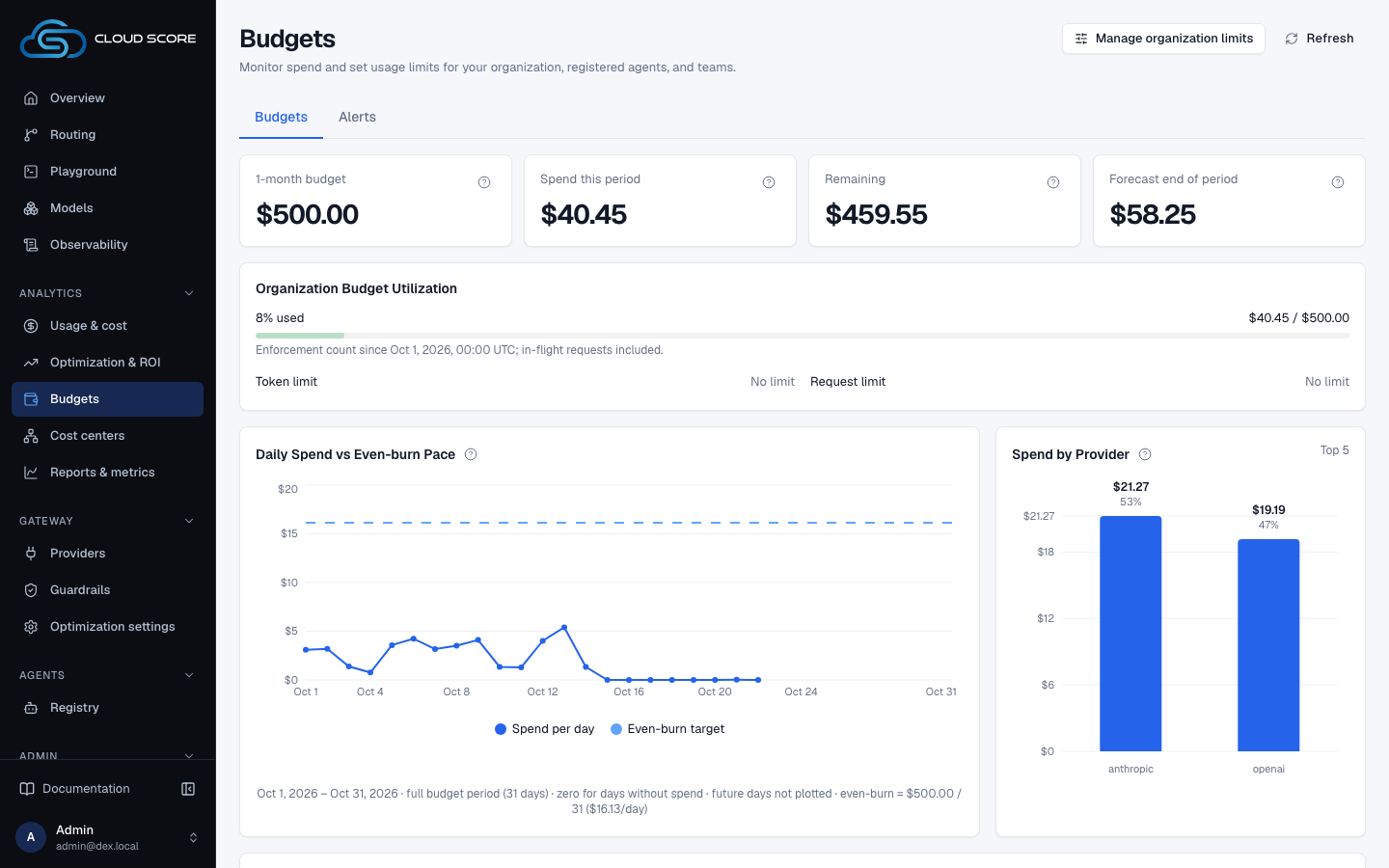
The Budgets tab keeps the editable organization meter, Organization Budget Utilization, with Manage organization limits, and the limits per scope. Above the meter, the organization tiles read the budget, Spend this period, Remaining and Forecast end of period; below it, Daily Spend vs Even-burn Pace shows how spend is pacing.
| Region | What it shows |
|---|---|
| Header row | Budgets with Budgets and Alerts tabs. The URL reads /budgets. |
Budgets | Intro copy naming the six scopes and the gate, then the basis line: Basis: model spend (list price, the figure the gate reserves against). Platform overhead — classifier and embedding calls — is reported separately on the Overview and is not counted here. |
New budget | The form: Scope (Workspace, API key, Team, Application, Agent, Environment); a second field that follows the scope; Amount (USD / month) with placeholder 100.00; Soft threshold (%) prefilled with 80; the At 100 % radios warn and block; the Add budget button. |
| Second form field | Value, disabled, placeholder whole workspace for the Workspace scope; API key select whose first option is — choose a key — and whose options read as {name} ({prefix}…); or Team tag, Application tag, Agent tag, Environment tag with placeholder exact attribution value. |
| Budgets table | Columns Scope, Amount / month, Soft at, At 100 %, This period, Enabled, and an unlabelled actions column. One row per budget; a disabled row is dimmed to 60 % opacity. |
| A budget row | Scope label with its value in mono (whole workspace, the key as {name} ({prefix}…), or the tag); the amount; {soft_pct}%; a red block or neutral warn badge with the link switch to warn or switch to block; the usage bar; the link on or off; the Delete button. |
| Usage bar | {spent} spent on the left, the utilization percentage on the right, a bar, and {reserved} in flight · since {period_start} underneath. Before any traffic: — no spend recorded this period. |
| States | Loading… while the list loads; the error message from the server in red if it fails; with no budgets at all: No budgets yet — requests are not gated. Add one above. |
What you can do
| Action | What happens | What you see | Confirmation |
|---|---|---|---|
block | Picks the hard action for the budget you are creating. | The Block requests at 100 %? dialog. After confirming, a red block badge appears next to Add budget. | asks first (Block at 100 %) |
Add budget | Creates the budget, enabled, with a blank or 0 soft threshold falling back to 80. | The button reads Saving…, the form resets, and the new row appears with — no spend recorded this period. On failure: the server message or save failed. | no confirmation |
switch to block | Changes an existing budget's hard action to block. | The badge turns red block and the link now reads switch to warn. | asks first (Block at 100 %) |
switch to warn | Changes the hard action back to warn, immediately. | The badge reads warn. | no confirmation |
on / off | Toggles the budget. The link shows the current state, so it reads on while the budget is enabled. Requests are no longer checked against a disabled budget, and it accumulates no usage. | The link flips to the other word and the row dims to 60 % once the budget is disabled. | no confirmation |
Delete | Deletes the budget and this period's recorded spend. | The Delete this budget? dialog, then the row is gone. On failure: the server message or update failed. | asks first (Delete) |
Cancel | Closes either dialog without changing anything. It has the default focus. | The dialog closes. | — |
Manage organization limits | In the page header, or beside No organization budgetin the organization tiles: opens the organization's limits. | The Organization limits sheet opens. | — |
Step-by-step
Cap the monthly spend of one team and block at the limit.
Click
BudgetsunderAnalyticsin the sidebar.In
New budget, setScopetoTeam.The second field becomes
Team tag. Typesupport: the spelling must match the team tag your requests carry exactly.Set
Amount (USD / month)to250.00and leaveSoft threshold (%)at80.Under
At 100 %, chooseblock.The
Block requests at 100 %?dialog opens and names the consequence for teamsupportand$250.00. Read it, then clickBlock at 100 %. The redblockbadge appears besideAdd budget.Click
Add budget.The row shows
Teamoversupport,$250.00,80%, theblockbadge, and— no spend recorded this perioduntil traffic arrives.
Set a warn-only budget for the whole workspace.
On
Budgets, leaveScopeonWorkspace.The second field is
Value, disabled, readingwhole workspace.Set
Amount (USD / month)to1000.00andSoft threshold (%)to90.Leave
At 100 %onwarnand clickAdd budget.No dialog:
warnis the only pre-selected action and never asks. The row showsWorkspaceoverwhole workspace,$1,000.00,90%, and thewarnbadge.Read the organization tiles at the top of the
Budgetstab.The budget tile reads
$1,000.00instead ofNo limit, withRemainingandForecast end of periodbeside it;Organization Budget Utilizationshows the share used, andDaily Spend vs Even-burn Pacedraws spend per day against the even-burn target.
Pause a budget, or remove it.
Click the link in the
Enabledcolumn of the row.It reads
onwhile the budget is enabled. Clicking it disables the budget: the row dims, the link readsoff, and requests in that scope are no longer checked against it. Click it again to resume.Click
Delete, readDelete this budget?, then clickDelete.The dialog quotes the spend that will be discarded with the budget, or
none. The button readsWorking…while the request runs.
Examples
The support team's blocking budget runs out
- What you do
Nothing new. The helpdesk keeps sending requests tagged
X-Dex-Team: supportagainst the$250.00budget from the first workflow.- What Cloud Score does
Once model spend for this month plus in-flight estimates exceed
$250.00, the pre-flight gate refuses every request attributed to that team before any provider is called. Nothing is queued or retried.- What you see
On the OpenAI-compatible endpoint, HTTP 403. On the native endpoint,
status: blockedwith the messagebudget exhausted: team support at 100.4% (model_spend). The budget row reads$251.10 spent,100.4%in red with a full red bar, and the request is ablockedrow in Observability ›Requests.
The warn-only workspace budget crosses its soft threshold
- What you do
Nothing. Traffic continues under the
$1,000.00workspace budget withSoft at90%.- What Cloud Score does
Reports the breach in the
X-Dex-Budget-Stateresponse header and serves the request. At 100 % it still serves, because the hard action iswarn.- What you see
The row reads
$912.40 spentand91.6%in amber, the bar turns amber, and$3.80 in flight · since 2026-09-01underneath. Nothing changes for your clients.
Reading the numbers
Every figure in the table is a string from the server; the page never adds money. Only the bar width is computed from the percentage.
| Label | Meaning | Unit / format | Shows — when |
|---|---|---|---|
Amount / month | The cap for one calendar month, on model spend at list price. | USD, for example $250.00 | Never; an amount is required to add a budget. |
Soft at | The utilization at which a breach is first reported while the request is still served. | whole percent, for example 80% | Never; blank or 0 is stored as 80. |
At 100 % | The hard action once spend plus in-flight estimates exceed the amount: report, or refuse. | badge warn or block | Never. |
{spent} spent | Model spend at list price recorded against this budget so far this period. | USD | — no spend recorded this period until the first request is settled. |
| Utilization | (spend + reserved) / amount. Red at 100 % or more, amber from the soft threshold up. | one-decimal percent from the server, for example 91.2% | Same as spent. |
{reserved} in flight | Pre-flight estimates reserved for requests that are still running; settled to actual spend when they finish. | USD | Same as spent. |
since {period_start} | The first day of the period the spend is counted from. | date | Same as spent. |
1-{period} budget | The enforced workspace-scope USD budget, shown at the top of the tab as the organization budget: its amount in the first organization tile, its live utilization in Organization Budget Utilization, and its even-burn line in Daily Spend vs Even-burn Pace. | USD, for example $1,000.00; Disabled: not enforced beneath it while the budget is off | No limit with No organization budget. |
Good to know
Budgets count model spend at list price, not what the provider bills.
The basis is the list price shown as AI spend on Usage & cost, not the Estimated invoice beneath it. Cached reads are counted at the full input rate, and platform overhead (classifier and embedding calls) is never counted. See Costs, savings, and estimates.
Validation
Add budgetstays disabled untilAmount (USD / month)has a value and, for every scope exceptWorkspace, the second field does too.Soft threshold (%)accepts 1 to 100; blank or 0 becomes 80.- A tag must match the attribution value exactly. The
API keyscope picks the key from a list, so its id is never typed. - Budgets are monthly only; there is no other period.
Block always asks, and Delete discards spend.
Choosing block, on the form or with switch to block, always opens Block requests at 100 %?; warn is the only pre-selected action. Delete removes the recorded spend for the period along with the budget. Both dialogs focus Cancel by default, show Working… on the confirm button while pending, and close on Escape or a click outside.
What a blocked client sees
The OpenAI-compatible endpoint answers HTTP 403. The native endpoint answers with status: blocked and the error message budget exhausted: <scope> <scope_value> at <utilization_pct>% (model_spend). A warn budget reports the same breach in the X-Dex-Budget-State header instead, whose values are ok, soft, hard, error, unavailable, or none. Sandbox keys cannot skip the gate. If the budget check itself fails, what happens depends on the action: a block budget fails closed — the request is refused with HTTP 503, Retry-After: 1 and the error type budget_unavailable (native's envelope contract reports status: failed with the same type), it is never sent to a provider and never billed, and retrying it is safe. With only warn budgets the gate fails open and the request is served, with X-Dex-Budget-State: error.
Workspace budgets and per-key budgets
The Monthly budget (USD, optional) field of a key, set on Admin › API keys, feeds the budget service as the key-scope budget for that key. The organization tiles, Organization Budget Utilization and Daily Spend vs Even-burn Pace follow the organization (workspace) budget only; without one the tiles read No organization budget. Create a Workspace budget here to enforce one. An operator can also run the older key-only gate instead of the pre-flight gate; its message reads monthly budget exhausted: spent $<spend> of $<budget>.
Where else the budget shows up
The Budget column and drawer card on Usage & costfollow the budget's own period and ignore the page range, as the organization blocks on this tab do. On the Alerts tab, a Budget utilization rule watches the current month of one budget and needs the budget to be enabled: a disabled budget accumulates no usage, so such a rule goes quiet.
Related
- AlertsBe notified by signed webhook or email when the hourly anomaly detector flags a group, or when a threshold rule on spend, requests, budget utilization, error rate, or p95 latency fires.
- Set budgets and get alertedTag spend to a team, cap it with a warning workspace budget and a blocking team budget, then wire a signed webhook and two threshold rules so you hear about it before the block lands.
- Attribute cost to teams and appsTag every request with team, application, agent, environment, and end_user so Usage & cost can break spend down by them as reported tags, budgets can cap a team or an app, and alert rules can watch them.
- OpenAI-compatible endpointPoint the official OpenAI SDK at the Cloud Score gateway: POST /v1/chat/completions routes when model is auto, pins when it is a model key, accepts dex_strategy, and answers with a dex_routing block, HTTP 403 on a block, 409 when no tool-capable model is available, and 502 on any other failure.
- Send requests through Cloud ScoreCall POST /v1/requests with a gateway key: the request fields, the response envelope, status versus HTTP code, error types, SSE streaming, and the two GET endpoints.
- TroubleshootingThe messages Cloud Score puts in front of you, grouped by the page that shows them, with what caused each one and what to do next.