Set budgets and get alerted
Tag spend to a team, cap it with a warning workspace budget and a blocking team budget, then wire a signed webhook and two threshold rules so you hear about it before the block lands.
On this page
The path
A budget caps monthly model spend at one scope and either warns or blocks at 100 %. A threshold rule watches the same numbers every 5 minutes and delivers to a channel. This guide sets up a workspace budget that warns, a team budget that blocks, one signed webhook, and two rules: one on budget utilization, one on spend.
Budgets count model spend at list price only. Platform overhead (classifier and embedding calls) is subtracted from Saved (net) on Optimizations and never counted against a budget. See Costs, savings, and estimates for what list price means.
Make spend attributable
A team, application, agent, or environment budget only gates requests that carry that exact tag. Setting defaults on the API key makes every untagged request on it attributable, including its history.
Click
API keysunderAdminin the sidebar.The key table opens. The
Attributioncolumn shows—for a key with no defaults.On the key's row, open the
⋯menu and clickEdit tags.The
Attribution — {key name}dialog opens on theCost attribution defaults (optional)block. Its helper readsApplied to requests on this key that carry no metadata or X-Dex-* tag of their own.Fill
Team,Application, andEnvironment.For example
support,helpdesk,production. Values are trimmed and capped at 120 characters. There is no field for agent or end user here.Click
Save.The row now shows chips
team=support,application=helpdesk,environment=production. On failure the dialog shows the server message orsave failed.
| Source of a tag | Precedence | Notes |
|---|---|---|
| Request body metadata | Highest | metadata.team, metadata.application, metadata.agent, metadata.environment, metadata.end_user; the OpenAI-compatible user field maps to end_user. |
| Request headers | Middle | X-Dex-Team, X-Dex-Application, X-Dex-Agent, X-Dex-Environment, X-Dex-End-User. |
Key defaults (Edit tags) | Lowest | Team, application, environment. Untagged history inherits the key's current defaults; end_user never inherits. |
Usage & cost shows what has no team.
On Usage & cost, Breakdown by Team keeps an Unassigned (no team) row for requests whose API key had no assigned team, and the reported-tag dimensions show Not reported for requests that carried no tag. See Attribution for the request-side tags.
Set the budgets
Every request is admitted against all the budgets that apply to it before a provider is called. The workspace budget below warns so nothing stops; the team budget blocks so one team cannot exhaust the month.
First, a workspace budget that warns.
Click
BudgetsunderAnalyticsin the sidebar.With no budgets the table reads
No budgets yet — requests are not gated. Add one above.The basis line under the heading readsBasis: model spend (list price, the figure the gate reserves against). Platform overhead — classifier and embedding calls — is reported separately on the Overview and is not counted here.In
New budget, setScopetoWorkspace.The
Valuefield is disabled and readswhole workspace.Enter
Amount (USD / month), for example1000.00.Leave
Soft threshold (%)at80andAt 100 %onwarn.Add budgetstays disabled until an amount is entered.Click
Add budget.The button reads
Saving…, the form resets, and the row showsWorkspace/whole workspace,$1,000.00,80%, badgewarn, and— no spend recorded this perioduntil traffic arrives.
Then, a team budget that blocks.
Set
ScopetoTeamandTeam tagtosupport.The field's placeholder reads
exact attribution value: it must match the team tag character for character.Enter
250.00as the amount and chooseblockunderAt 100 %.The
Block requests at 100 %?dialog opens. Read the consequence, then clickBlock at 100 %. A redblockbadge appears next toAdd budget.Click
Add budget.The row shows
Team/support,$250.00,80%, badgeblock, and aswitch to warnlink.
What the block dialog says.
Requests attributed to team "support" will be refused — HTTP 403 on the OpenAI-compatible endpoint, status: blocked on the native one — as soon as this month's model spend plus in-flight estimates exceed $250.00. Warn reports the same breach in X-Dex-Budget-State and serves the request. Clients see the block immediately; nothing is queued or retried.
| Column | What it shows |
|---|---|
Scope | Scope label plus the value: whole workspace, a key as name and prefix, or the tag. |
Amount / month | The cap, as a money string. |
Soft at | The percentage at which the breach is reported while the request is still served, for example 80%. |
At 100 % | Badge block or warn, with switch to warn / switch to block. Switching to block asks first. |
This period | Usage bar: spent, utilization, in flight, and the period start; or — no spend recorded this period. |
Enabled | on / off. A disabled row dims to 60 %. |
Before you delete or disable a budget.
Delete asks Delete this budget?and discards this period's recorded spend with the row. A budget switched off accumulates no usage, so any Budget utilization rule on it goes quiet. Budgets are monthly only. A blank Soft threshold (%) falls back to 80.
Add an alert channel
A channel is where firings go: a signed webhook or an email address. The rules in the next station deliver to it; without one they only record.
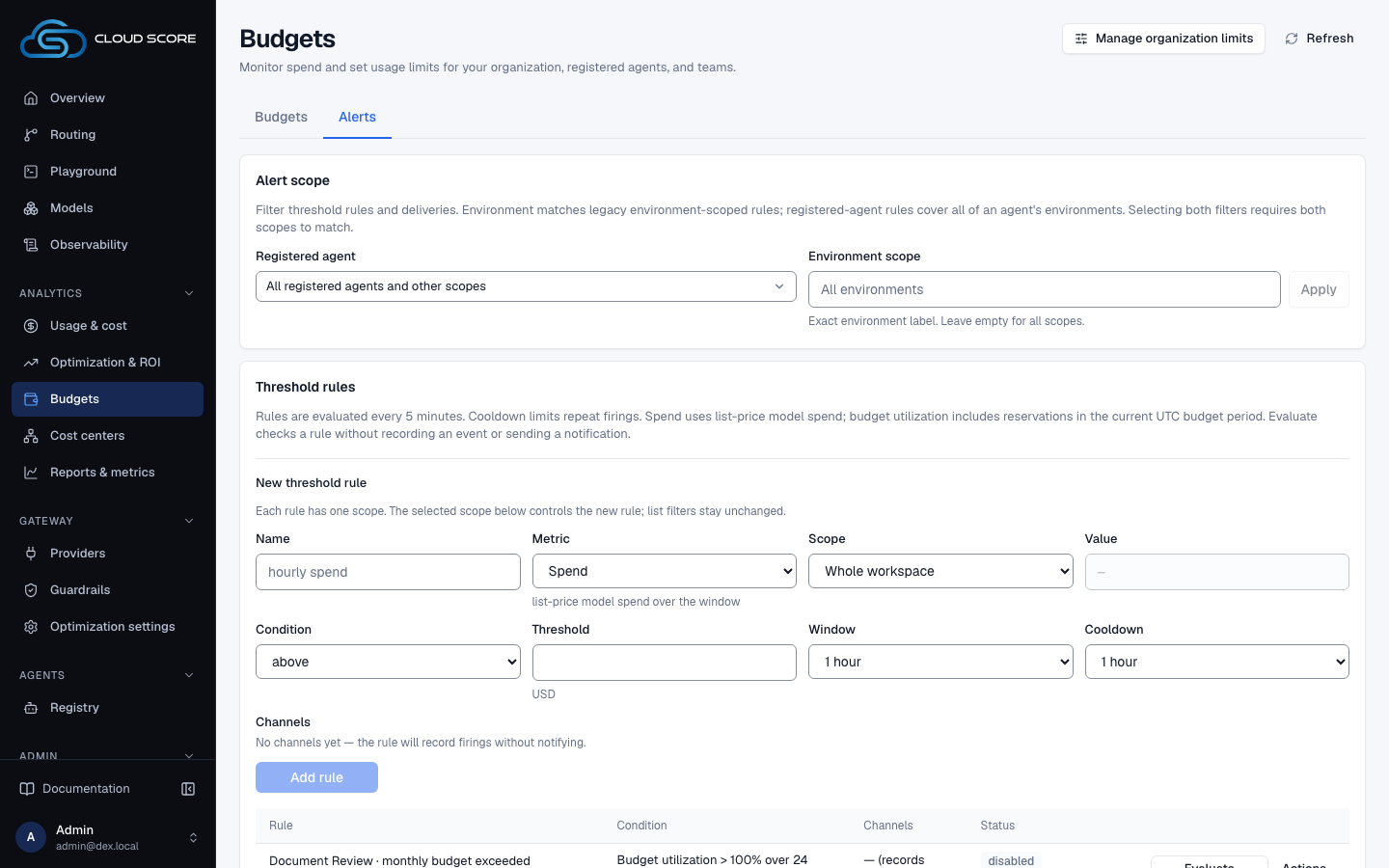
Click the
Alertstab.With no channels the
Alert channelscard readsNo channels — anomalies are recorded but nothing is notified.Set
KindtoWebhook (signed POST)andNametoops pager.Paste your public HTTPS endpoint into
URL. LeaveSecret (webhook, optional — generated if blank)empty, or type at least 16 characters.Add channelstays disabled until name, target, and a valid secret are in place.Click
Add channel.A panel reads
Signing secret — shown once. Store it with the receiver now; it cannot be read back.ClickCopy, store the value with your receiver, then clickDone.Click
Teston the channel row.The button reads
Sending…, then a line underStatusreadstest okwith the HTTP code and latency, ortest failedwith the error. The row's badge isenabled.
| Header on every webhook delivery | Value |
|---|---|
X-Dex-Signature | sha256=HMAC(secret, body), computed with the signing secret. |
X-Dex-Timestamp | When the delivery was signed. |
X-Dex-Event | cost.rule for a threshold rule firing, cost.anomaly for the hourly anomaly detector. |
Targets must be public.
Loopback, private, and cloud-metadata addresses are refused when saved and again on every delivery. A channel that keeps failing is disabled automatically; the row then shows {n} consecutive failures. Rotate secret breaks the receiver until you update it; the new value is shown once.
For email, choose Email (SMTP) and fill Address; the secret field is disabled. SMTP itself is not configured on this page.
Add threshold rules
Rules are evaluated every 5 minutes over a sliding window, fire at most once per window, then wait out their cooldown. The first rule warns before the team block lands; the second catches a spend spike anywhere in the workspace.
Rule one: fire when the support budget passes 90 % of its month.
In
Threshold rules, setNametosupport budget 90andMetrictoBudget utilization.The hint reads
spend + in-flight reservations against the budget for the current month.Set
Budgettoteam: support · $250.00/month.Only enabled budgets are listed. With none, the select reads
no enabled budgets — create one on the Budgets tab.Set
Conditiontoaboveand the threshold to90.The input carries a
%suffix. SetRe-check windowto6 hours; its hint readsutilization is over the month; the window only spaces repeat firings. SetCooldownto24 hours.Under
Channels, tickops pager (webhook)and clickAdd rule.Name, threshold, and value reset; metric, scope, window, cooldown, and channels are kept for the next rule.
Rule two: fire when workspace spend passes $25 in any hour.
Set
Nametohourly spendandMetrictoSpend.The hint reads
list-price model spend over the window: the same figure the budget gate uses.Set
Scopetowhole workspace.Any other scope needs a
Value, and it must match one exact value.Set
Conditiontoabove25.00,Windowto1 hour,Cooldownto1 hour.The threshold input carries a
$prefix for this metric.Tick
ops pager (webhook)and clickAdd rule.The row's
Conditioncell readsSpend > $25.00 over 1 hourwithcooldown 1 hourunder it.Click
Teston the row.The button reads
Checking…, then the status line readswould fireorwould not firefollowed by the observed value and the window. A test never fires and records nothing.
| Setting | Meaning | Default |
|---|---|---|
Window | The sliding period the metric is measured over. A rule fires at most once per window. | 1 hour |
Re-check window | Shown instead of Window for Budget utilization. Utilization is always over the month; this only spaces repeat firings. | 1 hour |
Cooldown | The minimum gap after a firing before the rule can fire again. | 1 hour |
Validation and quiet rules.
The threshold must satisfy threshold must be a non-negative number (up to 6 decimals). A rule with no channels shows No channels yet — the rule will record firings without notifying. and its row reads — (records only). An observed value of — means no data in the window, whereas spend over an empty window is 0, so a Spend rule with below acts as a silence detector.
What a blocked request looks like
Once the support team's month spend plus in-flight estimates exceed $250.00, its requests are refused before any provider is called. Nothing is queued or retried.
| Where | What a blocked request looks like |
|---|---|
| OpenAI-compatible endpoint | HTTP 403. |
| Native endpoint | status: blocked in the response. |
Any endpoint, budget on warn | The request is served; the breach is reported in the X-Dex-Budget-State header. |
Playground route board | The Policy station reads blocked and Record ends on blocked. |
Observability › Requests | The row's Gateway status is blocked. |
Observability › Gateway health | The Blocked series of Request outcomes includes it for the selected period; the Requests evidence sheet gives the exact counts. |
Usage & cost › Breakdown by | Set the Status chip (under More) to blocked: each team's row counts its refused requests, and View requests → in its drawer lists them. |
Admin › Developer | Documents the status as A routing policy or budget blocked the request before execution. |
The support team hits its cap on the 19th
- What you do
Nothing yet. The helpdesk sends its usual requests on the
helpdesk-prodkey, all taggedteam=support.- What Cloud Score does
Reserves each request's estimate against the
Team/supportbudget. At 90 % thesupport budget 90rule fires and posts toops pager. When spend plus reservations exceed $250.00, the next request is refused.- What you see
A
sentrow underDeliveries, ablockedrow inObservability, and the budget row'sThis periodbar at or above 100 %. Clickingswitch to warnlets traffic through again immediately.
A key can carry its own cap too.
Monthly budget (USD, optional) in Create API keyis a separate per-key cap, shown in the key list's Budgetcolumn. With budget pre-flight enabled it feeds the budget service as the key-scope budget; otherwise a legacy gate blocks requests once the calendar month's spend has reached the cap, with the message monthly budget exhausted: spent $X of $Y. Sandbox keys never skip the budget gate.
Watch the forecast
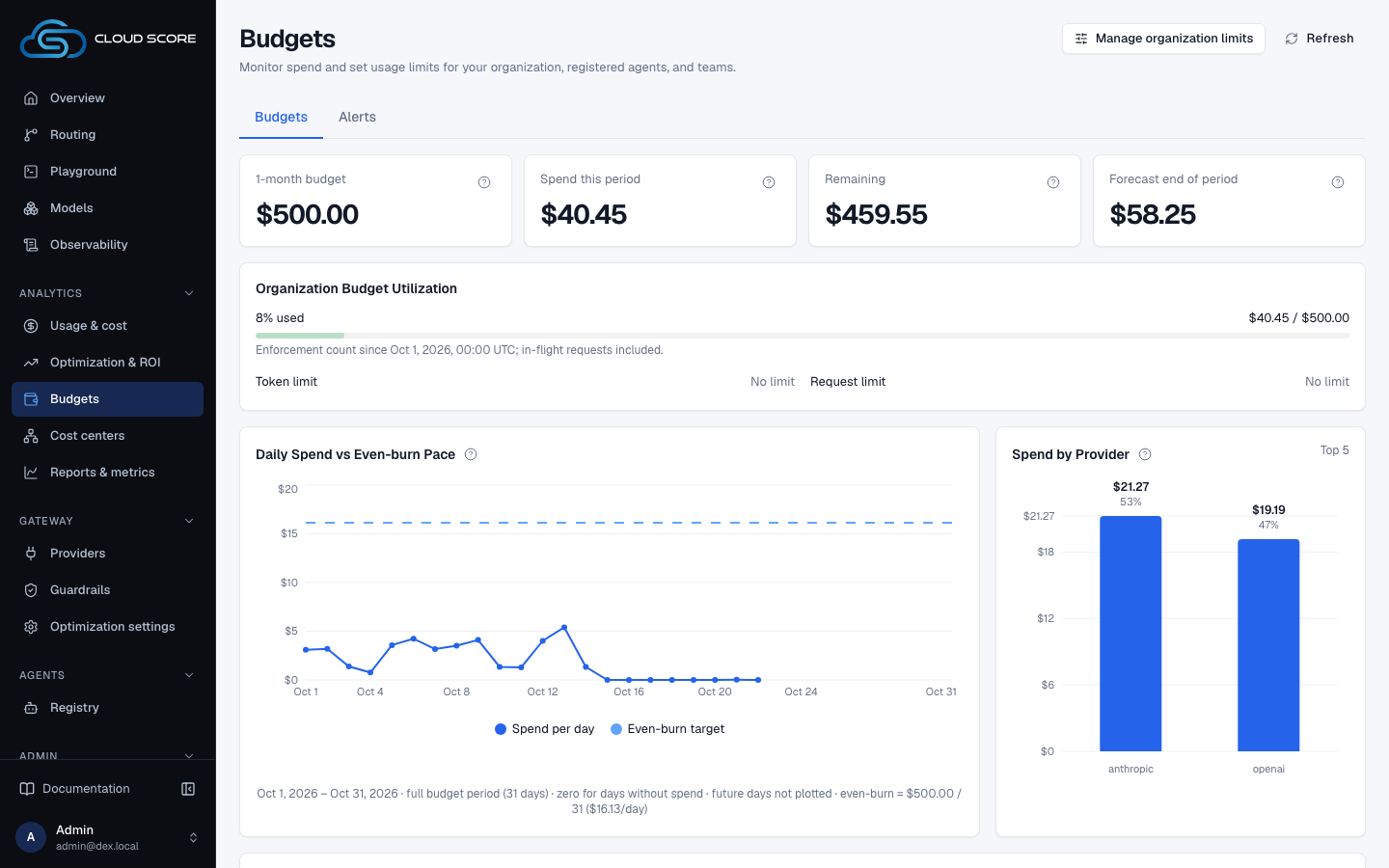
The Budgets page projects where the period lands against the organization budget, so you can raise a cap before a block rather than after.
Open
Budgetsand read the organization tiles.They read the budget,
Spend this period,Remaining(red and negative when over) andForecast end of period, which readsAbove the budgetwhen the projection passes the limit. Until enough of the period has passed it reads—with the reason, for exampleAvailable after 2 days of the period, or a quarter of it if shorter. Without an organization budget the budget tile readsNo limitandNo organization budget.Read
Organization Budget Utilization.The meter reads the share used, for example
62% used, with the spend and any in-flight reservations against the limit, then the token and request limits.Read
Daily Spend vs Even-burn Pace.The chart draws
Spend per dayagainst theEven-burn targetfor each UTC day of the budget's current period. Without an organization budget it readsSet an organization budget to see the pace.To raise the cap, click
Manage organization limits.
The organization tiles, Organization Budget Utilization and Daily Spend vs Even-burn Pacefollow the budget's own period; the tab has no range control. The forecast is linear: spend so far divided by the days elapsed, times the days in the period. They read the organization (workspace) budget only.
What to check afterwards
| Where | What to look for |
|---|---|
Budgets › Alerts › Deliveries | Set Status to sent, pending, failed, or dead. Each row names the Channel, the Source (a rule with its name, metric, and threshold, or an anomaly), Attempts, Next / sent, and Last error. Empty reads No deliveries. |
Threshold rules › Events | Expands a rule's firing history: Fired, Observed, Threshold, Window; or Never fired. The status cell also reads last fired with the time. |
Alert channels row | Badge enabled, or disabled with after {n} consecutive failures and when. Click Enable after fixing the receiver. |
Budgets › This period | Spent, utilization, and in-flight reservations per budget, with the period start. |
Observability | Set the Status chip to blocked to list refused requests (/logs). Open a row to see the route board's Policy station read blocked. |
Usage & cost › Breakdown by | Under More, set the Status chip to blocked and keep the dimension on Team to see who was refused. |
Recorded anomalies | The hourly detector's rows for the last 30 days, one per group per day; empty reads None recorded — the hourly detector found nothing above threshold. |
Deliveries retry with backoff until dead. A failed row shows its next attempt under Next / sent; fix the receiver and wait, or Test the channel to confirm it answers. Deleting a rule removes its events and their deliveries; deleting a channel removes its deliveries but keeps anomalies.
Related
- Investigate a failed, blocked, or expensive requestTrace one request from its row in Observability to the decision card, its savings receipt and a Playground reproduction, then read what its error message means.
- Statuses and badgesEvery status word and badge Cloud Score shows, what each one means, and the page it appears on.
- TroubleshootingThe messages Cloud Score puts in front of you, grouped by the page that shows them, with what caused each one and what to do next.
- API keysIssue the platform keys that authenticate every gateway request, and set what each key carries: a monthly budget, body storage, a security profile, sandbox rights, and cost attribution defaults.
- Usage & costWhere tokens and money go, by team, user, agent, model, provider, key and prompt size: five scope tiles, usage over time, token composition, share of requests against share of spend, and one breakdown table with a drawer per row.
- BudgetsCap monthly model spend for the workspace, an API key, a team, an application, an agent, or an environment, and choose whether each budget warns or blocks at 100 %.