Alerts
Be notified by signed webhook or email when the hourly anomaly detector flags a group, or when a threshold rule on spend, requests, budget utilization, error rate, or p95 latency fires.
On this page
What you see
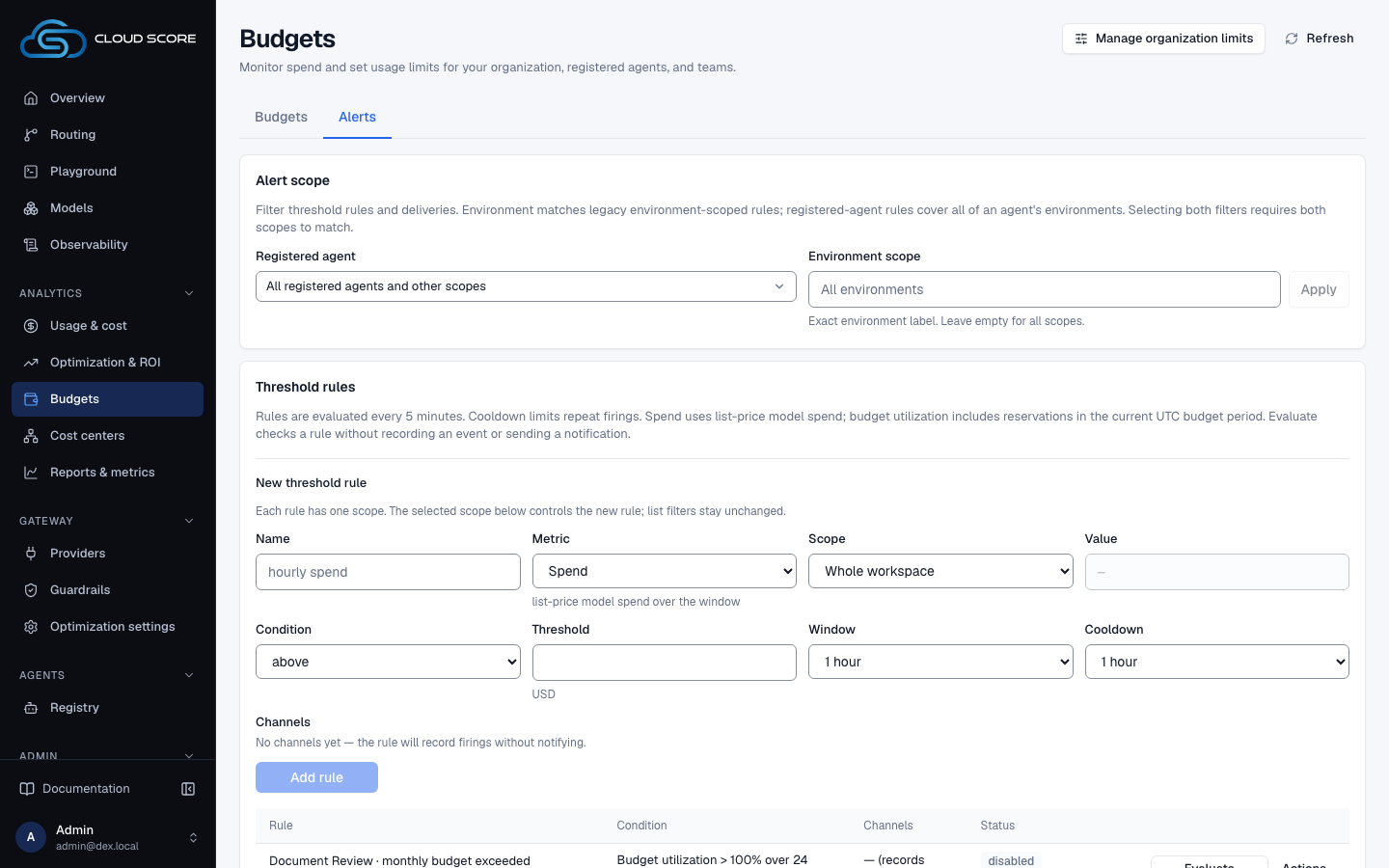
The Alerts tab of Budgets is four cards, top to bottom. It has no range control and no filter bar: everything on it is workspace-wide.
| Region | What it shows |
|---|---|
| Header row | Budgets with Budgets and Alerts tabs. The URL reads /budgets?tab=alerts. |
Alert channels | Intro copy: anomalies are checked hourly on the latest closed UTC day and delivered once per channel with retries; webhooks are signed with X-Dex-Signature: sha256=HMAC(secret, body) plus X-Dex-Timestamp and X-Dex-Event: cost.anomaly; targets must be public. Then the form (Kind, Name, URL or Address, Secret) and a table Name | Kind | Target | Status | actions. The target is masked by the server. Empty: No channels — anomalies are recorded but nothing is notified. |
| Secret panel | Appears after a webhook is created or its secret rotated: Signing secret — shown once. Store it with the receiver now; it cannot be read back., the secret in a code box, Copy and Done. |
Threshold rules | Intro copy: evaluated every 5 minutes over a sliding window, fires at most once per window then waits out its cooldown, delivered as X-Dex-Event: cost.rule. Then the form (Name, Metric, Budget or Scope and Value, Condition, Window, Cooldown, Channels) and a table Rule | Condition | Channels | Status | actions. Empty: No rules — only the anomaly detector will notify. |
Recorded anomalies | Captioned (last 30 days, one per group per day). Table Day | Group | Current | Baseline / day | Change | z | Why. Empty: None recorded — the hourly detector found nothing above threshold. |
Deliveries | A Status select (all, pending, sent, failed, dead) and a table Created | Channel | Source | Status | Attempts | Next / sent | Last error. Empty: No deliveries. |
| Metric option | Unit | Hint under the select | Second field |
|---|---|---|---|
Spend | $ | list-price model spend over the window | Scope and Value |
Requests | count | requests over the window | Scope and Value |
Budget utilization | % | spend + in-flight reservations against the budget for the current month | Budget, and Re-check window instead of Window |
Error rate | % | failed requests as a share of all requests over the window | Scope and Value |
Latency p95 | ms | 95th-percentile request latency over the window | Scope and Value |
| Rule form field | Options |
|---|---|
Scope | whole workspace, provider, model, api key, team, application, agent, environment, end user, task type, endpoint |
Value | Disabled until a scope is chosen. Placeholder API key id for api key, model key for model, exact value otherwise. |
Budget | Enabled budgets only: workspace budget · $X/month or {scope}: {value} · $X/month. With none: no enabled budgets — create one on the Budgets tab. |
Condition | above or below, then the threshold with a $ prefix for Spend or a % / ms suffix. |
Window | 5 minutes, 15 minutes, 1 hour (default), 6 hours, 24 hours, 7 days, 30 days |
Cooldown | none, 5 minutes, 1 hour (default), 6 hours, 24 hours |
Channels | One checkbox per channel, {name} ({kind}[, disabled]). With none: No channels yet — the rule will record firings without notifying. |
What you can do
| Action | What happens | What you see | Confirmation |
|---|---|---|---|
Add channel | Creates a webhook or email channel. | Button reads Saving…; the form resets; a webhook shows the secret panel. On error, the server message or save failed. | no confirmation |
Copy / Done | Copies the signing secret; closes the panel. | Copied for 1.5 seconds. After Done the secret is gone for good. | no confirmation |
Test (channel) | Sends a test delivery to the target now. | Button reads Sending…; then test ok or test failed with · HTTP {code}, the latency, and any error under Status. | no confirmation |
Disable / Enable (channel) | Toggles the channel. | Badge enabled or disabled; rules and deliveries refetch. | no confirmation |
Rotate secret | Generates a new signing secret (webhook only). | The secret panel again, with the new value shown once. | asks first: Rotate the signing secret? / Rotate |
Delete (channel) | Deletes the channel and its pending and past deliveries. Anomalies stay recorded. | The row is removed. | asks first: Delete this channel? / Delete |
Add rule | Creates a threshold rule, enabled. | Button reads Saving…; name, threshold, and value reset while metric, scope, window, cooldown, and channels stay. On error, the server message or save failed. | no confirmation |
Test (rule) | Evaluates the rule now. Fires nothing, records nothing. | Button reads Checking…; then would fire or would not fire, the observed value, the threshold, and the window bounds. | no confirmation |
Disable / Enable (rule) | Toggles the rule. | Badge enabled or disabled. | no confirmation |
Events / Hide events | Expands the rule's firing history. | The events sub-table, or Never fired. | no confirmation |
Delete (rule) | Deletes the rule, its recorded firings, and their deliveries. Channels stay. | The row is removed. | asks first: Delete this rule? / Delete |
Status select (Deliveries) | Filters the outbox by delivery status. | The table refetches; with no match, No deliveries with status {status}. | no confirmation |
Every confirm dialog opens with focus on Cancel, reads Working… on its confirm button while pending, and closes on Escape or a click outside it.
Step-by-step
Get paged on a webhook when hourly spend exceeds $25.
Click
BudgetsunderAnalytics, then chooseAlerts.In
Alert channels, setKindtoWebhook (signed POST).Enter
Nameops pagerand your public HTTPS endpoint inURL. LeaveSecretblank: its caption reads(webhook, optional — generated if blank).Click
Add channel.The secret panel appears. Click
Copy, store the value with your receiver, then clickDone. It cannot be read back afterwards.Click
Teston the new row.Wait for a line such as
test ok · HTTP 200 · 123ms. Atest failedline names the HTTP code or error; fix the receiver and test again.In
Threshold rules, fill the form.Namehourly spend;MetricSpend;Scopewhole workspace;Conditionaboveand25.00;Window1 hour;Cooldown1 hour; underChannelstickops pager (webhook).Click
Add rule.The row reads
hourly spendwithworkspace, conditionSpend > $25.00 over 1 hourandcooldown 1 hour, channelops pager, badgeenabled, andlast fired —.Click
Teston the rule.Read
would fireorwould not fireand the observed value. Later, checkEventson the row and theDeliveriescard.
Email the team before a budget is exhausted.
Create the budget on Budgets and leave it
on.warnat 100 % is fine; the rule watches utilization, not the hard action. Only enabled budgets appear in the rule form.On
Alerts, add an email channel.KindEmail (SMTP), aName, and the address inAddress(placeholderops@example.com).Secretis disabled for email. ClickAdd channel; there is no secret to store.In
Threshold rules, setMetrictoBudget utilization.The
Budgetselect replaces scope and value. Pick the budget, for exampleteam: support · $250.00/month.Set
Conditiontoaboveand90.Set
Re-check windowto6 hoursandCooldownto24 hours. The hint readsutilization is over the month; the window only spaces repeat firings. Tick the email channel.Click
Add rule, thenTest.The condition reads
Budget utilization > 90% over 6 hours. The observed value is the budget's current utilization; with no matching budget usage it reads—(no data in window).
Find out why a channel went quiet.
Read the
Statuscell in theAlert channelstable.A channel that turned itself off shows
disabledandafter {n} consecutive failures · {when}. One still enabled but failing shows an amber{n} consecutive failures.In
Deliveries, setStatustofailed, thendead.Last errornames the cause,Attemptshow many tries were made, andNext / sentwhen a failed row retries. Dead rows have used up their retries.Fix the receiver, click
Teston the channel, thenEnableit if it was disabled.Confirm
test ok; the badge returns toenabled.
Examples
An agent's spend tripled overnight
- What you do
Open
CostthenAlertsafter your pager fired.- What Cloud Score does
The hourly detector compared the agent's last 24 hours with its 7-day baseline, recorded one anomaly row for today, and queued a signed delivery with
X-Dex-Event: cost.anomalyto each enabled channel.- What you see
In
Recorded anomalies:Groupagent: triage,Current$48.20,Baseline / day$15.40,Change+212.0%in red,z3.1, and an explanation underWhy. InDeliveries:ops pager (webhook), sourceanomaly · agent: triage +212.0%, statussent,Attempts1.
Testing a spend rule during a quiet hour
- What you do
Click
Teston the rulehourly spend(Spend > $25.00 over 1 hour).- What Cloud Score does
Sums list-price model spend over the last hour for the whole workspace and compares it with the threshold. Nothing fires and nothing is recorded.
- What you see
Under
Status:would not fire· observed $4.12 vs > $25.00followed by the window's start and end times.Eventsstill showsNever fired.
Reading the numbers
| Label | Meaning | Unit / format | Shows — when |
|---|---|---|---|
Condition | The rule as it will be evaluated: metric, above (>) or below (<), threshold in the metric's unit, window. | Spend > $25.00 over 1 hour; thresholds render as $25.00, 80%, 2000ms, or 1000 | Threshold — when the rule has none stored. |
last fired | When the rule last recorded a firing. | Short date-time | — when the rule has never fired. |
observed | The metric's value right now over the window, produced by Test. | The metric's unit | — plus (no data in window) when there is nothing to measure: a rate over no requests, or no matching budget. Spend and Requests over an empty window are 0, not absent. |
Fired | Observed | Threshold | Window | One row per recorded firing: when, the value seen, the threshold at the time, and the window. | Date-time, metric unit, metric unit, window label | Never fired. replaces the table when there are no rows. |
{n} consecutive failures | How many deliveries to this channel have failed in a row. A channel disables itself after enough of them. | Count | Hidden while the count is 0. |
Current | Baseline / day | Change | The group's spend over the last 24 hours when the detector ran; its mean daily spend over the prior 7 days; the first against the second. | USD; USD per day; signed percent in red, for example +212.0% | Never on a recorded row. |
z | How many standard deviations the current value sits from the baseline. | Number | — when the baseline is flat, so no z-score exists. |
Why | The detector's explanation of the anomaly. | Text | — when the detector recorded no explanation. |
Next / sent | When a sent delivery went out, or when a pending or failed one is tried next. | Short date-time | — when the delivery is dead or no time is recorded. |
Last error | The error from the most recent failed attempt. | Text | — when no attempt has failed. |
Good to know
Webhook targets must be public.
Loopback, private, and cloud-metadata addresses are refused when a channel is saved and again on every delivery. Targets are stored masked; the table never shows the full URL or address.
The signing secret is shown once.
Leave Secret blank to have one generated, or enter at least 16 characters (placeholder at least 16 characters). Add channel stays disabled until the name, the target, and a blank or valid secret are in place. Rotate secret signs every delivery from then on with the new value, so the receiver rejects deliveries until you update it.
A failing channel switches itself off.
After consecutive failed deliveries the badge becomes disabled with after {n} consecutive failures · {when}. Click Enable once the receiver works again. A rule that lists a disabled channel shows the name with (disabled); a deleted one shows (deleted).
Rule validation.
The threshold must match threshold must be a non-negative number (up to 6 decimals). Add rule stays disabled until the name, a valid threshold, and a complete scope are set; a scoped rule needs a Value. Metric, dimension, and window vocabularies are closed on the server, so anything else is rejected.
Budget utilization rules need an enabled budget.
Disabled budgets accumulate no usage, so a rule on one goes quiet. Utilization is measured over the current month; the Re-check window only spaces repeat firings. Rules with no channel show — (records only) and still record firings under Events.
A spend rule with below is a silence detector.
Spend and Requests over an empty window are 0, so Spend below a small threshold fires when traffic stops. Error rate and Latency p95 over no requests observe — instead.
How often things run.
Rules are evaluated every 5 minutes, fire at most once per window, then wait out the cooldown. Test on a rule never fires or records. Anomaly detection runs hourly per workspace and stores one row per group per UTC day for 30 days; it uses the same rule as the Anomalies card on the Overview: a group is flagged when its last 24 hours are at least $0.01, at least 30 % above the 7-day daily mean, and at least 2 standard deviations away (or, with a flat baseline, more than 1.5 times the mean). Brand-new spenders are not flagged.
Deliveries retry, then die.
Each notification is delivered once per channel with retries and backoff until it is sent or dead. failed rows show their next attempt under Next / sent. Email delivery needs an SMTP-deliverable address; SMTP itself is not configured on this page.
Deletes remove history.
Deleting a rule removes its firings and their deliveries. Deleting a channel removes its pending and past deliveries; recorded anomalies stay. Both ask first.
Related
- Set budgets and get alertedTag spend to a team, cap it with a warning workspace budget and a blocking team budget, then wire a signed webhook and two threshold rules so you hear about it before the block lands.
- Statuses and badgesEvery status word and badge Cloud Score shows, what each one means, and the page it appears on.
- TroubleshootingThe messages Cloud Score puts in front of you, grouped by the page that shows them, with what caused each one and what to do next.
- Attribute cost to teams and appsTag every request with team, application, agent, environment, and end_user so Usage & cost can break spend down by them as reported tags, budgets can cap a team or an app, and alert rules can watch them.
- Costs, savings, and estimatesWhat AI spend, the estimated invoice, Cloud Score overhead, and the pre-flight estimate each measure, and how one savings ledger reads the same on every page.
- Usage & costWhere tokens and money go, by team, user, agent, model, provider, key and prompt size: five scope tiles, usage over time, token composition, share of requests against share of spend, and one breakdown table with a drawer per row.