Response cache
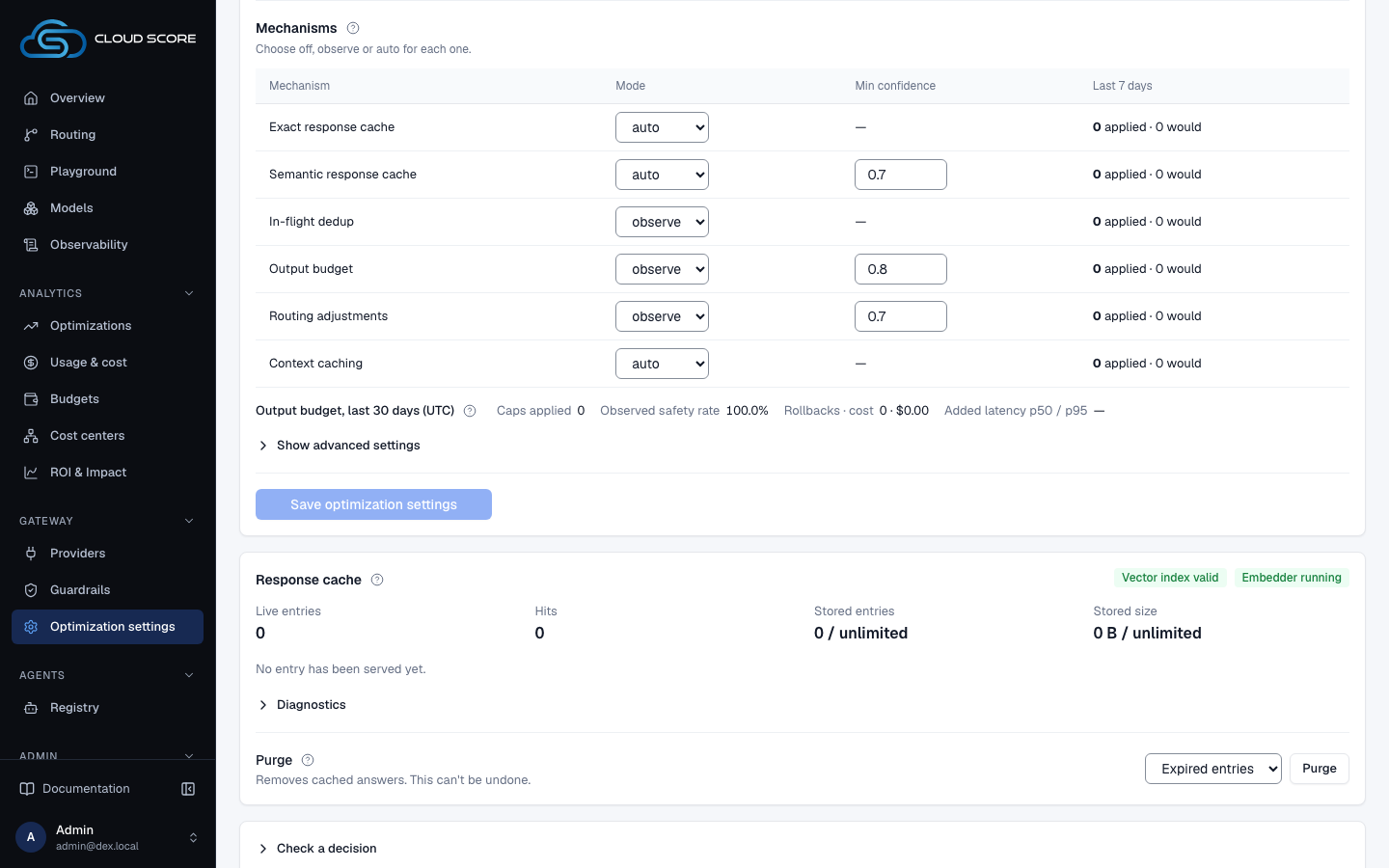
The Response cache section on the Settings tab of Optimization settings: how many answers the response cache holds, whether semantic lookups can use the vector index and the embedder, which entries are earning hits, and how to purge by scope.
On this page
What you see
The Response cache section, below the settings card on the Settings tab, shows what the response cache holds right now. Every figure is a server count over the cache store as it stands; the section has no range control, so nothing in it is filtered by a date range. How entries get written and served is explained in Caching and deduplication.
| Region | What it shows |
|---|---|
| Where it sits | Optimization settings has two tabs, Settings · Routing signals. This section sits on Settings, between the settings card and Check a decision; /optimization/settings?tab=cache opens Settings scrolled to it. No range control and no filter bar. |
| Header | The title Response cache with its help, then two badges: Vector index valid, Vector index missing or Vector index invalid, and Embedder running or Embedder stopped. Hover either for the cause; the running badge shows the embed queue. |
| Four figures | Live entries; Hits, a reporting counter, never a money figure; Stored entries as occupancy against the cap, in the form {usage.entries} / {max_entries} or {usage.entries} / unlimited; and Stored size in the same shape with byte sizes on both halves. The help beside the title says a cap of 0 (cache.max_entries, cache.max_bytes) means unlimited; otherwise the eviction job enforces it as an LRU cap. |
Top entries by hits | The table under the figures: the live entries caching is actually earning on, with the columns Prompt | Model | Hits | Size | Semantic | Last hit | Expires. The prompt is truncated; hover it for the full preview. Semantic is embedded or exact only. With no entries the table gives way to No entry has been served yet. |
Diagnostics | Collapsed until opened. Live entries as {embedded} embedded · {pending_embedding} pending; Embeddings, the embedder's provider and model such as openai · text-embedding-3-small, Semantic matching unavailable: {reason}, or — when the settings did not report one; Embed queue ({queued} / {maxsize} or stopped); Embedded inline; Failed · dropped; pgvector with the extension version; and Key epoch with an integer. Two notes follow: Iterative scan (strict order) is used on pgvector ≥ 0.8.0; below that only ef_search applies. An invalid index is otherwise invisible — lookups still succeed, just slowly. and Dropped or failed jobs are picked up by the 5-minute backfill; this queue is fast, not the source of truth. |
Purge | One row: the label Purge with its help and the hint Removes cached answers. This can't be undone. On the right, the scope select with Expired entries (pre-selected), One API key, One model and Everything, always last; a key or model select that appears only for those two scopes; and the Purge button. The help reads Removes entries from the store. Clients on affected keys will get fresh model answers until the store refills. Nothing here is reversible. The result line sits under the row. |
| Confirm dialog | Opens from Purge. Title Purge cache entries? or, for everything, Purge every cache entry?. The body names the scope in bold and quotes the live entry count, the stored count, and the stored bytes. |
What you can do
| Action | What happens | What you see | Confirmation |
|---|---|---|---|
Open a ?tab=cache link | Opens the Settings tab and scrolls to this section once the settings load. | The section shows a loading placeholder under its title, then fills from the server. | no confirmation |
Diagnostics | Opens the collapsed diagnostics. | The embeddings, embed queue, pgvector and key epoch lines described above. | — |
Hover a Prompt cell | Shows the full stored preview in a tooltip. | The untruncated preview. A — cell explains itself instead: Structured-output entries store no prompt text; they are exact-match only. | — |
Hover a header badge or a Semantic badge | Shows the reason behind the badge. | For example Exact-match only until the embedder reaches it (or forever, for structured output). on exact only. | — |
Expired entries | Selects the expired scope. This is the default. | The help explains it: Expired entries: reclaims rows that can never be served. Safe; the sweeper does this every 5 minutes anyway. | — |
One API key, then Choose a key… | Selects the key scope; a key select appears beside the scope. | Options read {name} ({key_prefix}…). Until a key is chosen the button is disabled and Choose a target first. shows under the row. | — |
One model, then Choose a model… | Selects the model scope; a model select appears beside the scope. | Options read {model_key} — {provider_type}. Same Choose a target first. rule. | — |
Everything | Selects the whole-workspace scope. Never pre-selected. | The Purge button turns red. The help reads Everything: every entry in this workspace. Every client cold-starts. | — |
Purge | Opens the confirm dialog for the chosen scope. | Purge cache entries?, or Purge every cache entry? for everything, with the scope phrase and the live count. | asks first |
Purge or Purge everything in the dialog | Removes the entries. Nothing is reversible. | The button reads Purging…, then Removed 42 entries (api key). under the row and the figures refetch. On failure: the server message or Purge failed. | this is the confirmation |
Cancel | Closes the dialog. The scope and target stay selected. | The row unchanged. | no confirmation |
Step-by-step
Confirm the cache is filling after you switch it on.
Give traffic a cache mode.
Either set a cache mode on a matching policy under Policies, or set
Response cacheunderWorkspace defaultstoexactorsemanticon theSettingstab and clickSave optimization settings(see Optimization settings).Send the same prompt twice from
Playground.Use a key that stores bodies; a no-retention key is never cached.
Click
Optimization settingsunderGatewayin the sidebar and scroll theSettingstab toResponse cache.Read
Live entriesandHits.Live entriesgrows with the first send; the second send is served from the store, and the prompt appears inTop entries by hits.
Check whether semantic matching can work.
In the section header, look for
Vector index valid.Vector index missingorVector index invalidmeans every semantic lookup scans the whole table. Hover the badge for the cause; an invalid index needs a rebuild by whoever runs your database.Open
Diagnosticsand check thatpgvectorshows a version, not—.Hovering
—readsThe vector extension is not installed — semantic caching cannot run.Check that
Embeddingsnames a provider and model.Semantic matching unavailable: {reason}gives the reason instead. Semantic caching needs a connected provider that can embed (OpenAI, Azure, Gemini, or Vertex); without one, semantic requests fall back to exact matching. Connect one under Integrations.Watch
Embed queueand the pending count besideLive entriesdrain.As entries get vectors, the
Semanticcolumn flips fromexact onlytoembedded.
Purge cached answers for one API key.
In the
Purgerow, chooseOne API key, then pick the key inChoose a key….The key select appears once the scope is
One API key; until a key is picked,Purgestays disabled.Click
Purge.The dialog
Purge cache entries?says you are about to removeevery entry written under key {key name}and quotes the live entry count. Its second line warns:Clients whose answers were cached will start receiving fresh model answers — and being billed for them — until the store refills.Click the red
Purge.Feedback:
Removed 42 entries (api key).The figures refetch.
Reclaim expired rows without touching anything a client sees.
Leave
Expired entriesselected and clickPurge.This dialog is the only one that is not styled as dangerous. Its second line reads
Expired rows can never be served; nothing a client sees changes.Click
Purgein the dialog.Stored entriesandStored sizedrop;Live entriesdoes not change, because expired rows had already stopped counting as live.
Examples
Semantic lookups feel slow
- What you do
Open
Optimization settings, scroll toResponse cacheand openDiagnostics.- What Cloud Score does
Reports the index state, the extension version, and the embedder queue as the server sees them right now.
- What you see
Vector index invalidin the header (hover: the planner ignores it and every lookup scans); underDiagnostics,pgvector0.7.4,Embeddingsgemini · gemini-embedding-001andEmbed queue3 / 256. Hits still land, just slowly. Ask your database operator to rebuild the index, or raiseSemantic cache · lookup timeout (ms)underShow advanced settingsmeanwhile.
A system prompt changed for one application
- What you do
Choose
One API key, pick that application's key inChoose a key…, clickPurge, read the live count inPurge cache entries?, and click the redPurge.- What Cloud Score does
Removes every entry written under that key. Other keys keep their entries.
- What you see
Removed 42 entries (api key).under thePurgerow;Live entriesandStored entriesrefetch. That application's next requests readNo cached entry yetin Observability until the store refills.
Reading the numbers
| Label | Meaning | Unit / format | Shows — when |
|---|---|---|---|
| Live entries | Entries that have not expired and belong to the current key epoch. The store right now, not a range. | Count | Never |
| … embedded · … pending | Live entries that have a vector, and live entries still waiting for one. | Two counts | Never |
| Hits | A reporting counter of served hits. It lags the un-flushed buffer and is never a money figure. | Count | Never |
| Stored entries | Every row the workspace owns, expired rows included until the sweeper runs, against the entry cap from Settings. | n / cap, or n / unlimited when the cap is 0 | Never |
| Stored size | The same occupancy in bytes, against the byte cap from Settings. | B, KB, MB, or GB against the cap | Never |
| pgvector | The installed version of the Postgres vector extension that semantic lookups run on. | Version text, for example 0.8.0 | The extension is not installed; hover for the cause |
| Key epoch | The epoch integer every live entry carries. The page shows only the number. | Integer | Never |
| Embed queue | The inline embed queue: jobs waiting over its capacity. | queued / maxsize, or stopped when the worker is not running | Never |
| Embedded inline | Entries the inline embedder has finished. | Count | Never |
| Failed · dropped | Jobs that failed, then jobs dropped because the queue was full or not running. The 5-minute backfill picks both up. | Two counts | Never |
| Prompt | A 120-character preview of the stored prompt; hover for the full preview. | Text | Structured-output entries, which store no prompt text and match exactly only |
| Model | The model and provider that produced the cached answer. | {model_key} {provider_type} | Never |
| Hits | How many times this entry has been served. | Count | Never |
| Size | The stored size of this entry. | B, KB, MB, or GB | Never |
| Semantic | Whether the entry has a vector and can match paraphrases, or only identical prompts. | embedded or exact only | Never |
| Last hit / Expires | When the entry was last served, and when it stops being live. | Local date and time | No timestamp recorded, or one the browser cannot parse |
Good to know
Nothing here is reversible.
Everything is always the last scope and never pre-selected. Every scope except Expired entries gets a red confirm button, and the dialog always quotes the live entry count so you know what you are about to drop. Purged clients are billed for fresh answers until the store refills.
An invalid index is silent.
Vector index invalid or Vector index missing does not stop semantic hits; every lookup just scans the table. A — under pgvector does stop them: semantic caching cannot run without the extension. The Semantic cache · lookup timeout (ms) field on the Settings tab bounds how long a lookup may take.
Store figures are not range-filtered.
Nothing in this section reacts to a date range. Stored entries and Stored size count expired rows until the 5-minute sweeper removes them, so they can exceed Live entries. What the response cache saved over a range is in the Exact response cache and Semantic response cache rows of By mechanism on Optimizations.
Caps come from Settings.
The cap in each occupancy figure is Response cache · max entries per workspace (0 = unlimited, else ≥ 1000) or Response cache · max bytes per workspace (0 = unlimited) from the Settings tab. Eviction is done by a scheduled job on least recently used entries. If that job is not registered on your backend, those two fields wear a Not wired badge and nothing enforces the cap.
Purging is not the way to skip the cache for one request.
Any caller can opt a single request out with constraints.cache = "no-store" or the X-Dex-Cache-Control header; nothing is served and nothing is stored for that request. Purge only when stored answers themselves are stale. To decide which keys cache at all, use API keys: a no-retention key is never cached.
States and errors.
While the stats load, the section shows a loading placeholder under its title. If the stats request fails, Couldn't load cache statistics. and the server's message replace the section body, with Retry. A failed purge shows the server's message or Purge failed under the row. Purge is disabled while a purge is running or while One API key or One model has no target.
Related
- ObservabilityThe per-request audit trail and the gateway's health: filter the request list, open a request for its route, attempts, cost and savings receipt, and read latency, outcomes and retries on Gateway health.
- Send requests through Cloud ScoreCall POST /v1/requests with a gateway key: the request fields, the response envelope, status versus HTTP code, error types, SSE streaming, and the two GET endpoints.
- Cut Cost Without Losing QualityPrice the cost of quality on one real prompt, write the two policies that pay for themselves, promote an optimization mechanism only when the observe counts justify it, then read the ledgers that prove it worked.
- Roll out an optimization safelyPromote one optimization mechanism from observe to auto without surprising your callers: read the would-apply counts, set a confidence floor, confirm the promotion, verify it per request in Observability, read the savings on Optimizations, and roll back in one save.
- Statuses and badgesEvery status word and badge Cloud Score shows, what each one means, and the page it appears on.
- TroubleshootingThe messages Cloud Score puts in front of you, grouped by the page that shows them, with what caused each one and what to do next.