Models, tiers, and scoring
How the Models registry, the 1–5 quality and latency priors, measured signals, and the cost, latency, and quality weights combine into the score that picks a model.
On this page
What it is
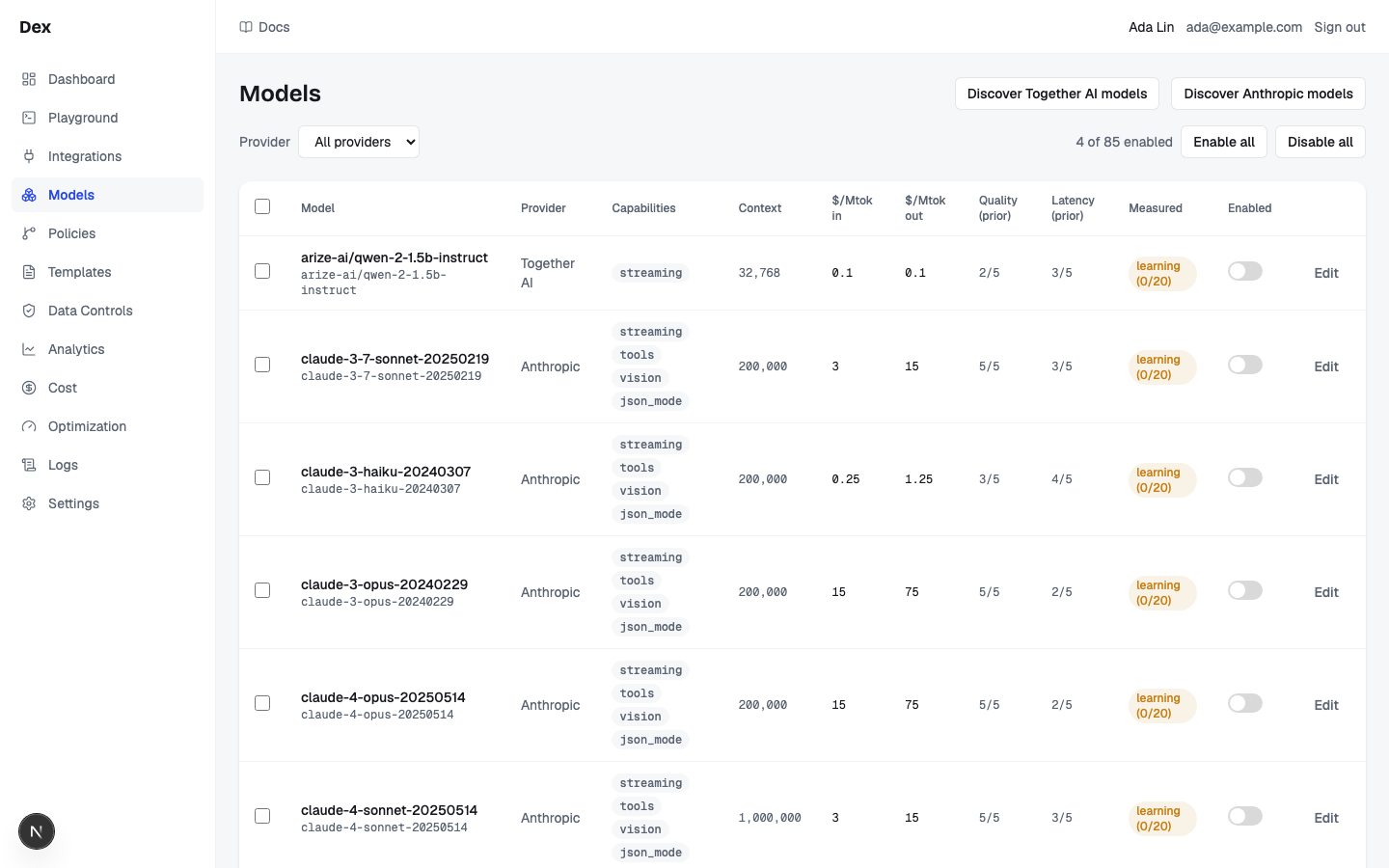
The Modelspage is the workspace's model registry: every model Cloud Score knows about per connected provider, with the facts routing needs. A request can only ever be routed to a model that is Enabled there. At the Select stage, Cloud Score scores the models that survived matching and policy filters on three axes, cost, latency, and quality, and the highest score wins. The rest are kept, in rank order, as failover backups.
| Fact on the row | What routing does with it |
|---|---|
Enabled | Only enabled models become candidates. Discovered models arrive disabled. |
Capabilities | A request competes only among models holding every capability it needs (vision, tools, json_mode, streaming). |
Context | A model is dropped when its context window is smaller than the estimated input plus the expected output. |
$/Mtok in and $/Mtok out | List prices per million tokens; the Estimate stage prices each candidate with them, and the cost axis of the score uses that estimate. |
Quality (prior) and Latency (prior) | The 1–5 grades that feed the quality and latency axes of the score. |
Measured | What the router has observed about the model recently; it can only lower a score, never raise it. |
Populating the registry
Each connected provider gets a Discover OpenAI models style button. Discovery inserts unseen models disabled and syncs prices, context, and capabilities, then reports for example Added 57 from LiteLLM (disabled — enable to route) · updated 57. Nothing routes until you switch a row on or use Enable selected or Enable all. See Enable models.
Tiers are priors, Measured is evidence
A tier is an opinion Cloud Score starts with, not a measurement. The column tooltips say so: Operator-set prior (price band at discovery). Not a measurement. and Operator-set prior. Not a measurement.
| Column | Scale | Where the value comes from | How it changes |
|---|---|---|---|
Quality (prior) | 1–5, 5 best | Discovery derives it from the output price band: $10 or more per Mtok gives 5, $3 or more gives 4, $0.5 or more gives 3, $0.1 or more gives 2, anything lower gives 1. | Edit it in Edit under Quality tier (1–5). Once edited, discovery never rewrites this row's tiers again. |
Latency (prior) | 1–5, 5 fastest | Discovery derives it from the model key's name: nano gives 5; mini, haiku, or flash give 4; pro or opus give 2; anything else 3. | Edit it under Latency tier (1–5). Same permanence rule. |
Measured | Sample count and a total adjustment that is 0 or negative | Completed requests in the last 7 days: provider health, measured reliability, and measured latency. The tooltip breaks the total into Δ health, Δ reliability, and Δ latency. | Never editable. It never touches the tier; it only subtracts from the score. |
Three things the Measured cell can show instead of a number, and none of them is zero:
learningwith the sample count and the floor in brackets: fewer than 20 completed requests, so the model is exempt from every penalty. The tooltip readsNot penalised: still learning (12 of 20 samples). Cold start is inert by design — no delta is applied until the sample floor is reached.on theRouting signalstab of Optimization settings.—with the tooltipNo measured signal for this model yet: no completed requests in the stats window.—for the whole column when the backend does not serve routing signals yet; the tooltip says it is unmeasured, not zero.
| State | Meaning (the badge tooltip) | Effect on the score |
|---|---|---|
up | Last health check passed. No penalty. | None. |
degraded | A failed check, or p95 above 3× the window median. Small penalty. | Half the health penalty. |
down | Two consecutive failed checks. Penalised until one clean check. | The full health penalty. |
unknown | No checks yet, or the last check is stale (older than 3× the loop interval). Never penalised. | None. |
How a score is made
Filter
five gates remove candidates
Weights
default 0.4 / 0.2 / 0.4
Score
normalised within the field
Adjust
measured penalties, 0 or below
Affinity
+0.05 to last turn's model
Pick
highest wins; rest are backups
Filters first. Five gates run in a fixed order before anything is scored. The Select detail in Observability records how many candidates each gate removed.
| Gate (as named in the trace) | Removes | Set by |
|---|---|---|
excluded_failover | Models already tried and failed on this request. | The Execute stage, on a hard provider error. |
allowed_provider | Every provider not on the policy allow-list. The last matching policy replaces the list. | Policies. |
denied_provider | Every provider on a policy deny-list. Denials from several policies add up. | Policies. |
model_override | Everything except the pinned model. A caller's pin beats a policy's forced model. | The caller, or Policies. |
cost_cap | Candidates whose estimate is above the cap; the lower of the caller's and the policy's cap applies. | The caller, or Policies. |
Then the weights. The score is the cost weight times how cheap the model is, plus the latency weight times its latency grade, plus the quality weight times its quality grade. The built-in default is 0.4 cost, 0.2 latency, 0.4 quality. Workspace sliders under Admin › Organization, a policy's preferred tier, and the caller's own strategy or quality hint each override the one before; see Routing strategies.
Scores are relative.Each axis is normalised within the current candidate set: the cheapest candidate counts as 1.0 on cost and the priciest as 0, and the 1–5 tiers are stretched the same way. A model's score therefore changes whenever the field changes, after a filter, a failover, or a catalog edit. If every candidate ties on an axis, that axis stops discriminating.
Then two nudges. Learned routing adjustments subtract the measured penalties from the routing signals snapshot, each 0 or below and clamped at 0.30 in total; a model with fewer than 20 samples and any unknown health state are never penalised. An open cooldown can exclude a model, but an exclusion that would empty the field is suppressed and recorded instead. Finally, affinity adds a flat +0.05 to the model that answered the previous turn of the same conversation, within the affinity window of 300 seconds by default. It is a tie-breaker, never an override.
Routing adjustments observe by default
Routing adjustments ships in observe mode: the penalties are recorded on every request but not applied. They change selection only once the mechanism is set to auto on Optimization settings › Settingsand the decision's confidence clears the mechanism's minimum (0.7 by default). The Measured column on Models and the Routing signals tab show the observation either way.
The reference model
The score picks the model; the reference model is what that pick is compared against when Cloud Score reports what routing saved. It plays no part in scoring. The helper text under Reference model on Optimization settings › Settings reads: What every request is compared against for the savings ledger. "auto" = the cheapest model of the top quality tier among the request's candidates; the client's requested model always wins when it matches.
client
the caller's requested model, when it is among the candidates
workspace
the model chosen under Reference model
strongest
the cheapest model in the top quality tier of the field
The first that applies wins, and the source is recorded with the plan. Only enabled models are offered in the select, as gpt-4o — openai style entries, with auto first. Check a decision on the same tab shows the outcome for a pasted request as Reference followed by the model and its source, for example gpt-4o (workspace).
A caller that pins a model gets that model as the reference, so routing savings for that request are $0 by construction. Requests with no reference are still counted, but they are left out of the Savings waterfall on Optimizations.
In the product
| Term or stage | Where you meet it |
|---|---|
Enabled, Capabilities, Context, prices | Models, one row per model; the Provider filter scopes the toolbar counts and Enable all / Disable all to the rows in view. |
Quality (prior), Latency (prior) | Models columns; edited in the Edit dialog fields Quality tier (1–5) and Latency tier (1–5). |
Measured | Models column; the full breakdown is the Optimization settings › Routing signals table with Health, Samples, Penalty (the total over its health · reliability · latency parts, or Not penalised while learning), and Cooldown. |
up / degraded / down / unknown | The Health column on Routing signals and the Measured tooltip. The counts above the table are Models tracked, Learning, Degraded or down, and Cooling down. |
Match | The Match station on the route board in Playground and Observability, for example 2 models: how many enabled models passed capabilities and context. |
Select | The Select station and, on the Playground, the decision summary under it in Details › Routing: the winner and its score. Its detail lists the filter gate counts and a reason such as selected gpt-5-mini (score 0.700). |
| Weights | Admin › Organization for the workspace default; Policies for a preferred tier; Admin › Developer for the strategy cards, for example Balanced with 40% cost · 20% latency · 40% quality. |
| Routing adjustments and affinity | Optimization settings › Settings, the Routing adjustments row and its mode; the affinity window is Legacy · affinity TTL fallback (s) under Show advanced settings. |
| Reference model | Optimization settings › Settings, the Reference model select and Check a decision; the Optimization decision card in Observability and Playground, whose Candidates table has a Δ vs selected column. |
| Provider health checks | Providers: the health dots on each provider card are the checks the router's health signal is built from. The Connected, Error, and Disconnected badges report the same check on the page. |
Switches act immediately
The row switch, Enable selected, Disable selected, Enable all, and Disable all have no confirmation. Disabling removes the model from the candidate pool at once and purges its cached responses; disabling the last enabled model makes every request fail with no_candidates. Running Discover OpenAI models again also disables enabled rows the catalog no longer lists.
Example
A routine summary of about 1,000 input tokens with 500 expected out. Three enabled models pass Match; no policy filters apply; the caller sends no strategy, so the built-in 0.4 / 0.2 / 0.4 weights are used.
| Candidate | Estimated cost | Quality (prior) | Latency (prior) | Cost term | Latency term | Quality term | Score |
|---|---|---|---|---|---|---|---|
gpt-5-mini | $0.001250 (cheapest, 1.0) | 4/5 (0.5) | 4/5 (0.5) | 0.400 | 0.100 | 0.200 | 0.700 |
claude-haiku-4-5 | $0.003500 (0.55) | 3/5 (0) | 5/5 (1.0) | 0.220 | 0.200 | 0.000 | 0.420 |
gpt-5 | $0.006250 (priciest, 0) | 5/5 (1.0) | 3/5 (0) | 0.000 | 0.000 | 0.400 | 0.400 |
Same three candidates, three strategies
- What you do
Send the prompt from
PlaygroundwithRoutingonauto, then again onlatency, then onintelligence.- What Cloud Score does
Scores the same normalised axes with different weights: 0.4 / 0.2 / 0.4, then 0.1 / 0.7 / 0.2, then 0.1 / 0.2 / 0.7. Filters, policies, and budgets are unchanged.
- What you see
The decision summary in
Details›Routingnamesgpt-5-miniat 0.700 the first time, with the trace reasonselected gpt-5-mini (score 0.700);claude-haiku-4-5at 0.755 the second;gpt-5at 0.700 the third. UnderOptimization decision, theCandidatestable shows each alternative'sΔ vs selected.
If gpt-5-mini were down and Routing adjustments were in auto, its health penalty would come off the 0.700 before the pick. In observe mode the same penalty is written to the trace and the Routing signals tab, and gpt-5-mini still wins.
Related
- ModelsThe registry of every model Cloud Score may route to: discover a provider's catalogue, enable the models allowed to compete, and override prices and tiers.
- OptimizationsRead what the optimization engine applied and what it saved against the reference model, on the Optimizations and Prompt Optimization pages in Analytics.
- Optimization settingsSet the reference model, the workspace-default response cache, and each mechanism's mode and confidence floor, confirm promotions and check a decision before traffic feels it, and read the routing signals.
- Developer and platform settingsAdmin › Developer generates a copy-paste integration snippet for your language and client; Admin › Organization sets the two workspace routing knobs: the classifier model with its timeout, and the cost, latency, and quality scoring weights.
- PoliciesThe workspace rulebook: when a request matches a policy's conditions, Cloud Score biases scoring, fences providers, forces a model, caps cost, blocks the request, or switches on the response cache.
- IntegrationsConnect model providers with encrypted credentials, test them before and after saving, watch each connection's health, and see which providers can feed the semantic cache.