Costs, savings, and estimates
What AI spend, the estimated invoice, Cloud Score overhead, and the pre-flight estimate each measure, and how one savings ledger reads the same on every page.
On this page
Prompt Optimization: optimize, review, then run
Prompt Optimization has one ON/OFF control, defaults ON, and accepts any prompt length. In Playground, Optimize prompt prepares a complete optimized prompt before answer routing, at the level you pick — Standard, Balanced or Thorough. Live counts use a real backend tokenizer. Review the original, optimized version and diff, then choose Run original or Run optimized. Our checks cannot guarantee that meaning is preserved, which is why you review the result. Editing the request invalidates its comparison. Workspace defaults are under Optimization › Settings.
Playground explicitly requests a bounded optimization and shows its recorded cost. A rejected, unavailable or unhelpful result falls back to your original without hiding its expense. Requests sent ON without a prepared proposal are optimized by structural rules only. Comparison details show the outcome, the rules applied and the measured work time. Infrastructure still consumes resources; unallocated compute keeps fully loaded savings unknown. Historical optimization expenses remain recorded and are not reset to zero.
The execution receipt distinguishes the selected prompt from the prompt actually sent for the answer, including no provider send when a cache supplies it. Optimization can have a recorded cost even when the original is selected or no answer is generated. Unknown infrastructure cost keeps fully loaded net unknown. Fewer tokens do not establish a latency or quality improvement. Analytics, ROI and Reports reuse Prompt Optimization evidence with production/demo filters and daily, weekly and monthly views.
See Playground for comparison and recovery, and Analytics for measurement coverage. Historical compression receipts do not establish choices or costs that were never recorded.
What it is
One request leaves behind several money figures, and each answers a different question: what Cloud Score expected before routing, what the tokens cost at list price, what the provider is likely to charge, what Cloud Score spent on its own model calls, and what routing, caching or compression avoided. Every one of them is computed on the server and sent to the browser as an unrounded string; the app rounds once for display and never adds two money figures together.
Estimate
before routing, from the price card
AI spend
measured tokens at list price
Estimated invoice
provider cache discount applied
Overhead
Cloud Score's own model calls, priced apart
Savings (est.)
what a mechanism avoided
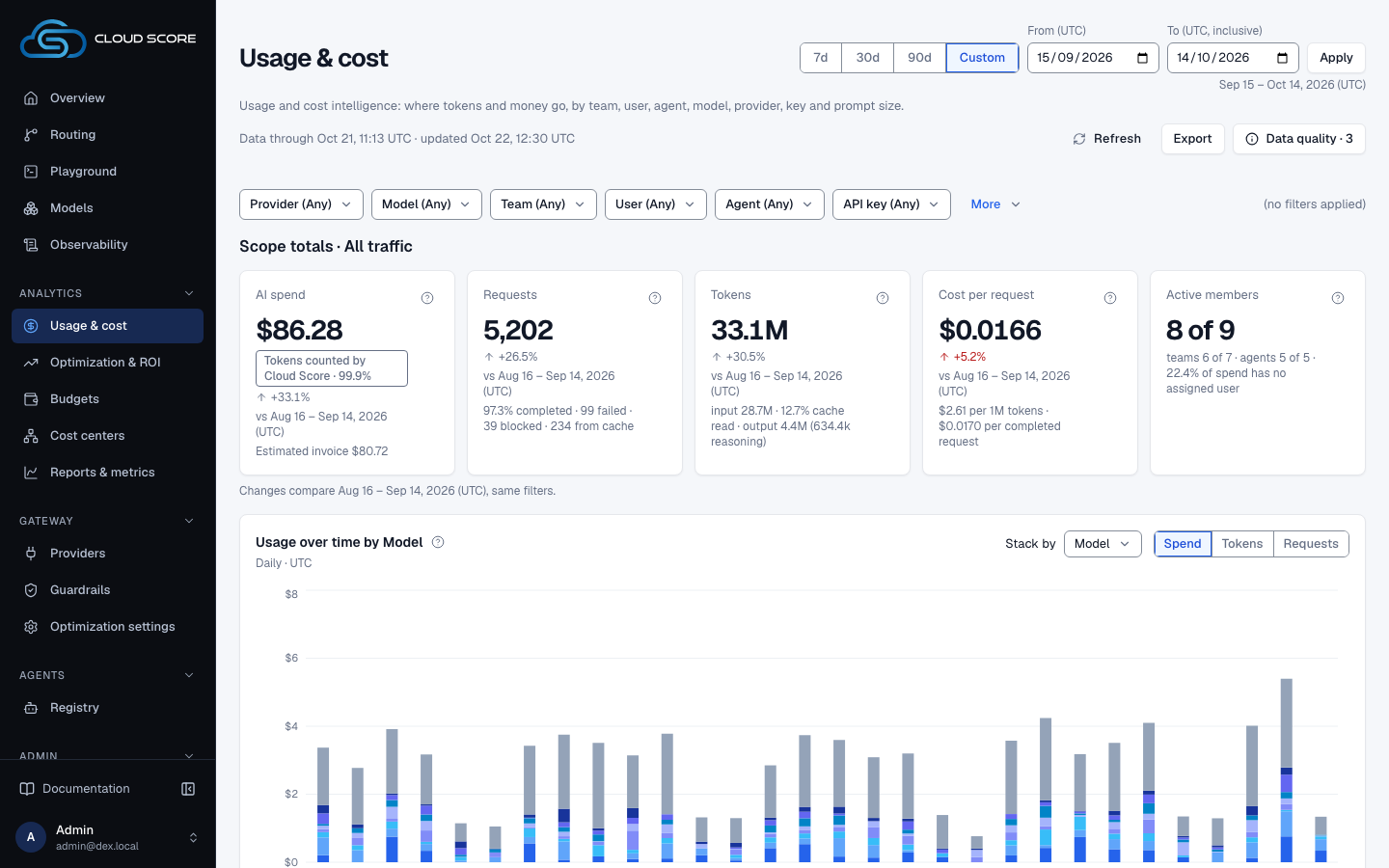
Every figure is attributed to the request that produced it. Usage & cost slices spend by Team, User and Agent(the API key's assigned team and member, and the registered agent), by the application, environment and end user callers report, and by API key, model, provider and prompt size. Requests with no assignment or tag keep a row of their own, such as Unassigned (no team) or Not reported, so totals reconcile. The key a request runs under is the one you created in Your first request; it also decides which budgets the request is admitted against.
One request, several prices
| Figure | What it measures | Where you read it |
|---|---|---|
| List price (AI spend) | Measured tokens multiplied by the price card of the model at execution, with cached tokens charged at the full input rate. Exact, never an estimate. This is the figure every budget reserves against. | AI spend on Usage & cost and Observability; Total (list — budget gate basis) in a request's evidence; Actual cost (list price) on its Savings receipt. |
| Estimated invoice (billable) | What the provider is likely to charge for the same tokens: cached reads at the cached rate, cache writes at the write premium, from the same price cards. It is not reconciled to a provider bill. The difference from AI spend is the provider cache discount, never Cloud Score savings. | Estimated invoice beneath AI spend on Usage & cost, and Estimated bill at the end of the Savings waterfall on Optimizations; Overview's Total spend shows the same billable figure; Billable (cached reads at cached rate)in a request's evidence. |
| Cloud Score overhead | What Cloud Score's own model calls cost inside requests (classifiers, embeddings, prompt rewrites), priced from the model card and counted only for calls with known usage. It is subtracted once, from gross savings, to give net savings, and never counted by budgets. | Saved (gross) minus Saved (net), and the Overhead column of Breakdown, on Optimizations; − Cloud Score overhead (known) on each Savings receipt; Platform overhead and Total overhead in a request's evidence. |
| Estimated before routing | The pre-flight estimate for the winning model: input tokens from the tokenizer of that model family, multiplied by the price card of the winner, plus the expected output budget. | Estimated before routing in a request's evidence. The Estimate station on the Playground route board shows the cheapest candidate instead, for example from $0.000125. |
| Delta vs estimate | Actual minus the estimate for the winner, signed. Positive means the request cost more than estimated. | Δ actual vs estimate (server-computed)in a request's evidence. |
| Estimate accuracy | Per model: rows carrying both an estimate and an actual, the mean absolute percentage error between them, the signed total delta, and rows with no estimate at all. | The Estimate accuracy card on Optimization settings › Routing signals, columns Est. rows, MAPE, Δ, No est. |
In the words of the AI spend help
What these requests cost at each model's catalog list price on the day they ran. Estimated invoice subtracts provider prompt-cache discounts and adds cache-write premiums from the same price cards; it is not reconciled to a provider bill.
Why budgets gate on list price
A budget admits a request before any provider is called, so it can only reserve the figure Cloud Score can compute on its own: tokens at list price. Cloud Score overhead is reported separately and is not counted against a budget.
Estimates have gaps by design
A request served from the cache or coalesced onto another request never executed, so it has no estimate: its evidence reads — with the cause served row, or recorded before estimates were kept. With no priced estimates in range, MAPE reads — with No priced estimates in range., never 0%. When a request billed several calls (a failover or a re-prompt), the delta compares one winner estimate against the whole bill. The policy engine gates on the minimum estimate over all candidates, which is a different number from the winner estimate that accuracy measures.
One savings ledger
Optimizations reads its savings from one ledger. Gross savings is what routing, the response cache and compression (prompt optimization inside) saved against the reference model at list price; net savings subtracts the known Cloud Score overhead once. Overview's Estimated savings comes from its own query over its own range: it is gross savings, names no reference model, and reads — while any reference request in the range is unpriced, as Saved (gross)and Saved (net) on Optimizations do, with the cause.
| Page | Label | Scope | What it counts | With nothing to show |
|---|---|---|---|---|
Overview | Estimated savings tile. | The selected range, default 7d; production traffic. | Gross savings, before Cloud Score overhead: reference-model cost minus actual cost over requests with a reference model. | — with No declared reference model or Reference pricing incomplete. |
Optimizations | Saved (net), Saved (gross), Savings breakdown, Breakdown, By mechanism and the Savings waterfall. | The selected range, default 30 days of whole UTC days ending today, plus the filter bar. | The same ledger split by mechanism and dimension, with escalations kept as negative routing savings. | Savings breakdown reads No requests with a reference model in this range. |
Request page | Savings receipt | One request. | That request's reference cost, actual cost, routing, response cache and compression savings, known overhead and net. | No savings are claimed without a recorded reference model. |
Routing savings can be negative
When Cloud Score escalated to a model dearer than the reference, the routing saving is below zero: theRouting step of the Savings waterfall goes below zero, and a request's Routing saved vs baseline (est.) shows a negative amount. A client that pins its own model makes that model the reference, so its routing saving is zero by construction.
Recommendations and projections are not savings
Recommendations on Optimizations estimate what a change might save per month: an estimate, never added to savings. Projected annual savings on Optimizations and Savings projectionson ROI & Impact project net savings at the range's pace; they are projections, never earned savings.
Reading the numbers
A missing measure is different from a measured zero. On Usage & cost, money, percentages, tokens and counts are rounded once for display, half up, and negatives keep a true minus sign; chart tooltips and the request evidence keep the full server value. Overview's Default tiles round money half up to cents, trim trailing zeros and print negatives with a hyphen, for example $16.1 or -$13.16. Optimizations prints the server's amount the same way but keeps sub-cent digits, for example $0.0034.
| Page | How money is printed | When nothing is recorded |
|---|---|---|
Usage & cost | Rounded USD with thousands separators, for example $1,234.56; the exact amount is in chart tooltips. | Missing figures read — with their cause. A recorded zero stays zero; negative savings keep their sign. A partial chip marks a figure computed from the priced requests alone. |
Observability, Playground | Per-request receipts retain their recorded dollar values, for example $0.001234. | An unavailable cost reads — with its cause. |
| Label | Meaning | Unit / format | Shows — when |
|---|---|---|---|
Total (list — budget gate basis) | List price for the request: measured tokens at the price card of the model, cached tokens at the full input rate. Exact. | USD | — with list cost not recorded. |
Billable (cached reads at cached rate) | What the provider charges once cached reads and cache writes are priced at their own rates. | USD | — with not computed for this row. |
Status · basis | Cost status and pricing basis, for example computed · list price. Statuses: computed (measured tokens), estimated (a streamed attempt omitted usage), pending (awaiting reconciliation), reconciled (recomputed later). | text | Never. |
Total overhead | The Cloud Score model calls made on this request's behalf, priced from the model card. Not model spend and not counted by budgets. | USD | — with overhead total not reported. |
Estimated before routing | The pre-flight estimate for the winner, made before the provider was called. | USD | — with served row, or recorded before estimates were kept. |
Δ actual vs estimate (server-computed) | Actual minus estimate, signed and computed on the server. Positive means dearer than estimated. | signed USD | — with delta not reported or no estimate. |
MAPE | Mean absolute percentage error between estimate and actual, per model, over rows that have both. | percent | No priced estimates in range.; never shown as 0. |
Reference cost | What the reference population would have cost on its reference model: the model the client requested if it was a candidate, else the workspace reference model, else the cheapest model of the strongest quality tier. A baseline, never money spent. | USD | No reference-priced traffic in the range. |
Routing saved vs baseline (est.) | For one request: reference cost minus compression minus actual cost. Negative on an escalation. | USD, signed | — |
Cheapest eligible cost (est.) | The floor: what the request would have cost on the cheapest model still eligible after policy. | USD | — |
Remaining headroom (est.) | Actual cost minus the floor: what a cheaper eligible model would still have saved. | USD | — |
Provider prompt-cache saved (est.) | Measured cached tokens times the published discount of the provider, minus the cache-write premium. Can be negative over a window that writes entries without reading them. It lowers the invoice and is never Cloud Score savings. | USD | An unavailable saving reads —; a recorded zero stays zero. |
In the product
| Term or stage | Where you meet it |
|---|---|
| Pre-flight estimate | The Estimate station in the Playground's Details › Routing, then Details › Usage once the request finishes. |
| Per-request cost | Every row in Observability › Requests, its Request drawer, and the request page's Cost & savings tab. |
| Per-request savings | The Savings receipt on the request page's Overview tab. |
| Spend over a range | AI spend on Usage & cost, with Estimated invoice beneath it, and the Usage & cost breakdown by team, user, agent, model, provider, key or prompt size. |
| Savings over a range | Saved (net), the Savings waterfall and By mechanism on Optimizations; Return on investment on ROI & Impact. |
| Estimate accuracy | Optimization settings › Routing signals › Estimate accuracy. |
| The budget gate | Budgets, where limits are counted at list price. |
| Declaring the reference | Optimization settings › Settings, field Reference model; leave it on auto to compare against the cheapest candidate of the strongest tier. |
Example
Reading the money of one request
- What you do
Open
Observability, click acompletedrequest, thenView full requestand itsCost & savingstab.- What Cloud Score does
Lays out that one request's tokens, list and billable cost, the estimate it was routed on, the platform calls it triggered, and the counterfactuals against the reference model and the cheapest eligible model.
- What you see
The rows below, read top to bottom. The
Overviewtab'sSavings receiptsums the same request's savings by mechanism.
| Evidence row | Reads | What it tells you |
|---|---|---|
Input tokens | 1250 | Input tokens the provider reported, including the cached subset. |
Cached input tokens (subset) | 1000 | Of those, 1000 came from the provider prompt cache. List price still charges them at the full input rate. |
Output tokens | 180 | Output tokens the provider reported. |
Total (list — budget gate basis) | $0.001275 | List price. This is what the budget reserved and what AI spend counts on every page. |
Billable (cached reads at cached rate) | $0.001125 | What the provider charged once the 1000 cached tokens were priced at the cached rate. |
Status · basis | computed · list price | Cost was computed from measured tokens on the list-price basis; nothing is awaiting reconciliation. |
Estimated before routing | $0.0011 | What Cloud Score expected the winning model to cost before calling it. |
Δ actual vs estimate (server-computed) | +$0.000175 | The answer ran a little longer than the output budget assumed. This row feeds the Estimate accuracy card. |
Total overhead | $0.000103 | The classifier call for this request, priced from its own model card. Not part of the list figure above and not gated by any budget. |
Provider prompt-cache saved (est.) | $0.00015 | List minus billable: the provider discount on the cached reads. |
Routing baseline cost (est.) | $0.0051 | The same tokens on the declared reference model, named under Reference model (declared) in the Routing section. |
Routing saved vs baseline (est.) | $0.003825 | Baseline minus actual; nothing was compressed. A negative figure here would mean an escalation. |
Cheapest eligible cost (est.) | $0.0009 | The floor: the cheapest model that survived policy would have cost this. |
Remaining headroom (est.) | $0.000375 | Actual minus floor: what routing to the floor model would still save. |
Only Total (list — budget gate basis) and the token counts are measured facts. Every row marked (est.) is a counterfactual computed on the server, and a row the server did not record prints — with its reason rather than a zero.
Related
- Home dashboardsA recorded view of request outcomes, estimated cost avoided, routing, optimization, policy attribution, and operational health for the traffic you select.
- Usage & costWhere tokens and money go, by team, user, agent, model, provider, key and prompt size: five scope tiles, usage over time, token composition, share of requests against share of spend, and one breakdown table with a drawer per row.
- OptimizationsRead what the optimization engine applied and what it saved against the reference model, on the Optimizations and Prompt Optimization pages in Analytics.
- BudgetsCap monthly model spend for the workspace, an API key, a team, an application, an agent, or an environment, and choose whether each budget warns or blocks at 100 %.
- ObservabilityThe per-request audit trail and the gateway's health: filter the request list, open a request for its route, attempts, cost and savings receipt, and read latency, outcomes and retries on Gateway health.
- Optimization settingsSet the reference model, the workspace-default response cache, and each mechanism's mode and confidence floor, confirm promotions and check a decision before traffic feels it, and read the routing signals.