Developer and platform settings
Admin › Developer generates a copy-paste integration snippet for your language and client; Admin › Organization sets the two workspace routing knobs: the classifier model with its timeout, and the cost, latency, and quality scoring weights.
On this page
What you see
What used to be one Settings page is now two entries under Admin in the sidebar. Developer (/admin/developer) holds the snippet generator, with no tabs. Organization (/admin/organization) opens on its General tab, whose Platform section holds the classifier and the scoring weights. Below it, the When enabled for this deployment, additional Organization cards and Single sign-on and Diagnostics tabs appear. With those sections disabled, General contains only the live Platform controls.
| Region | What it shows |
|---|---|
Developer | The page title, then the sections below, top to bottom. |
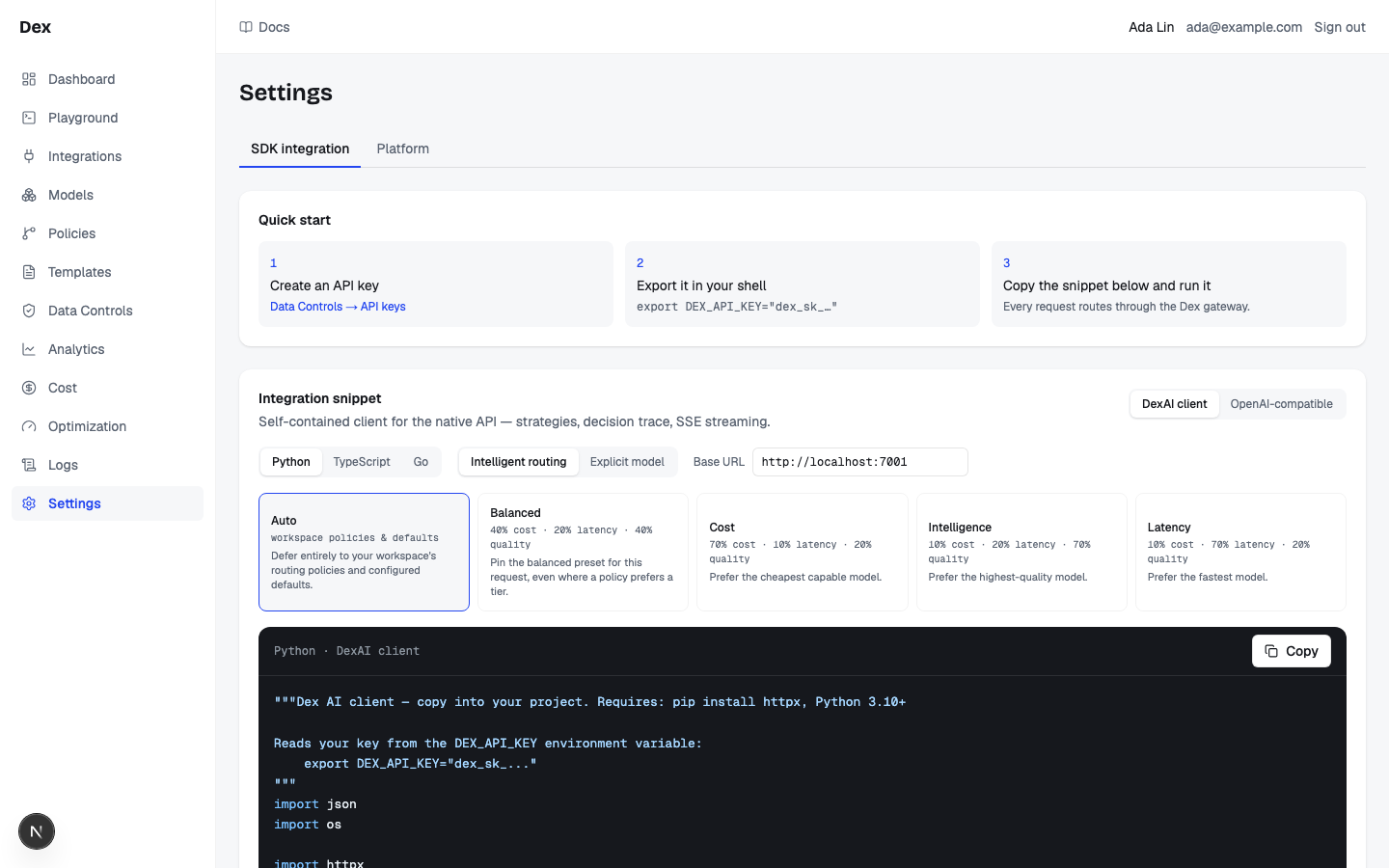
Quick start | Three numbered steps: Create an API key with the button Admin → API keys, Export it in your shell with the line export DEX_API_KEY="dex_sk_…", and Copy the snippet below and run it with the note Every request routes through the Cloud Score gateway. |
Integration snippet | The generator. A blurb that changes with the client, three segmented toggles (client, language, mode), the Base URL field, then either the five strategy tiles or the Model (enabled in this workspace, provider connected) select, and the code block with a Copy button. |
Endpoints | A Method | Path | Purpose table of the four gateway routes. |
Response envelope | The rule The native API answers HTTP 200 even for failed requests — the outcome lives in status. Always check the envelope, not the HTTP code., a JSON sample titled 200 OK, and an error.type | Meaning table. |
Authentication | One paragraph: send Authorization: Bearer dex_sk_… on every request; keys are shown once; revoke and re-create them from the API keys tab; invalid and disabled keys both get 401. |
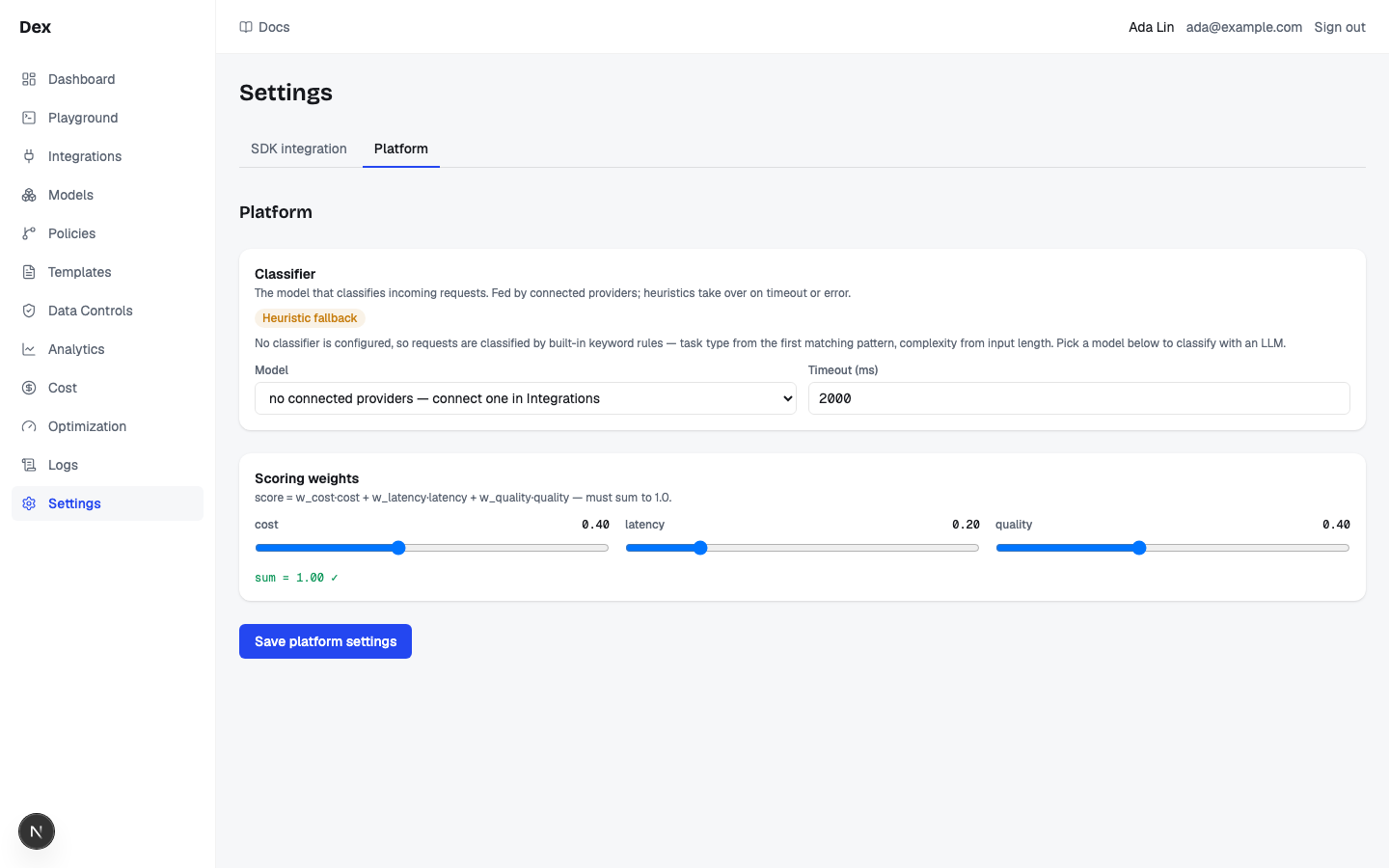
Platform | On Admin › Organization, General tab. Heading Platform, then the Classifier card and the Scoring weights card, an error line after a failed save, and the Save platform settings button. |
Classifier | Description The model that classifies incoming requests. Fed by connected providers; heuristics take over on timeout or error., an optional note or warning badge, the Model select, and the Timeout (ms) number field. |
Scoring weights | Formula score = w_cost·cost + w_latency·latency + w_quality·quality — must sum to 1.0., three sliders cost, latency, quality with their value to two decimals, and the sum line. |
| Tile | Weights line | Blurb |
|---|---|---|
Auto | workspace policies & defaults | Defer entirely to your workspace's routing policies and configured defaults. |
Balanced | 40% cost · 20% latency · 40% quality | Pin the balanced preset for this request, even where a policy prefers a tier. |
Cost | 70% cost · 10% latency · 20% quality | Prefer the cheapest capable model. |
Intelligence | 10% cost · 20% latency · 70% quality | Prefer the highest-quality model. |
Latency | 10% cost · 70% latency · 20% quality | Prefer the fastest model. |
Method | Path | Purpose |
|---|---|---|
POST | /v1/requests | Native API — strategies, constraints, decision trace, SSE streaming. |
GET | /v1/requests/{id} | Retrieve a past request with its full routing trace. |
POST | /v1/chat/completions | OpenAI-compatible. model: "auto" routes; a concrete name pins. |
GET | /v1/models | Models enabled for your workspace, with capabilities and pricing. |
error.type | Meaning |
|---|---|
no_candidates | No enabled model satisfies the constraints (including an unknown or disabled pinned model). |
blocked | A routing policy or budget blocked the request before execution. |
provider_error | Every eligible model failed after retries and failover. |
validation_failed | Output validation failed; partial_output may be present. |
security_blocked | Guardrails refused the request; HTTP contract and compatible API: 403. |
deadline_exceeded | Native HTTP contract: 504; compatible API: 502. |
budget_unavailable | Budget enforcement unavailable; HTTP contract and compatible API: 503 with Retry-After: 1. |
optimization_stale | Optimized proposal is no longer current; HTTP contract and compatible API: 409. |
outcome_unknown | Request outcome is uncertain; HTTP contract and compatible API: 409. |
What you can do
Nothing in the snippet generator or the Platform section opens a dialog or asks for confirmation. Only one action calls the server.
| Action | What happens | What you see | Confirmation |
|---|---|---|---|
Admin → API keys | Navigates to Admin › API keys. | The API keys page. | no confirmation |
Cloud Score client / OpenAI-compatible | Sets the snippet client and regenerates the code. | The blurb, the code, and the block title change at once, for example Python · Cloud Score client. | no confirmation |
Python / TypeScript / Go | Sets the snippet language. | The code block updates; the title becomes the language then the client. | no confirmation |
Intelligent routing / Explicit model | Switches between the strategy tiles and the model select. | The grid or the select is shown; the snippet is regenerated. | no confirmation |
Auto, Balanced, Cost, Intelligence, Latency | Sets the strategy in the snippet: constraints.strategy for the native client, a comment note for the compatible client. | The chosen tile gets an accent border. | no confirmation |
Model (enabled in this workspace, provider connected) | Pins that model in the snippet: constraints.model_override for the native client, model: for the compatible client. | The snippet updates. Entries read as display name · model key (provider type). | no confirmation |
Base URL | Overrides the gateway URL baked into the snippet; a trailing slash is trimmed. | The snippet updates as you type. | no confirmation |
Copy | Writes the raw snippet to the clipboard. | The button shows a check icon and Copied for 1.5 seconds. | no confirmation |
Model | Sets the draft classifier provider and model; empty means no classifier. | Draft only, nothing saved. | — |
Timeout (ms) | Sets the draft classifier timeout. | Draft only, nothing saved. | — |
cost / latency / quality | Sets the draft weights and recomputes the sum. | sum = 1.00 ✓ in green, or the sum followed by — must equal 1.00 in red. | — |
Save platform settings | Sends the draft classifier and weights to the server; on success the form reseeds from the saved values. | The button reads Saving…, then returns to normal. On failure a red line shows the server message or Save failed. | no confirmation |
Step-by-step
Integrate an existing OpenAI app as a drop-in.
Click
DeveloperunderAdminin the sidebar.The page opens on
Quick start, with the snippet generator below it.Click
Admin → API keys, create a key, and copy itsdex_sk_…value.See API keys for the dialog. The full key is shown once.
Export the key in your shell.
bashexport DEX_API_KEY="dex_sk_…"Click
OpenAI-compatible, thenTypeScript,Python, orGo.The blurb reads
Official OpenAI SDK pointed at the gateway — drop-in for existing OpenAI code.Leave
Intelligent routingandAutoselected.The compatible snippet sends
model: "auto", which routes.Change
Base URLif the gateway is not onhttp://localhost:7001.Click
Copy, paste the snippet into your project, and run it.The button reads
Copiedfor 1.5 seconds. Failures reach the OpenAI SDK as 403 for a policy or budget or security block, 503 for budget_unavailable with Retry-After: 1, 409 for stale or uncertain optimization outcomes, and 502 for other gateway errors.
Use the native API with a cost-first strategy and streaming.
Click
Cloud Score client, thenPython.The blurb reads
Self-contained client for the native API — strategies, decision trace, SSE streaming.Under
Intelligent routing, click theCosttile.Its weights line reads
Engine v1: 70% cost · 10% latency · 20% quality. The tile gets an accent border.Click
Copy.The block is titled
Python · Cloud Score client. The snippet sendsstrategy="cost"on both the plain call and the streaming call.Check status in every response.
The native API answers HTTP 200 even when the request failed. Read
statusand, when present,error.type:no_candidates,blocked,provider_error, orvalidation_failed.
Pin one model for a request.
Click
Explicit model.The strategy tiles are replaced by
Model (enabled in this workspace, provider connected). The first usable model is selected at once and the snippet already pins it.Choose a model from
Model (enabled in this workspace, provider connected).Only models that are enabled and whose provider is
Connectedare listed. With none, the select readsNo usable models — connect a provider first.Read the helper text under the select.
Pinning a model disables cross-model failover — a hard provider failure fails the request instead of rerouting. Availability is workspace-level; keys don't carry per-key model restrictions.Click
Copy.The native snippet sends
constraints.model_overridewith the model key; the compatible snippet sends it asmodel:.
Configure the classifier and the scoring weights.
Click
OrganizationunderAdminin the sidebar.The
Generaltab is open by default. While thePlatformsection loads it readsLoading platform settings….If you see the
Heuristic fallbackbadge, connect a provider first.The badge means no classifier is saved and none could be resolved, so requests are classified by built-in keyword rules. Connect one under Integrations and enable a model under Models, then return here.
Under
Classifier, pick aModeland setTimeout (ms).Options read as model key, then the provider name, for example
gpt-4o-mini — OpenAI. The timeout accepts 100 to 60000 in steps of 100;2000is the default.Under
Scoring weights, dragcost,latency, andqualityuntil the line readssum = 1.00 ✓.Each slider runs 0 to 1 in steps of 0.05. While the sum is off, the line is red and the save button is disabled.
Click
Save platform settings.The Save button shows pending progress, then
Saved.appears, the form reseeds from saved values and the noteShowing the resolved default — nothing saved yet. Save to persist.disappears.
Examples
Cheap classifier, quality-weighted routing
- What you do
With OpenAI connected, open
Admin›Organization. TheClassifiercard showsShowing the resolved default — nothing saved yet. Save to persist.withgpt-4o-mini — OpenAIand2000. Leave those, then setcostto 0.20,latencyto 0.10, andqualityto 0.70, and clickSave platform settings.- What Cloud Score does
Stores the classifier row and the weights. From now on every request without a strategy of its own is scored with quality weighted at 0.70.
- What you see
sum = 1.00 ✓before saving,Saving…on the button, then the resolved-default note is gone and the fields show the saved values.
Latency-sensitive Go service on the native API
- What you do
Click
Cloud Score client,Go, and theLatencytile (10% cost · 70% latency · 20% quality). SetBase URLto your gateway host and clickCopy.- What Cloud Score does
Generates the
Go · Cloud Score clientsnippet withStrategy: "latency"and the base URL you typed, trailing slash removed.- What you see
The block title
Go · Cloud Score client, the tile with an accent border, andCopiedon the button. Requests sent with the snippet answer with an envelope whosestatussays what happened.
Reading the numbers
| Label | Meaning | Unit / format | Shows — when |
|---|---|---|---|
| Model (under Classifier) | The provider and model that classify each request with a task type and complexity. Only models of connected providers are listed. | model key, then the provider name | Reads select a model when nothing is chosen, or no connected providers — connect one in Integrations when no connected provider has models. |
| Timeout (ms) | How long the classifier call may take before the built-in heuristics classify instead. | integer milliseconds, 100 to 60000, step 100 | Never blank; the fallback value is 2000. |
| cost / latency / quality | The workspace default weights used to score candidate models with routing engine v1. | 0.00 to 1.00, step 0.05, shown with two decimals | Never blank; the server default is 0.4 / 0.2 / 0.4. |
| sum = 1.00 ✓ | The three weights added together. | two decimals | Becomes sum = X.XX — must equal 1.00 (with the actual sum) whenever the total is more than 0.001 away from 1. |
| Strategy tile weights line | The preset mix a strategy pins for the request instead of the workspace weights. | percentages, cost · latency · quality | Static text; Auto shows workspace policies & defaults instead. |
| Base URL | The gateway host the snippet targets. | URL string | Never blank; starts as http://localhost:7001 unless the deployment sets its own gateway URL. |
No live money appears on this page. The cost_usd in the 200 OK sample is static example JSON, not a measurement.
Good to know
Weights and transport describe their actual scope
Scoring weights apply to routing engine v1. Engine v2 uses its routing profile; changing these sliders does not edit that profile. Strategy mix descriptions are marked Engine v1. A remote Base URL using HTTP shows Use HTTPS for a remote gateway because the key would travel without transport encryption; localhost and loopback development URLs are exempt. The default URL is unchanged.
Gateway outcome contracts
Native requests default to HTTP 200 envelopes for pipeline outcomes; opt-in HTTP contracts report outcome codes. Authentication and request validation may return 401 and 422 before pipeline contracts apply. budget_unavailable uses 503 and Retry-After: 1; optimization_stale and outcome_unknown use 409. Streaming terminal outcomes stay in-band. Read X-Dex-Status-Contract and error.type, rather than treating every error as 502. Successful authentication updates last-used; sandbox and body-storage settings govern billing and retained evidence.
Weights must sum to 1.00
Checked on both sides: the button stays disabled while the line reads — must equal 1.00, and a request that slips through gets the server error scoring weights must sum to 1.0 (±0.001). Other server errors shown on the red line: model_key is required when provider_id is set, provider not found (the chosen provider is not in this workspace), and a validation message when Timeout (ms) is outside 100 to 60000.
Saving without a classifier never removes one
When Model is empty the save sends no classifier and the server keeps whatever is stored, saving only the weights. A stored classifier cannot be removed from this page.
Two model lists, two filters
The Classifier Model select lists every model of a connected provider, enabled or not. The Explicit model select on Developer also requires the model to be enabled. Neither list depends on the API key: keys carry no per-model restrictions.
Pinning disables failover
A pinned model that is unknown or disabled answers with no_candidates instead of rerouting. In Explicit model mode a model that stops being usable snaps the select back to the first usable one.
Named strategies and the compatible client
With OpenAI-compatible selected, a tile other than Auto only adds a comment to the snippet: Note: named strategies (<strategy>, …) are native-API-only — switch to the "Cloud Score client" tab to use them. "auto" routes fully. The compatible snippet always sends model: "auto" in routing mode.
HTTP 200 on failure is the default
The native API puts the outcome in status and answers 200. To get real HTTP codes instead, send the header X-Dex-Error-Status: http: 403 for blocked, 409 for no_candidates, 502 for provider_error and validation_failed, 504 for a deadline. Every response names the contract it used in X-Dex-Status-Contract. Streams always use the envelope.
Base URL and Copy are browser-side
The default Base URLcomes from the deployment's public gateway URL and must be reachable from your machine, for example the published port http://localhost:7001 in development. Copy uses the browser clipboard, which needs HTTPS or localhost; a failed copy reports that it could not copy and lets you retry.
What the snippets need
Python snippets need Python 3.10 or later and httpx, and set a 60 second HTTP timeout. TypeScript snippets use top-level await, so run them as an ES module. The Go compatible snippet needs github.com/openai/openai-go.
Old Settings links
/settings no longer exists and every old link redirects: /settings?tab=sdk to /admin/developer, /settings?tab=keys to /admin/keys (see API keys), and a bare /settings or /settings?tab=platform to /admin/organization.
Related
- Send requests through Cloud ScoreCall POST /v1/requests with a gateway key: the request fields, the response envelope, status versus HTTP code, error types, SSE streaming, and the two GET endpoints.
- OpenAI-compatible endpointPoint the official OpenAI SDK at the Cloud Score gateway: POST /v1/chat/completions routes when model is auto, pins when it is a model key, accepts dex_strategy, and answers with a dex_routing block, HTTP 403 on a block, 409 when no tool-capable model is available, and 502 on any other failure.
- SDK snippetsAdmin › Developer generates a copy-paste client for Python, TypeScript, or Go, against the native API or the OpenAI SDK, with a routing strategy or a pinned model baked in.
- Attribute cost to teams and appsTag every request with team, application, agent, environment, and end_user so Usage & cost can break spend down by them as reported tags, budgets can cap a team or an app, and alert rules can watch them.
- TroubleshootingThe messages Cloud Score puts in front of you, grouped by the page that shows them, with what caused each one and what to do next.
- Statuses and badgesEvery status word and badge Cloud Score shows, what each one means, and the page it appears on.