Protect sensitive data in prompts and answers
Build an AI Security profile that redacts card numbers and blocks a confidential codename, attach it to a key, prove it in the Playground, and audit every verdict in Logs.
On this page
The path
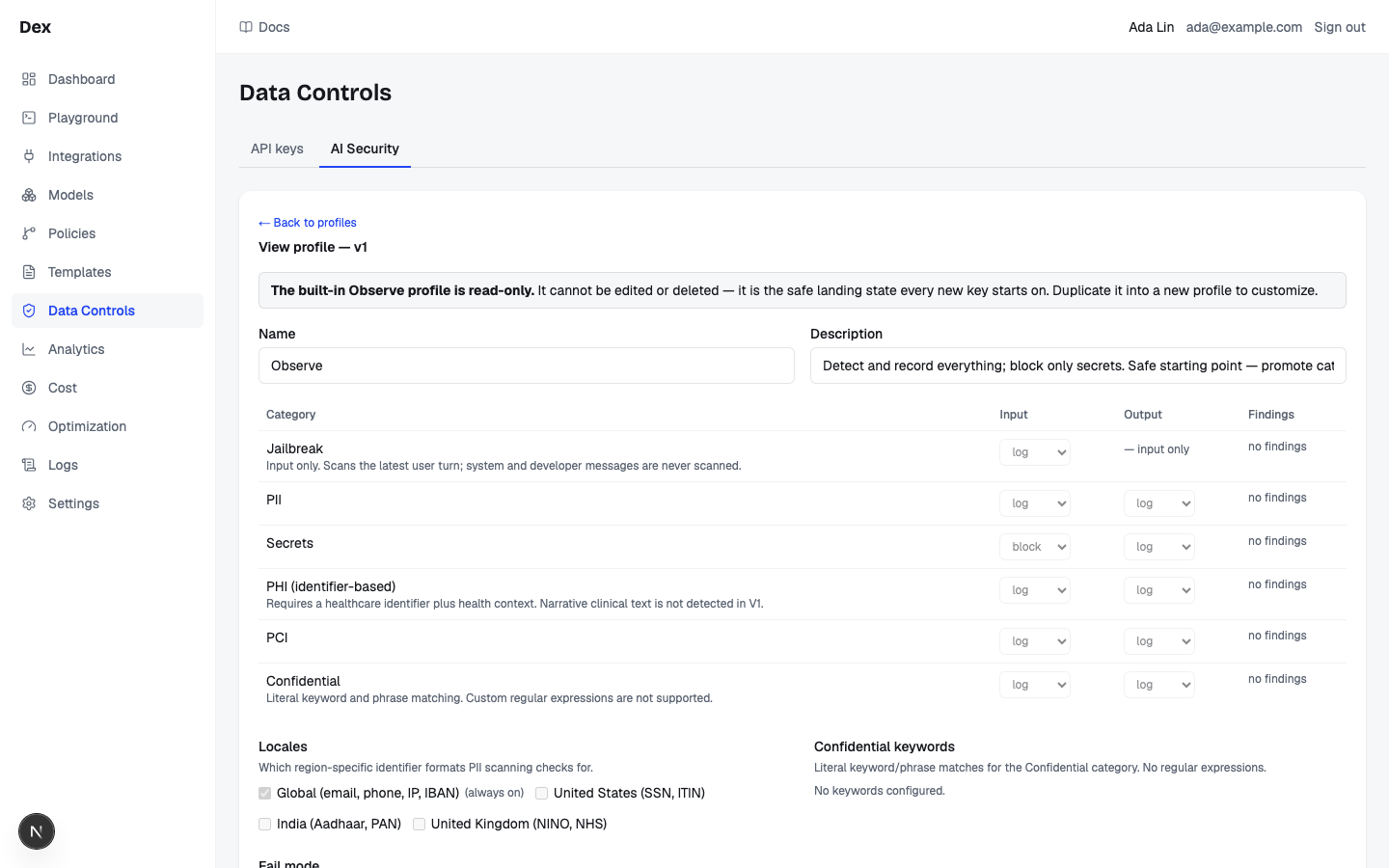
Every new key starts on the built-in Observe profile: every category is logged, Secrets are blocked on input, and nothing is redacted. This guide builds a stricter profile that redacts card numbers in both directions and blocks a confidential codename, then proves it end to end. The full control reference is on AI Security.
| Action | On the prompt (Input) | On the answer (Output) | Streaming |
|---|---|---|---|
Off | Not scanned. | Not scanned. | Live. |
Log | A security event is recorded; the request continues unchanged. | Same. | Live. |
Redact | Matched spans are replaced in place, for example [REDACTED:CREDIT_CARD]. Redaction is irreversible. | Same, on the answer before it reaches the caller. | Buffered when set as the Output action. |
Block | The request is refused with 403; status blocked; nothing reaches a model. | The answer is refused; status blocked. | Buffered when set as the Output action. |
Use a real-looking card number to test.
Published test numbers such as 4111111111111111 score below the fixed confidence floor and return No findings under every profile this editor can build. Use a Luhn-valid number such as 4539578763621486 to demonstrate PCI.
Build a security profile
A profile is a versioned bundle of per-category rules, locales, keywords, and a fail mode. Saving never rewrites history: each save is a new version, and existing security events keep pointing at the version that produced them.
Click
GuardrailsunderGatewayin the sidebar.The
Security profilescard lists the built-inObserveprofile with the badgeBuilt-in; itsBehaviorcolumn reads what each category does.Viewopens it read-only.Click
New profile.The editor opens on a profile named
New profilewith Observe's default rules copied in. Cancel closes this local draft without creating anything; the first Save creates the profile.Set
NametoSupport tickets — strict.Descriptionis optional. Names must be unique per workspace; a duplicate fails witha profile with that name exists.In the rules table, set
PCItoRedactunder bothInputandOutput.Each row has a select per direction with
Off,Log,Redact,Block; the legend line above the table says what each does, for exampleLog: Detect and record only. The request is sent unchanged.The moment an output action becomes Redact or Block, the boxOutput enforcement buffers the response.appears above the table.Set
ConfidentialtoBlockonInputandLogonOutput, then add a keyword.Under
Confidential keywords, typeProject FalconintoKeyword or phraseand press Enter or clickAdd. It appears as a pill with a×remover. Matching is literal, case-insensitive, and word-bounded; up to 500 entries; no regular expressions.Under
Locales, tickUnited States (SSN, ITIN).Global (email, phone, IP, IBAN)is marked(always on)and cannot be unticked. Only the PII category reads locales.Leave
Fail modeonFail open (allow if incomplete).The setting decides what happens when a scan cannot run or cannot finish: an internal error, or more than 512,000 characters of text.
Fail closed (block if incomplete)blocks when a degraded category was set to Block.In
Scan rules, pasteCard 4539578763621486 exp 12/27intoSample text, keepInputselected, and clickScan.The verdict badge reads
Would redactfollowed byPCI. The findings table (Category,Entity,Matches,Confidence,Detector) shows aCREDIT_CARDentity, andRedaction diffshowsBeforeandAfterpanes with[REDACTED:CREDIT_CARD]in place of the number. Now pasteStatus update on Project Falconand scan again: the badge readsWould blockwithConfidential.Click
Save (creates new version).The heading becomes
Edit profile — v2and the footer readsSaving creates a new immutable version (currently v2). Existing security_events keep pointing at the version that produced them.
Output enforcement turns off live streaming.
The editor's box says it exactly: Clients using a key on this profile stop receiving live tokens — time-to-first-token becomes time-to-full-response. Categories set to Log keep live streaming. The trigger is any category other than Jailbreak with an Output action of Redact or Block; Log does not trigger it. The whole answer is held until Guard out settles, then delivered in one piece.
A redaction on a JSON request becomes a block.
When a request asks for JSON output through response_format on the native endpoint or the OpenAI-compatible endpoint, an output redaction is escalated to a block, so a billed re-prompt is not wasted on JSON that cannot validate. The Playground never sends response_format, so you will only meet this from your own application.
Scan rules is a simulation.
Simulation only. Nothing here is stored, and production enforcement is unchanged until you save this profile. It runs the real detectors against the editor's unsaved state, so you can test before saving. The textarea caps at 20,000 characters and scans are throttled to 60 a minute; past that you see Too many scans — wait a moment and try again.
What is never scanned.
Jailbreak is input only; its Output cell reads — input onlyand it scans only the latest user turn. The list card's notice Not scanned in V1: names the channels the scanner never inspects: tool and function definitions, JSON schemas, the native intent label, images and other content parts, and message names on the OpenAI-compatible endpoint. Tool-call arguments are scanned in both directions; a redact finding inside them is logged and the arguments pass unaltered.
Attach it to a key
A profile does nothing until a key carries it. Every request on that key is scanned in both directions from the moment you attach. Keys are managed on API keys.
Still in the editor, under
Attached keys, pick the key inAttach a key.The select lists every key not already on this profile as
{name} ({prefix}…). The key moves into the list with aDetachlink. The helper readsAPI keys using this profile right now. Changes above apply to all of them the moment you save.Or bind it at creation:
API keystab,Create key, then choose the profile underSecurity profile.In the
Create API keydialog the select offersObserve (default),No guardrails (requests are not scanned), and one option per custom profile. The no-profile choice shows the warningNo guardrails. Choosing a profile that enforces output showsThis profile enforces output security, so responses on this key are buffered — clients stop receiving live tokens.LeaveStore request/response bodieschecked so Traces can show the stored prompt excerpt.Confirm on the
API keystab.The key row's
Securitycolumn shows the profile name plus a monospace line built fromblock:,redact:, andlog only (not enforced):with the category ids each action covers. A key with no profile readsNo guardrails.
Detach leaves the key unscanned.
Detach asks you to confirm the captured key before leaving it with no security scanning. The only way back onto the built-in profile from the app is Attach a key inside the Observe editor (open it with View).
Escalating to block is confirmed once, then immediate.
If a later save newly sets any category to Block while keys are attached, the browser asks This will start blocking PCI on 1 API key(s) immediately. Requests that match will be blocked. Continue? (with your categories and key count). Every other save applies to all attached keys without a prompt. ← Back to profiles discards unsaved edits silently.
Send a prompt with a card number
The Playground shows the two security stations live in Details › Routing, so you can watch the profile act before any application depends on it.
Click
Playgroundin the sidebar and paste the attached key intoPlatform API key.Type a prompt with a card number in
Message.For example: draft a refund confirmation for card
4539578763621486exp 12/27.Leave
Stream the answeron (underAdvanced options) and clickSend.The button reads
Running…while the request runs.Open
Details›Routingand readGuard in, the first station.It reads
redact · PCI · buffered: the action, the categories it matched, andbufferedbecause the profile enforces on output, so live deltas were held back. The model received[REDACTED:CREDIT_CARD]in place of the number.Wait for the answer and read
Guard out.The answer lands in one piece after the output scan instead of streaming.
Guard outuses the same format for what AI Security did to the answer, and the status badge readsCompleted.In
Details›Usage, clickCopy IDto keep thereq_…id.
| PCI action on the profile | Guard in | Result pane |
|---|---|---|
Log | log · PCI | Streams live; badge Completed; the chip Detected, not enforced: PCI with This profile only records matches. Set the category to Redact or Block to enforce it. |
Redact | redact · PCI · buffered | Arrives whole after the output scan; badge Completed; the chip Redacted before sending: PCI. |
Block | block · PCI | Badge Blocked; the chip Blocked before sending: PCI shows above the answer area in place of the gateway's error message; Record reads blocked; in Details › Usage, Model reads — and Attempts reads 0. |
A Cloud Score key pasted into a prompt on the default profile
- What you do
With a key still on
Observe (default), paste a Cloud Score platform key into the Playground'sMessageand send it.- What Cloud Score does
The Secrets detectors recognise the
dex_sk_prefix. Observe blocks Secrets on input, so the request is refused before classification and no model is called.- What you see
Guard inreadsblock · SECRETS, the status badge readsBlocked, the Result pane shows the chipBlocked before sending: Secrets, and inDetails›UsageModelshows—andAttemptsshows0.
Read the verdict in Logs
Traces is the only place a security verdict is recorded per request: as a chip in the list and as the two guard stations in the drawer.
Click
Tracesin the sidebar and setSecurity filtertoredacted.Traces keeps supported filters in the URL so a shared link restores the same evidence view.
In the
Gatewaycolumn, hover the chipredact · PCI.The tooltip reads
AI Security redact on input: PCI. Block chips are red, redact chips amber, log chips grey.Click the row.
In
Request detail, the route board'sGuard inreadsredact · PCI · buffered, and theCachesection readsNot served from cache — not cached — the request was redacted by ai security. Close it withClose details.Switch
Security filtertoblockedand open a row.The status badge reads
blocked,RequestreadsNot stored: blocked by AI Securitybecause a block suppresses previews whatever the key's setting, andAttemptsreadsno execution attempts recordedwhen the block was on input. In the list,Costshows$0(a known zero) andTokensshows—/—.
Security filter | Rows it shows |
|---|---|
any security | Everything. |
blocked | Requests whose decisive verdict was a block, in either direction. |
redacted | Requests redacted in either direction and not blocked. |
logged | Requests where categories matched but the profile only recorded events. |
not scanned | Degraded scans: a detector failed open or the text was truncated, so the request was not fully scanned. |
The cache never stores a redacted prompt.
A redacted request is cache-ineligible; its reason is security_redacted, shown in the drawer as above. Cached responses are re-scanned under the serving key's profile at serve time, so a hit the guard blocks is recorded with the cache reason security_blocked instead. See Caching and deduplication.
What to check afterwards
| Where | What to look for |
|---|---|
Logs › Security filter | Set redacted or blocked; every matching row carries an action chip in Gateway, for example redact · PCI. |
Logs › Request detail › route board | Guard in and Guard out summaries; buffered confirms output enforcement held the stream. |
Logs › Request detail › Cache | Not served from cache — not cached — the request was redacted by ai security on redacted rows. |
Gateway › Guardrails › editor › Findings | Per category, {d} in 24h · {w} in 7d; hover for the 24 h breakdown by action such as log 3 · block 1. no findings when the 7-day total is zero. |
Admin › API keys › Security | The profile name and its block: / redact: / log only (not enforced): line on every key you attached. |
Playground › Details › Routing | The same two stations, live. |
Findings are per profile.
The Findings column counts the security events the profile you are editing recorded, across all its versions and every key that used it, for the last 24 hours and 7 days; it counts events, not requests.
Events never contain the matched text.
A security event stores category, entity, direction, action, confidence, match count, and detector only. Detection is deterministic (patterns, checksums, keywords), so spaced digits, base64, or look-alike characters evade it, and redaction cannot be undone.
Related
- Investigate a failed, blocked, or expensive requestTrace one request from its row in Observability to the decision card, its savings receipt and a Playground reproduction, then read what its error message means.
- Statuses and badgesEvery status word and badge Cloud Score shows, what each one means, and the page it appears on.
- TroubleshootingThe messages Cloud Score puts in front of you, grouped by the page that shows them, with what caused each one and what to do next.
- GlossaryEvery Cloud Score term that appears in the app, what it means in one or two sentences, and the page and tab where you meet it.
- AI SecurityBuild versioned security profiles that log, redact, or block jailbreaks, PII, secrets, PHI, PCI, and confidential keywords in prompts and answers, test them with Scan rules, and attach them to API keys.
- API keysIssue the platform keys that authenticate every gateway request, and set what each key carries: a monthly budget, body storage, a security profile, sandbox rights, and cost attribution defaults.