SDK snippets
Admin › Developer generates a copy-paste client for Python, TypeScript, or Go, against the native API or the OpenAI SDK, with a routing strategy or a pinned model baked in.
On this page
Prompt Optimization: optimize, review, then run
Prompt Optimization has one ON/OFF control, defaults ON, and accepts any prompt length. In Playground, Optimize prompt prepares a complete optimized prompt before answer routing, at the level you pick — Standard, Balanced or Thorough. Live counts use a real backend tokenizer. Review the original, optimized version and diff, then choose Run original or Run optimized. Our checks cannot guarantee that meaning is preserved, which is why you review the result. Editing the request invalidates its comparison. Workspace defaults are under Optimization › Settings.
For an interactive native flow, POST the full request to /v1/prompt-optimizations/prepare as {"request_type":"native","request":{...}} using the same bearer execution key. Include authoring options with the optimization strength (deterministic, balanced or aggressive) and the editable message indices. Then send the unchanged source request to /v1/requests with constraints.prompt_optimization containing enabled, proposal_id, the sealed proposal_token and choice (original or optimized). Use a distinct Idempotency-Key for preparation and execution. Keep the sealed token in memory only. Explicit {"enabled":false} preserves the original. Legacy compression fields are deprecated compatibility aliases; do not combine conflicting old and new controls.
Playground explicitly requests a bounded optimization and shows its recorded cost. A rejected, unavailable or unhelpful result falls back to your original without hiding its expense. Requests sent ON without a prepared proposal are optimized by structural rules only. Comparison details show the outcome, the rules applied and the measured work time. Infrastructure still consumes resources; unallocated compute keeps fully loaded savings unknown. Historical optimization expenses remain recorded and are not reset to zero.
The execution receipt distinguishes the selected prompt from the prompt actually sent for the answer, including no provider send when a cache supplies it. Optimization can have a recorded cost even when the original is selected or no answer is generated. Unknown infrastructure cost keeps fully loaded net unknown. Fewer tokens do not establish a latency or quality improvement. Analytics, ROI and Reports reuse Prompt Optimization evidence with production/demo filters and daily, weekly and monthly views.
See Playground for comparison and recovery, and Analytics for measurement coverage. Historical compression receipts do not establish choices or costs that were never recorded.
What the generator makes
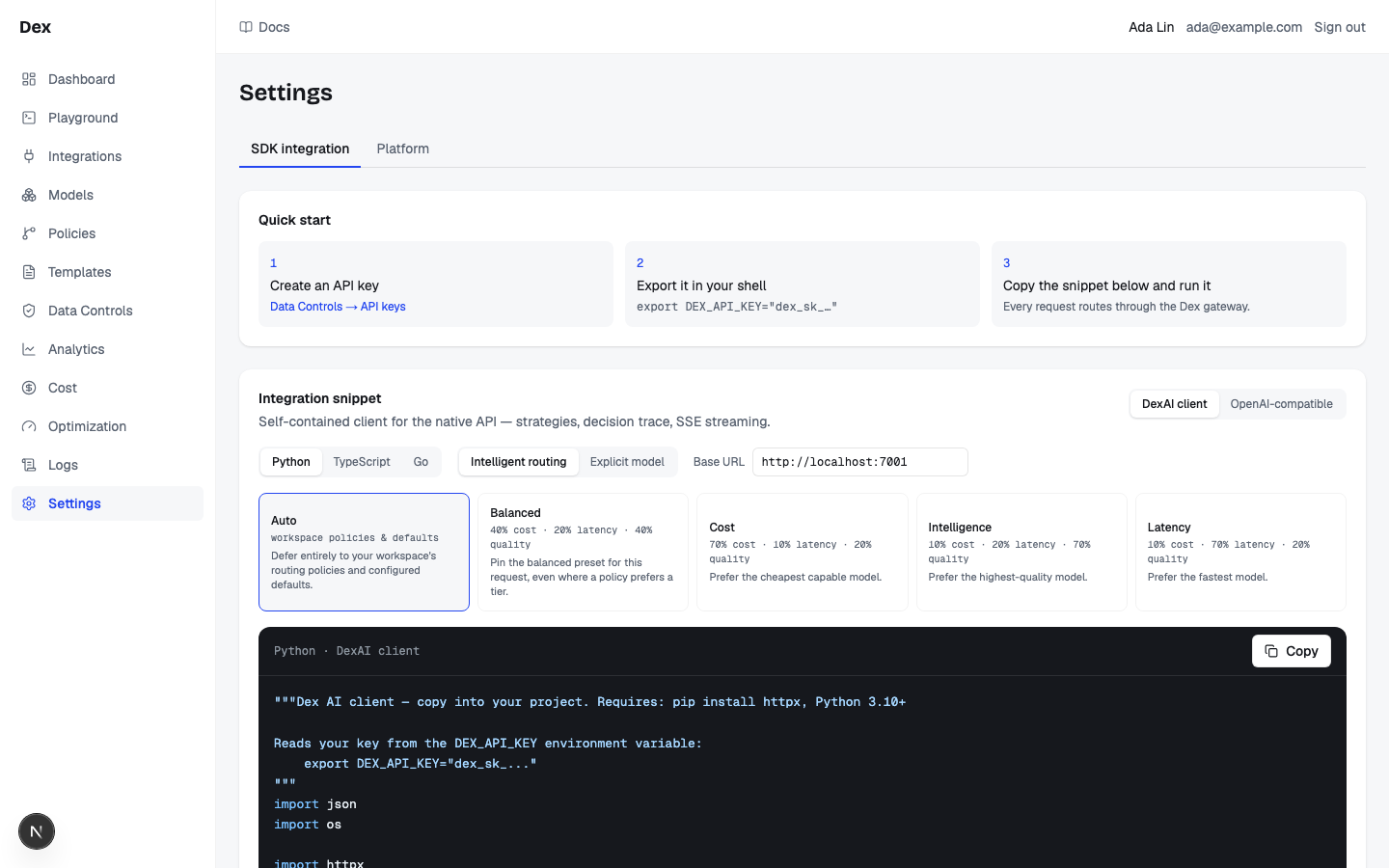
Admin › Developer opens the generator. Its Integration snippet card builds one complete client file from four choices, and the code changes the moment you change any of them. Nothing on this page is saved; it only writes code for you to copy.
| Choice | Options | What it changes in the code |
|---|---|---|
| Client | Cloud Score client or OpenAI-compatible | Whether the file is a self-contained client for the native API or the official OpenAI SDK pointed at the gateway. |
| Language | Python, TypeScript, or Go | The language of the file. Three languages times two clients gives six snippets. |
| Mode | Intelligent routing or Explicit model | Whether the request carries a routing strategy or pins one model. |
Base URL | A text field | The gateway host the snippet sends to. |
The code panel's header names the combination as language then client, for example Python · Cloud Score client, with a Copy button on the right. The blurb under the Integration snippet heading follows the client: for the native client it reads Self-contained client for the native API — strategies, decision trace, SSE streaming. and for the OpenAI SDK it reads Official OpenAI SDK pointed at the gateway — drop-in for existing OpenAI code.
Quick start
The Quick start card above the generator is three numbered steps. Every snippet reads its key from the DEX_API_KEY environment variable, so step 2 is not optional.
Create an API key: clickAdmin → API keys.The button opens
Admin›API keys. Create a key and copy the value that starts withdex_sk_; it is shown once. See API keys.Export it in your shell.The card shows the exact command:
bashexport DEX_API_KEY="dex_sk_…"Copy the snippet below and run it.The card's note says why:
Every request routes through the Cloud Score gateway.
Cloud Score client or OpenAI-compatible
Cloud Score client | OpenAI-compatible | |
|---|---|---|
| Endpoint it calls | POST | POST |
| Path | /v1/requests | /v1/chat/completions |
| Dependencies | Python: httpx, Python 3.10+. TypeScript: run as an ES module (top-level await). Go: standard library. | The official OpenAI SDK for that language; the Go snippet needs github.com/openai/openai-go. |
| Strategies | Sent as constraints.strategy; the five named strategies all work. | Always sends model: "auto" in routing mode. The generator adds a comment that named strategies are native-API-only and that the Cloud Score client tab is where to use them. |
| Pinned model | constraints.model_override | the model field set to the model key |
| Streaming | A stream helper iterates SSE frames: delta carries text, done carries the full envelope, error carries a message. | Whatever the OpenAI SDK offers; the snippet is a plain chat completion. |
| Errors | The generated client raises on no_candidates, blocked, provider_error, and validation_failed (Python: DexAIError). | The SDK's status error: 403 for policy, budget or Guardrails refusal, 503 for unavailable budget enforcement, 409 for stale or uncertain optimization outcomes, and 502 for other gateway failures. |
| HTTP timeout | 60 s in Python; none set in TypeScript or Go. | The SDK default. |
The native Python snippet exposes two calls. With the Cost tile selected they read:
res = client.chat.dexai(..., strategy="cost")
for delta in client.chat.stream(..., strategy="cost"):
The request and response shapes behind each client are on Native endpoint and OpenAI-compatible endpoint.
Intelligent routing or Explicit model
With Intelligent routing selected, a row of five strategy tiles appears. Each tile shows its label, a weights line, and a one-line blurb. The selected tile gets an accent border and its id goes into the snippet.
| Tile | Weights line | Blurb |
|---|---|---|
Auto | workspace policies & defaults | Defer entirely to your workspace's routing policies and configured defaults. |
Balanced | 40% cost · 20% latency · 40% quality | Pin the balanced preset for this request, even where a policy prefers a tier. |
Cost | 70% cost · 10% latency · 20% quality | Prefer the cheapest capable model. |
Intelligence | 10% cost · 20% latency · 70% quality | Prefer the highest-quality model. |
Latency | 10% cost · 70% latency · 20% quality | Prefer the fastest model. |
With Explicit model selected, the tiles are replaced by a select labelled Model (enabled in this workspace, provider connected). It lists only models that are enabled and whose provider is connected, each as display name, then model key, then the provider type in brackets. Under it the helper text warns: Pinning a model disables cross-model failover — a hard provider failure fails the request instead of rerouting. Availability is workspace-level; keys don't carry per-key model restrictions.
Explicit model picks a model for you.
The moment you switch to Explicit model, the select defaults to the first usable model and the snippet pins it immediately; there is no unselected state. If a model you chose later stops being usable (disabled, or its provider disconnected), the select snaps back to the first usable model and the snippet changes with it. Check the model key in the copied code before you ship it.
With no enabled model under a connected provider the select shows only No usable models — connect a provider first. Connect one under Integrations and enable a model under Models.
Base URL
| Where the value comes from | Result |
|---|---|
The NEXT_PUBLIC_GATEWAY_URL environment variable of the Cloud Score frontend, when set | The field starts with that value. |
| Nothing set | The field starts with http://localhost:7001. |
| You type into the field | The snippet updates live. A trailing slash is trimmed before it is written into the code. |
The URL must be reachable from where the code runs.
The value is taken from the browser's environment, not checked against anything. Use the published host port (the Docker compose defaults are http://localhost:7001 for dev and http://localhost:8001 for prod), not a compose-network hostname. A wrong value does not fail loudly on this page; it fails when the snippet runs.
Copy and run
Click
Copyin the code panel's header.The button shows a check icon and reads
Copiedfor 1.5 seconds, then returns toCopy. What lands on the clipboard is the raw snippet; the colouring in the panel is cosmetic and is not copied.Paste it into your project as one file.
Python needs 3.10+ and
httpx. TypeScript snippets use top-levelawait, so run them as an ES module. The GoOpenAI-compatiblesnippet importsgithub.com/openai/openai-go.Run it with
DEX_API_KEYexported.Every authenticated call is policy-checked, logged, and billed, and it updates the key's last-used timestamp. See Logs.
Copy needs a secure context.
The button writes with the browser clipboard API, which works over HTTPS or on localhost. If the write fails, inline feedback reports the failure and the Copy button lets you retry.
What the snippet gets back
The Response envelope card under the generator shows what a native snippet receives. Its paragraph is the rule to remember: The native API answers HTTP 200 even for failed requests — the outcome lives in status. Always check the envelope, not the HTTP code.
{
  "id": "req_5f8e6d2a-…",
  "status": "completed",
  "output": "• Revenue grew 18% QoQ…",
  "routing": {
    "model": "gpt-4o-mini",
    "provider": "openai",
    "classifier": "llm",
    "task_type": "summarization",
    "complexity": 2,
    "candidates_considered": 6,
    "attempts": 1
  },
  "usage": {
    "input_tokens": 412,
    "output_tokens": 96,
    "cost_usd": 0.000119,
    "latency_ms": 842
  }
}error.type | Meaning (as shown on the card) |
|---|---|
no_candidates | No enabled model satisfies the constraints (including an unknown or disabled pinned model). |
blocked | A routing policy or budget blocked the request before execution. |
provider_error | Every eligible model failed after retries and failover. |
validation_failed | Output validation failed; partial_output may be present. |
security_blocked | Guardrails refused the request; HTTP contract and compatible API: 403. |
deadline_exceeded | Native HTTP contract: 504; compatible API: 502. |
budget_unavailable | Budget enforcement unavailable; HTTP contract and compatible API: 503 with Retry-After: 1. |
optimization_stale | Optimized proposal is no longer current; HTTP contract and compatible API: 409. |
outcome_unknown | Request outcome is uncertain; HTTP contract and compatible API: 409. |
The Endpoints card lists the four gateway routes the snippets use or that you may call next: POST /v1/requests, GET /v1/requests/{id}, POST /v1/chat/completions, and GET /v1/models. The Authentication card repeats the bearer rule: Authorization: Bearer dex_sk_… on every request, and invalid and disabled keys both get the same 401.
Examples
Drop Cloud Score under an existing OpenAI app
- What you do
Click
OpenAI-compatible, thenTypeScript. LeaveIntelligent routingandAutoselected, setBase URLto your gateway, clickCopy, and replace your existing client construction with the pasted one.- What Cloud Score does
Receives every call on
/v1/chat/completionswithmodel: "auto"and routes each one by your workspace policies and defaults.- What you see
Your app runs unchanged. A policy or budget block surfaces in the SDK as a
403; any other failure as a502. Every call is policy-checked, logged, and billed.
A Go service that wants speed and precise error handling
- What you do
Click
Cloud Score client,Go, then theLatencytile (10% cost · 70% latency · 20% quality). Copy the snippet, then add theX-Dex-Error-Status: httpheader to its requests.- What Cloud Score does
Scores candidates with the latency preset and, because the header asks for the
httpcontract, answers failures with real status codes:409forno_candidates,502for a provider or validation failure.- What you see
Your retry logic can skip a
409(a configuration problem that will not fix itself) and retry a502. Every response carriesX-Dex-Status-Contractso you can confirm which contract applied.
Good to know
Weights and transport describe their actual scope
Strategy weights describe routing engine v1. Engine v2 uses its routing profile. A remote HTTP Base URL shows a warning because the key would travel without transport encryption; localhost and loopback development hosts are exempt. Use HTTPS for a remote gateway.
Gateway outcome contracts
Native requests default to HTTP 200 envelopes for pipeline outcomes; authentication and validation can return 401 and 422 first. The opt-in HTTP contract maps outcomes to status codes. Read X-Dex-Status-Contract and error.type. Streaming terminal outcomes stay in-band in done or error frames.
Nothing here is saved.
Client, language, mode, strategy, model, and Base URL are only inputs to the generator. Reloading the page resets them. The workspace settings that do persist live in the Platform section of Admin › Organization; see Developer and platform settings.
A pinned model does not fail over.
In Explicit model mode a hard provider failure fails the request instead of rerouting. A pinned model that is unknown or disabled returns no_candidates.
Strategy tiles only change native snippets.
With OpenAI-compatible selected, choosing Cost, Intelligence, Latency, or Balanced adds a comment to the snippet and still sends model: "auto". Switch to Cloud Score client to send a named strategy.
Streaming is always the envelope contract.
A native stream (stream: true) arrives as text/event-stream frames and ignores X-Dex-Error-Status; the done frame carries the full envelope and the error frame carries the message.
Tag requests for the Cost pages.
The snippets do not send attribution. Add a metadata object with team, application, agent, environment, or end_user to the request (or the matching X-Dex-team style headers) and it comes back as routing.attribution. Details on Attribution.
Keys carry no model restrictions.
Model availability is workspace-level. GET /v1/models returns the models enabled for the workspace, whichever key calls it.
Related
- TroubleshootingThe messages Cloud Score puts in front of you, grouped by the page that shows them, with what caused each one and what to do next.
- Statuses and badgesEvery status word and badge Cloud Score shows, what each one means, and the page it appears on.
- Investigate a failed, blocked, or expensive requestTrace one request from its row in Observability to the decision card, its savings receipt and a Playground reproduction, then read what its error message means.
- Routing strategiesThe five per-request weight presets (auto, balanced, cost, intelligence, latency), how they rank against policies and workspace sliders, and what a strategy never changes.
- API keysIssue the platform keys that authenticate every gateway request, and set what each key carries: a monthly budget, body storage, a security profile, sandbox rights, and cost attribution defaults.
- Developer and platform settingsAdmin › Developer generates a copy-paste integration snippet for your language and client; Admin › Organization sets the two workspace routing knobs: the classifier model with its timeout, and the cost, latency, and quality scoring weights.